Apple in iOS 12 introduced a new Siri Shortcuts feature that's designed to let users create multi-step automations using first and third-party apps.
Since iOS 12's release, app developers have been adding Siri Shortcuts support to their apps, and today, Apple highlighted several apps that have launched useful Siri Shortcut options.
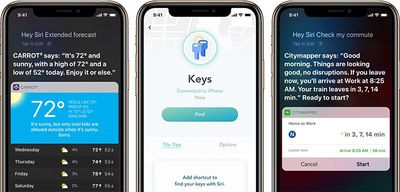
Tile, for example, has added a Shortcut designed to let you find an item attached to a Tile device, like your keys, by asking Siri. Apps like CARROT and Dark Sky offer up weather details with Siri commands like "rain report" or "UV index," while Citymapper lets you get commute information in seconds.
Evernote lets you get quick access to Shortcuts for sharing notes, creating audio notes, creating camera notes, and printing, while Day One has Shortcuts for creating journal entries and recording audio. Calendar app Fantastical lets you schedule events and preview what's coming next, and Trello, Things, and Omnifocus all have Shortcut options for streamlining projects.
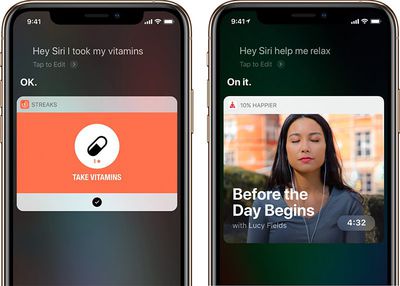
Apple also highlights Waterminder for tracking your water intake, Lose It! for keeping track of what you're eating, MyTherapy for monitoring daily medications, and meditation in Headspace, all features that can be accessed via simple Siri commands without the need to open up the respective apps.
Thursday February 5, 2026 12:22 pm PST by Joe Rossignol
Apple plans to announce the iPhone 17e on Thursday, February 19, according to Macwelt, the German equivalent of Macworld.
The report, citing industry sources, is available in English on Macworld.
Apple announced the iPhone 16e on Wednesday, February 19 last year, so the iPhone 17e would be unveiled exactly one year later if this rumor is accurate. It is quite uncommon for Apple to unveil...
Thursday February 5, 2026 12:54 pm PST by Joe Rossignol
Apple turns 50 this year, and its CEO Tim Cook has promised to celebrate the milestone. The big day falls on April 1, 2026.
"I've been unusually reflective lately about Apple because we have been working on what do we do to mark this moment," Cook told employees today, according to Bloomberg's Mark Gurman. "When you really stop and pause and think about the last 50 years, it makes your heart ...
Saturday February 7, 2026 9:26 am PST by Joe Rossignol
Apple today shared an ad that shows how the upgraded Center Stage front camera on the latest iPhones improves the process of taking a group selfie.
"Watch how the new front facing camera on iPhone 17 Pro takes group selfies that automatically expand and rotate as more people come into frame," says Apple. While the ad is focused on the iPhone 17 Pro and iPhone 17 Pro Max, the regular iPhone...
Friday February 6, 2026 3:06 pm PST by Juli Clover
In the iOS 26.4 update that's coming this spring, Apple will introduce a new version of Siri that's going to overhaul how we interact with the personal assistant and what it's able to do.
The iOS 26.4 version of Siri won't work like ChatGPT or Claude, but it will rely on large language models (LLMs) and has been updated from the ground up.
Upgraded Architecture
The next-generation...
Tuesday February 3, 2026 7:47 am PST by Joe Rossignol
While the iOS 26.3 Release Candidate is now available ahead of a public release, the first iOS 26.4 beta is likely still at least a week away. Following beta testing, iOS 26.4 will likely be released to the general public in March or April.
Below, we have recapped known or rumored iOS 26.3 and iOS 26.4 features so far.
iOS 26.3
iPhone to Android Transfer Tool
iOS 26.3 makes it easier...
Kinda wish it didn't say "App says: ..." and just say the text. Same with "Running your Shortcut." I think it's a waste of time to say running your shortcut. And for me it kind of breaks the experience of Siri doing stuff when it's saying "App says...".
Without those, I think the experience would be much more seamless.
Hopefully one day, Siri won't require a highly specific phrase. Or maybe you can add multiple trigger phrases at least. Don't want to always have to speak the exact same words.
Honestly, I’m still not entirely sure how I should use this. For whatever reason it doesn’t invite me to find out either.
This is how I've felt about 'shortcuts'. I know they are there only because I read sites like this. For what was one of the most anticipated features of the release according to the tech writers, if you didn't know about it you'd never find it and if you did know, you need to download the app, work out what it does and then figure out which bits work with your phone/watch etc.
Set up a shortcut in Overcast called "Techmeme" which plays their "Ride Home" podcast which I listen to on my way home. BTW I highly recommend it.
Me: "Hey Siri, Techmeme"
Siri interpretations:
"Hey Siri Text meme" *tries to send a message* "Hey Siri Tech Meme" *blob of text from Wolfram Alpha* "Hey Siri Techmeme" Tries to play in Overcast, fails every time on the first try, works every time on the second try if I don't end up with her thinking I said something else listed above.
When it's having problems, I've tried "Hey Siri, Play Techmeme" which opens the Podcasts app, which I don't want because it doesn't have the features I use such as speeding up voice pauses.
I tried setting it to "Ride Home" which a lot of times means that maps tries to pull up driving directions to my home.
It really seems half baked at this point. I think I'm just going to have to come up with a completely different phrase like "Hey Siri I like bananas" for her to understand what I want, but even then it will always fail to start playing on the first time and play successfully when I ask a second time. Not sure if that's a glitch with Siri or Overcast.