
Popular image editing app Pixelmator Pro was today updated to version 1.2, which adds full support for macOS Mojave, a new light mode, faster machine learning tools, and more.

The update introduces compatibility for Continuity Camera and Quick Actions, two macOS Mojave features. Continuity Camera support is designed to let you import a photo into Pixelmator Pro directly from an iPhone, while Quick Actions let you edit images using Finder.
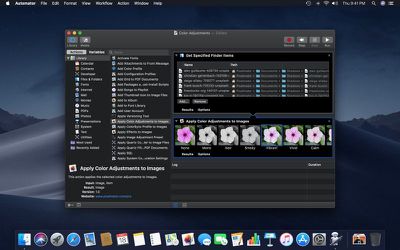
pixelmatorprobatchprocessing
Batch processing functionality has been added to Automator for white balance, auto enhance, color adjustments, effects, and file conversions, and Automator is what powers the new Quick Actions you'll find in Finder. There are also tools for creating your own Pixelmator Pro Quick Actions that can be executed without opening the Pixelmator app.

macOS Mojave brought Core ML 2, which is now powering Pixelmator Pro features like Auto Layer Naming, ML Color Adjustments, ML Hue & Saturation, ML White Balance, ML Lightness, and a new ML Enhance feature that's designed to let Apple's neural network analyze and improve the colors of an image in just a few seconds.

ML Enhance is an auto enhance feature that was trained on 20 million professional photos, which lets it tweak 37 color adjustments all at once for the best possible automatic color tuning.
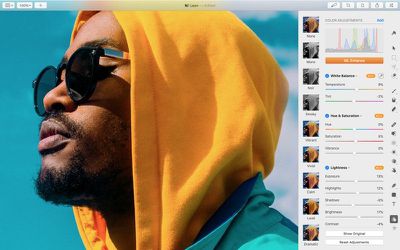
pixelmatorpromlenhance
The updated version of Pixelmator Pro includes a new light appearance and a revamped dark appearance, both of which are designed to work with the Light Mode and Dark Mode in macOS Mojave. Pixelmator Pro will automatically activate one of these modes based on your macOS settings.

SVG fonts are also supported in Pixelmator Pro 1.2, and several bug fixes have been included.

Pixelmator Pro 1.2 can be downloaded from the App Store for $29.99, a 50 percent discount off of the regular Pixelmator Pro price. Customers who have already purchased Pixelmator Pro will get the update for free. [Direct Link]

Top Rated Comments

Pakaku Avatar
96 months ago
The updated version of Pixelmator Pro includes a new light appearance and a revamped dark appearance, both of which are designed to work with the Light Mode and Dark Mode in macOS Mojave.
Pixelmator is the only OSX app that I'm aware of that actually added a light theme after Mojave started adding support for a dark themed UI.
Score: 5 Votes (Like | Disagree)
Nozuka Avatar
96 months ago
I like how fast and consistent they are with adding/using new OS features. I wish other developers would do the same.
Score: 4 Votes (Like | Disagree)
Amazing Iceman Avatar
96 months ago
Allow me please to throw the typical question:
Which one is better now: Pixelmator Pro or Affinity Photo?

It would be a huge plus if Pixelmator Pro releases an iOS app with all the features of the macOS version.
Score: 2 Votes (Like | Disagree)
macbanjo Avatar
96 months ago
Allow me please to throw the typical question:
Which one is better now: Pixelmator Pro or Affinity Photo?

It would be a huge plus if Pixelmator Pro releases an iOS app with all the features of the macOS version.
I have AP on booth the Mac and iPad, AP to me is more a pro tool along the lines of photoshop with the learning curve.
for color corrections I think AP has the edge, but for building a file with layers and text and whatnot I like using PP.
Pixelmator is very Mac like in its layout and learning curve and I like the pro version one window workflow.
I believe I read a while back that they were working on a new version for the Ipad that would be more in line with the desktop version, which I'm hoping to see
Score: 2 Votes (Like | Disagree)
travelsheep Avatar
96 months ago
Pixelmator is the only OSX app that I'm aware of that actually added a light theme after Mojave started adding support for a dark themed UI.
Wow ! Great news ! Plus an option to view the interface without having to use a scanning electron microscope would be nice.
Score: 1 Votes (Like | Disagree)
RMo Avatar
96 months ago
Pixelmator is the only OSX app that I'm aware of that actually added a light theme after Mojave started adding support for a dark themed UI.
I'll have to try this out! Maybe Light Mode will help me see the icons better, but:

Wow ! Great news ! Plus an option to view the interface without having to use a scanning electron microscope would be nice.
Yes, I also wish for non-microscopic icons. Maybe the next release, or so I've been wishing for years. :)
Score: 1 Votes (Like | Disagree)

Popular Stories

maxresdefault

Apple Shows Off a Key Reason to Upgrade to the iPhone 17

Saturday February 7, 2026 9:26 am PST by
Apple today shared an ad that shows how the upgraded Center Stage front camera on the latest iPhones improves the process of taking a group selfie. "Watch how the new front facing camera on iPhone 17 Pro takes group selfies that automatically expand and rotate as more people come into frame," says Apple. While the ad is focused on the iPhone 17 Pro and iPhone 17 Pro Max, the regular iPhone...
Finder Siri Feature

Why Apple's iOS 26.4 Siri Upgrade Will Be Bigger Than Originally Promised

Friday February 6, 2026 3:06 pm PST by
In the iOS 26.4 update that's coming this spring, Apple will introduce a new version of Siri that's going to overhaul how we interact with the personal assistant and what it's able to do. The iOS 26.4 version of Siri won't work like ChatGPT or Claude, but it will rely on large language models (LLMs) and has been updated from the ground up. Upgraded Architecture The next-generation...
wwdc sans text feature

Apple Rumored to Announce New Product on February 19

Thursday February 5, 2026 12:22 pm PST by
Apple plans to announce the iPhone 17e on Thursday, February 19, according to Macwelt, the German equivalent of Macworld. The report, citing industry sources, is available in English on Macworld. Apple announced the iPhone 16e on Wednesday, February 19 last year, so the iPhone 17e would be unveiled exactly one year later if this rumor is accurate. It is quite uncommon for Apple to unveil...
apple wallet drivers license feature iPhone 15 pro

Apple Says These 7 U.S. States Plan to Offer iPhone Driver's Licenses

Monday February 9, 2026 6:24 am PST by
In select U.S. states, residents can add their driver's license or state ID to the Apple Wallet app on the iPhone and Apple Watch, and then use it to display proof of identity or age at select airports and businesses, and in select apps. The feature is currently available in 13 U.S. states and Puerto Rico, and it is expected to launch in at least seven more in the future. To set up the...
14 inch MacBook Pro Keyboard

New MacBook Pros Could Now Arrive in March

Sunday February 8, 2026 6:02 am PST by
New MacBook Pro models with the M5 Pro and M5 Max chips could arrive as soon as Monday, March 2, according to Bloomberg's Mark Gurman. In today's "Power On" newsletter, Gurman said that the release of new MacBook Pro models is tied to the release of macOS Tahoe 26.3. The launch is said to be slated for as early as the week of March 2. He added that the M4 Pro and M4 Max models on sale today...















