Parallels Toolbox for Mac has been updated with a handful of macOS Mojave features, including Dark Mode support and the ability to annotate screenshots with the new and improved systemwide Take Screenshot tool.
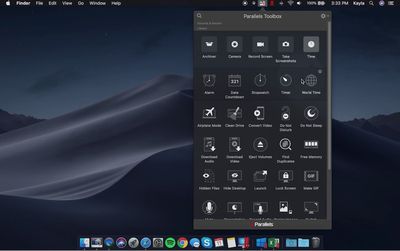
parallels toolbox mojave
Parallels Toolbox 3, a free update for existing users, features three new tools for quickly uninstalling apps, viewing local times in various locations around the world, and revealing files and folders that are normally hidden in macOS.

The complete list of new and enhanced features added in Toolbox 3, as outlined in Parallels' press release:

  • Uninstall Apps: Easily remove applications and their files with a single click for faster removals.

  • World Time: See local times in various locations around the world to save time when working with colleagues globally.

  • Hidden Files: Reveals and conceals files normally hidden in MacOS to reduce desktop clutter and increase productivity.

  • Annotate Screenshots: Available only for macOS Mojave users, they can now use the Take Screenshot tool to add helpful markups including text, arrows, circles and more for quicker use in emails or presentations

  • Support for playlist download from video hosting websites: Quickly download playlists from Facebook, YouTube, Vimeo, and many more

  • Safari Extension for Download Video: Users can now enjoy a download video extension on their Safari browsers for quicker access downloading online videos to their desktops (compatible with macOS Mojave and Safari 12)

  • Dark Mode: Support for the setting in macOS Mojave

  • Customizable "Save As": Each individual tool now allows new files to be saved in customizable locations, rather than the same default destination, for streamlined efficiency

  • Resize Image: HEIF now joins JPEG, TIFF, and PNG as supported formats

  • Record Audio: Users can now save audio recordings in a MP3 file format, with the built-in microphone in a single click. You can also record from an external microphone or the computer if it's selected as the input source in System Preferences › Sound

Demo videos:


Parallels Toolbox adds a dropdown menu to the macOS menu bar with a collection of tools and shortcuts that simplify common tasks to just a click or two, such as taking screenshots, resizing images, hiding the desktop, recording audio, switching resolutions, creating password-protected archives of files, and more.

Parallels Toolbox 3 is available today for $19.99 per year for new users. The annual subscription includes free updates with new and enhanced tools as they become available "several times a year." Lower-priced Toolbox Packs with specific collections of tools are also available from $9.99 per year.

Note that while Parallels is best known for its virtualization software that allows for Windows and Linux to be run within macOS, its Toolbox software can be used natively on any compatible Mac or Windows PC.


Related Forum: macOS Mojave

Top Rated Comments

OldSchoolMacGuy Avatar
95 months ago
Pay a yearly fee so they can go in, add the addition of one Apple-provided API for Dark Mode.
Score: 6 Votes (Like | Disagree)
MacGizmo Avatar
95 months ago
I don't get it. Why would anyone pay $20 per year for features that are already built-in to the OS itself? There is nothing (that I see) in this utility that does anything you can't already do for free—with the exception of downloading video playlists from websites. But there are free extensions for all browsers that do that or at the very least cheaper (one-time payment) apps available.
Score: 4 Votes (Like | Disagree)
OldSchoolMacGuy Avatar
95 months ago
Oh, maybe you missed the body of the article. About half of it is a list of changes. I count more than one, probably requiring more than one Apple-provided API. About half of the title is "and Other macOS Mojave Features". I probably wouldn't pay $20/year for this software, but it's pretty obvious that their improvements aren't as limited as you say.
Half of them are quick and simple implementations and simple API tie-ins (like screenshot annotation). Certainly not any real changes to justify an upgrade fee.
Score: 2 Votes (Like | Disagree)
AndrewWx Avatar
95 months ago
they almost had me - until I saw the subscription info - UGH please no.
Score: 2 Votes (Like | Disagree)
tnsmart Avatar
95 months ago
Pay a yearly fee so they can go in, add the addition of one Apple-provided API for Dark Mode.
Oh, maybe you missed the body of the article. About half of it is a list of changes. I count more than one, probably requiring more than one Apple-provided API. About half of the title is "and Other macOS Mojave Features". I probably wouldn't pay $20/year for this software, but it's pretty obvious that their improvements aren't as limited as you say.
Score: 1 Votes (Like | Disagree)

Popular Stories

Apple Logo Zoomed

Tim Cook Teases Plans for Apple's Upcoming 50th Anniversary

Thursday February 5, 2026 12:54 pm PST by
Apple turns 50 this year, and its CEO Tim Cook has promised to celebrate the milestone. The big day falls on April 1, 2026. "I've been unusually reflective lately about Apple because we have been working on what do we do to mark this moment," Cook told employees today, according to Bloomberg's Mark Gurman. "When you really stop and pause and think about the last 50 years, it makes your heart ...
wwdc sans text feature

Apple Rumored to Announce New Product on February 19

Thursday February 5, 2026 12:22 pm PST by
Apple plans to announce the iPhone 17e on Thursday, February 19, according to Macwelt, the German equivalent of Macworld. The report, citing industry sources, is available in English on Macworld. Apple announced the iPhone 16e on Wednesday, February 19 last year, so the iPhone 17e would be unveiled exactly one year later if this rumor is accurate. It is quite uncommon for Apple to unveil...
Finder Siri Feature

Why Apple's iOS 26.4 Siri Upgrade Will Be Bigger Than Originally Promised

Friday February 6, 2026 3:06 pm PST by
In the iOS 26.4 update that's coming this spring, Apple will introduce a new version of Siri that's going to overhaul how we interact with the personal assistant and what it's able to do. The iOS 26.4 version of Siri won't work like ChatGPT or Claude, but it will rely on large language models (LLMs) and has been updated from the ground up. Upgraded Architecture The next-generation...
iOS 26

iOS 26.3 and iOS 26.4 Will Add These New Features to Your iPhone

Tuesday February 3, 2026 7:47 am PST by
While the iOS 26.3 Release Candidate is now available ahead of a public release, the first iOS 26.4 beta is likely still at least a week away. Following beta testing, iOS 26.4 will likely be released to the general public in March or April. Below, we have recapped known or rumored iOS 26.3 and iOS 26.4 features so far. iOS 26.3 iPhone to Android Transfer Tool iOS 26.3 makes it easier...
maxresdefault

Apple Shows Off a Key Reason to Upgrade to the iPhone 17

Saturday February 7, 2026 9:26 am PST by
Apple today shared an ad that shows how the upgraded Center Stage front camera on the latest iPhones improves the process of taking a group selfie. "Watch how the new front facing camera on iPhone 17 Pro takes group selfies that automatically expand and rotate as more people come into frame," says Apple. While the ad is focused on the iPhone 17 Pro and iPhone 17 Pro Max, the regular iPhone...