
Apple Updates iWork Apps With Improved Apple Pencil Integration, Custom Shapes and More - GeekWebGuides
Skip to Content

Apple Updates iWork Apps With Improved Apple Pencil Integration, Custom Shapes and More

by

As promised earlier in March, Apple today introduced major updates for all of its iWork for iOS apps, including Pages, Keynote, and Numbers.

Today's update brings enhanced Apple Pencil functionality, coinciding with the addition of ‌Apple Pencil‌ support on the new iPad Air and the fifth-generation iPad mini.
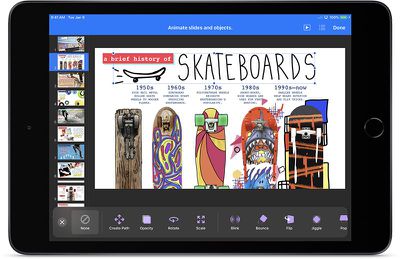
Keynote 2019
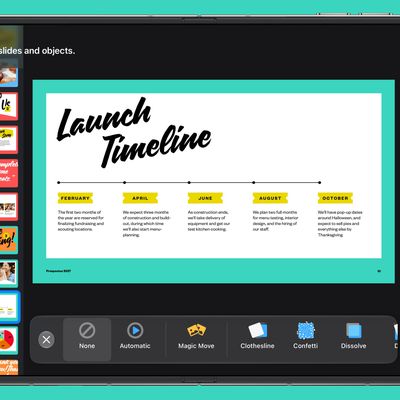
The new version of Keynote allows you to draw paths with your finger or with the ‌Apple Pencil‌ to animate an object, and there are options to add action build effects, like new move, rotate, and scale animations.

You can create and share animated GIFs by exporting one or more slides, and there's an option to edit presenter notes while presenting or rehearsing a slide show. With Keynote and the other iWork apps, you can also save custom shapes. Keynote's full release notes are below:

- Draw a path with your finger or Apple Pencil to animate an object across the slide.
- Add emphasis to presentations with action build effects, including move, rotate, and scale animations.
- Create and share an animated GIF by exporting one or more slides.
- Edit presenter notes while presenting or rehearsing a slideshow.
- Save custom shapes for use in other presentations and access them on any device using iCloud.
- Create themes to use as a model for new presentations, and access them on any device using iCloud.
- Slides with custom wider aspect ratios now display better in the slide navigator, light table, and presenter display.
- Create image placeholders to easily replace images without affecting the formatting of your slide.
- Improved performance while collaborating on presentations.
- Edit grouped objects while collaborating.
- Support for vertical text in shapes and text boxes in Chinese, Japanese, and Korean languages.

In the Numbers app, there's a new feature for making precise changes to table row and column counts with the format pane, the maximum zoom level has been increased to 400 percent, collaboration features have been improved, and there's an option to create templates to use as a model for new spreadsheets. The full Numbers release notes are below:

- Make precise changes to table row and column counts and sizes with the format pane.
- Performance and usability improvements to Smart Categories.
- Save custom shapes for use in other spreadsheets, then access them on any device using iCloud.
- Create templates to use as a model for new spreadsheets, and access them on any device using iCloud.
- Increased maximum zoom level to 400%.
- Enhancements to Excel and comma separated value file import.
- Create image placeholders to easily replace images without affecting the formatting of your spreadsheet.
- Improved performance while collaborating on spreadsheets.
- Edit grouped objects while collaborating.
- Support for vertical text in shapes and text boxes in Chinese, Japanese, and Korean languages.

Pages features a new table of contents view to navigate through a document or book, and a table of contents can be inserted into a page. Custom shapes can be saved and used in other documents, and image placeholders can be added to replace images without affecting page formatting. Release notes for the Pages update are below:

- Use the new table of contents view to easily navigate your document or book.
- Insert a table of contents onto a page in a word-processing document.
- Save custom shapes for use in other documents and access them on any device using iCloud.
- Create templates to use as a model for new documents, and access them on any device using iCloud.
- Create image placeholders to easily replace images without affecting the formatting of your page.
- Switch your document between word processing and page layout.
- Improved performance while collaborating on documents.
- Edit grouped objects while collaborating.
- In Chinese, Japanese, and Korean languages, you can now type vertically in your entire document or in an individual text box.

Apple has also updated its iWork for macOS apps with some of the same features that have been added to its iOS apps. All of Apple's iWork apps for both macOS and iOS are free for you to download.

Apple first announced all of these updates on Monday, March 18, when debuting the new ‌iPad mini‌ and the new ‌iPad Air‌ models. All of Apple's iPads now support either the original ‌Apple Pencil‌ or the ‌Apple Pencil‌ 2 (iPad Pro models), both which can be used in all of the iWork apps.
Tag: iWork

Top Rated Comments

Konigi Avatar
99 months ago
macOS versions received updates today too.
You're right, thanks! The article focused primarily on iOS versions and my AppStore page was not refreshed.

I am a heavy user of these macOS apps, I love seeing updates. I feel like iWorks are much more interesting to use than Microsoft Office versions.
Score: 4 Votes (Like | Disagree)
99 months ago
You can create and share animated GIFs by exporting one or more slides,
This is a fun little addition, and useful for quick proofing and feedback. I have worked with clients who are mostly on PCs but can be convinced to run a Keynote off a Mac for maximum polish -- but when you're going back and forth with them, it's a bit of a nightmare because they're emailing you from a PC or (maybe) an iPhone if you're lucky. Being able to quickly export a GIF is a cool workaround for this.
[doublepost=1553811536][/doublepost]
Apple has done quite a bit to close the gap, but no, the latest version of iWork still doesn't have all of the functionality that iWork '09 had. (btw, iWork '09 still works on the latest version of mac OS).

For those who are curious, no, this version still doesn't restore the full functionality of linked text boxes.
I just want my g-d control palattes back, at this point. Those sidebars do not cut it at all.

The big thing for me that was lost (and thank god later restored) was the ability to paste vector objects from Illustrator and back again with no pixelization or loss of quality. That means you can build illustrations and icons off to the side in Illustrator and never have to worry about exporting individual assets. It's a massive time saver. But damn, I miss the palattes.

But overall, I have to say I'm very happy with iWork, especially since it's free. If Pages alone was a standalone word processor and layout program by another company, I could see it costing $50-75, even $100. (Or, worse, some kind of $5.99/month software rental deal).
Score: 2 Votes (Like | Disagree)
sracer Avatar
99 months ago
I've never really used iWork, but I'm curious. Has iWork on Mac caught up to where it was beore the "iOS-ification"?
Apple has done quite a bit to close the gap, but no, the latest version of iWork still doesn't have all of the functionality that iWork '09 had. (btw, iWork '09 still works on the latest version of mac OS).

For those who are curious, no, this version still doesn't restore the full functionality of linked text boxes.
Score: 2 Votes (Like | Disagree)
tubular Avatar
99 months ago
Big fan of Keynote.
Score: 2 Votes (Like | Disagree)
99 months ago
Apple should really borrow some functionality from it.
I think it’d be fruitless to compete with Excel when there’s a great product already out there that has 100% of Excel’s features and is 100% compatible with Excel... which is, of course, Excel :) The majority of people using Excel really don’t need all the features, they’re just looking to do some quick totals or, in a LOT of cases, just order some lists. I think it’s reasonable that someone should be expected to graduate out of Numbers knowing a lot of the basics to work in Excel and then do pivot charts!
Score: 1 Votes (Like | Disagree)
Chris Grande Avatar
99 months ago
Someday animations on Master Slides will return… today is not that day.

The better super wide slide support is interesting, guess they needed better handling of those new massive WWDC presentations.

I do have to say I have been very pleased with iWorks live collaboration features, they are so much better then Microsoft's Office's implementation. I hope Apple bundles that tech up into an API for developers at some point.
Score: 1 Votes (Like | Disagree)

Popular Stories

iphone duo keynote

Apple's iWork Apps Get 'Intelligent Assistant' and iPhone Duo Support

Thursday October 22, 2026 1:02 pm PDT by
Apple today added an "Intelligent Assistant" to Keynote, Numbers, and Pages. The feature is available in beta for Apple Creator Studio subscribers. The update is available again following the temporary removal of the apps from the App Store. In Numbers, Intelligent Assistant can build formulas, visualize data, help generate formulas with natural language, and generate tables. The Pages...
iPhone Duo Trio

Here's What Apple's Apps Look Like on the iPhone Duo

Tuesday October 20, 2026 11:12 am PDT by
With just three days to go until the iPhone Duo is released, Apple is getting ready for the launch. Behind the scenes, the App Store now has screenshots of Apple's built-in apps running on the Duo. We've seen some apps in marketing materials, but images of the ones we haven't seen give us an idea of what it will be like using the iPhone Duo day to day. Many apps are shown in landscape...
Apple Creator Studio iWork suite

Apple Pulls Keynote, Pages and Numbers From App Store [Update: Back]

Thursday October 22, 2026 11:01 am PDT by
Apple has temporarily removed Keynote, Pages, and Numbers from the App Store, just after releasing an update that added iPhone Duo support and a new Intelligent Assistant. It is not clear if the apps were removed intentionally, or if it is a bug. Apple has not said when the apps will be reinstated, but if it was in error, they should return soon. Update: The Mac versions are back without...
Latest Stories
iPhone Duo Demand Reportedly Exceeds Apple's Expectations
1 hour ago
iPhone Duo Launch Begins as First Orders Reach Customers
7 hours ago
1Password for Agents Keeps Your Passwords Hidden From AI
8 hours ago
iPhone Duo 24 Hours Later: Your Questions Answered
9 hours ago
Apple's iWork Apps Get 'Intelligent Assistant' and iPhone Duo Support
10 hours ago
Apple is Apparently Considering a Slightly Larger iPhone Duo
10 hours ago
Giant iPhone Duo Displays Coming to Four Apple Stores
11 hours ago
Apple Pulls Keynote, Pages and Numbers From App Store [Update: Back]
12 hours ago
Apple Updates More Apps With iPhone Duo Support
12 hours ago
Apple Will Label Apps 'Made for iPhone Duo' in App Store
15 hours ago
Amazon Takes $49 Off iPad With Prices Starting at $399.99
15 hours ago
F1 on Apple TV Now Available in Dolby Atmos
16 hours ago
Apple Reveals More Than 50 Apps That Will Be Updated for iPhone Duo
17 hours ago
Apple Blocks Certificates That Could Help Attackers Fake Websites
18 hours ago
Giant iPhone Duo Installations Spotted at Apple Fifth Avenue
19 hours ago
iPhone Duo 2 Prototypes Include Under-Display Face ID
19 hours ago
Tesla App Gains iPad and iPhone Duo Support
23 hours ago
Apple Reportedly Boosts iPhone Duo Orders by 44%
23 hours ago
Fortnite Returning to Australian App Store After Court Ruling
1 day ago
Apple Ordered to Open iPhone to Rival App Stores in Australia
1 day ago
Apple Suppliers Face Hurdles Cutting Circuit Board Emissions
1 day ago
Things Updated for iPhone Duo With Adaptive Layout
1 day ago
Simplicity and Siri AI Are HomeView's Killer Features, Apple Says
1 day ago
iPhone Duo Reviewers Really Miss Face ID
1 day ago
Does the iPhone Duo Run Hot? Here's What Reviews Found
1 day ago
Apple Music's New Look is Now Live on Apple's Website
1 day ago
Anthropic Launches Claude Duet, a Proactive AI Agent
1 day ago
What 32,000 Folds Did to the iPhone Duo's Hinge
1 day ago
iPhone Duo's Hidden FaceTime Camera Takes 'Trash' Photos
1 day ago
iPhone Duo Has 'Edge Light' Feature That Debuted on Macs Last Year
2 days ago









































