
Apple's Clips App Updated With New Posters, Camcorder Filter, Live Titles and More

Apple today updated its Clips app for the iPhone and the iPad to introduce new posters, new title and caption options, updated stickers, a camcorder filter, and more.

The Clips app, for those unfamiliar with it, is a video editing app that's designed to let users combine video clips, images, and photos with voice-based titles, music, filters, and graphics to create unique videos that can be shared on social media.
clipsappupdate
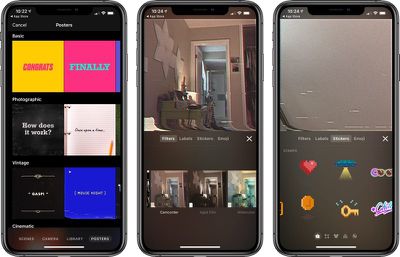
Apple has added a new camcorder filter that's designed to introduce a retro video camera look for your videos, and there are eight new poster background options with colorful vintage designs, a camcorder recording screen, and an animated globe in honor of earth day.

You can create titles and captions using three newly introduced Live Titles styles, and there are new 8-bit and 3D stickers you can add to your videos. Songs created in GarageBand or other music apps can be added to your Clips projects, and there's now ClassKit support to allow students to deliver video assignments to teachers through the Schoolwork app. Full release notes are below:

- Use the new camcorder filter to give your videos a retro video camera look
- Choose from 8 new posters including options with solid backgrounds, colorful vintage designs, a classic blue camcorder recording screen, and an animated globe to celebrate Earth Day.
- Create titles and captions with 3 new Live Titles styles featuring static text that appears all at once or animated text that highlights each word as it's spoken
- Apply new 8-bit and 3D-styled stickers to add emphasis to your videos
- Create songs in GarageBand and other music apps, then add them directly to new or existing Clips projects
- Duplicate and rename projects
- Share projects with friends via AirDrop or email, save them to Files, or upload them to cloud storage service with share extensions
- ClassKit support lets students deliver video assignments to teachers using the Schoolwork app

Apple first released clips in early 2017 and has since updated it multiple times. Clips is compatible with the ‌iPhone‌ 5s and later, the original iPad Air and later, and the iPad mini 2 and later. Style transfer effects require the ‌iPhone‌ 7 or 2017 iPad Pro or later, while Selfie Scenes require an ‌iPhone‌ or ‌iPad Pro‌ with TrueDepth Camera.

Clips can be downloaded from the App Store for free. [Direct Link]

Tag: Clips

Popular Stories

Apple Logo Zoomed

Tim Cook Teases Plans for Apple's Upcoming 50th Anniversary

Thursday February 5, 2026 12:54 pm PST by
Apple turns 50 this year, and its CEO Tim Cook has promised to celebrate the milestone. The big day falls on April 1, 2026. "I've been unusually reflective lately about Apple because we have been working on what do we do to mark this moment," Cook told employees today, according to Bloomberg's Mark Gurman. "When you really stop and pause and think about the last 50 years, it makes your heart ...
wwdc sans text feature

Apple Rumored to Announce New Product on February 19

Thursday February 5, 2026 12:22 pm PST by
Apple plans to announce the iPhone 17e on Thursday, February 19, according to Macwelt, the German equivalent of Macworld. The report, citing industry sources, is available in English on Macworld. Apple announced the iPhone 16e on Wednesday, February 19 last year, so the iPhone 17e would be unveiled exactly one year later if this rumor is accurate. It is quite uncommon for Apple to unveil...
Finder Siri Feature

Why Apple's iOS 26.4 Siri Upgrade Will Be Bigger Than Originally Promised

Friday February 6, 2026 3:06 pm PST by
In the iOS 26.4 update that's coming this spring, Apple will introduce a new version of Siri that's going to overhaul how we interact with the personal assistant and what it's able to do. The iOS 26.4 version of Siri won't work like ChatGPT or Claude, but it will rely on large language models (LLMs) and has been updated from the ground up. Upgraded Architecture The next-generation...
iOS 26

iOS 26.3 and iOS 26.4 Will Add These New Features to Your iPhone

Tuesday February 3, 2026 7:47 am PST by
While the iOS 26.3 Release Candidate is now available ahead of a public release, the first iOS 26.4 beta is likely still at least a week away. Following beta testing, iOS 26.4 will likely be released to the general public in March or April. Below, we have recapped known or rumored iOS 26.3 and iOS 26.4 features so far. iOS 26.3 iPhone to Android Transfer Tool iOS 26.3 makes it easier...
iphone 17 pro dark blue 1

iPhone 18 Pro Max Rumored to Deliver Next-Level Battery Life

Friday February 6, 2026 5:14 am PST by
The iPhone 18 Pro Max will feature a bigger battery for continued best-in-class battery life, according to a known Weibo leaker. Citing supply chain information, the Weibo user known as "Digital Chat Station" said that the iPhone 18 Pro Max will have a battery capacity of 5,100 to 5,200 mAh. Combined with the efficiency improvements of the A20 Pro chip, made with TSMC's 2nm process, the...

Top Rated Comments

AlbinoPigeon Avatar
90 months ago
Lol, I forgot this even existed.
Score: 4 Votes (Like | Disagree)
albebaubles Avatar
90 months ago
Never heard of it.
Score: 4 Votes (Like | Disagree)
IRockThat828pScreen Avatar
90 months ago
Never understood the point of this app. Just build all this into the iMessage camera.
Score: 2 Votes (Like | Disagree)
BootsWalking Avatar
90 months ago
I love the Clips app but it eats through the battery like a ravenous electricity monster.
Score: 2 Votes (Like | Disagree)
JGIGS Avatar
90 months ago
I literally had to look that up to remember what it was
You may have to do the same with Clips one day. ;)
Score: 1 Votes (Like | Disagree)
chrisduketv Avatar
90 months ago
Still no support for vertical video? Wow. You guys are on top of current trends, Apple. Spot on

Until vertical video support is added, this app is dead to me ☠️
Score: 1 Votes (Like | Disagree)














