
Apple today seeded the fourth beta of an upcoming macOS Catalina update to its public beta testing group, two weeks after seeding the third public beta and a day after seeding the fifth macOS Catalina developer beta.

Beta testers who have signed up for Apple's beta testing program will be able to download the macOS Catalina beta through the Software Update mechanism in System Preferences after installing the proper profile. Those who want to be a part of Apple's beta testing program can sign up to participate through the beta testing website, which gives users access to iOS, macOS, and tvOS betas.
test macOS 10
Potential beta testers should make a full Time Machine backup before installing macOS Catalina, and it may not be wise to install it on a primary machine because betas can be unstable and often have many bugs.

macOS Catalina eliminates the iTunes app, which has been a key Mac feature since 2001. In Catalina, iTunes has been replaced by Music, Podcasts, and TV apps. The new apps can do everything that iTunes can do, so Mac users aren't going to be losing any functionality, and device management capabilities are now handled by the Finder app.

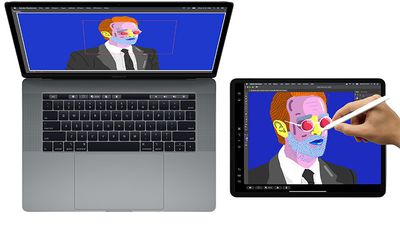
macOS Catalina has a useful new Sidecar feature, designed to turn the iPad into a secondary display for the Mac. It can work as a traditional second display or with a mirroring feature. Apple Pencil support works with ‌Sidecar‌, so you can turn your ‌iPad‌ into a drawing tablet using apps like Photoshop.
sidecarmacoscatalina
For those with an Apple Watch set up to unlock the Mac, there's now an option to approve security prompts in Catalina by tapping on the side button of the watch. Macs with a T2 chip in them also support Activation Lock, making them useless to thieves much as it does on the iPhone.

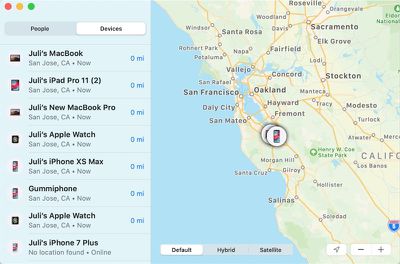
There's a new Find My app that lets you track your lost devices, and previously, this functionality was only available via iCloud on the Mac. There's even a new option to find your devices even when they're offline by leveraging Bluetooth connections to other nearby devices, something that's particularly handy on the Mac because it doesn't have a cellular connection.
findmy
Apple is expanding Screen Time to the Mac in Catalina, letting Apple users track their device usage across Mac, iOS, and ‌iPad‌ for a better overall picture of time spent using electronics.

For developers, a "Project Catalyst" feature lets apps designed for the ‌iPad‌ be ported over to the Mac with just a few clicks in Xcode and some minor tweaks. Apple's ultimate goal with Project Catalyst is to bring more apps to the Mac.

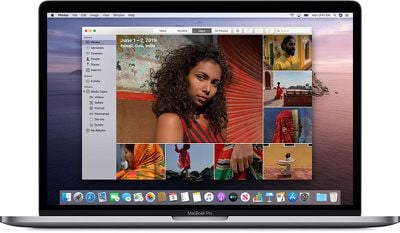
Photos features an updated interface that better highlights your best pictures, Safari includes a new start page with Siri Suggestions, Mail has a new feature for blocking emails and another new option for muting threads, and the Reminders app has been overhauled and is now more useful.
macoscatalinaphotos
Before installing macOS Catalina, be aware that it does not support 32-bit apps, so some older apps that have not been updated in some time may stop working. For more on macOS Catalina, make sure to check out our macOS Catalina roundup.


Related Forum: macOS Catalina

Top Rated Comments

xxray Avatar
85 months ago
I have iOS/iPadOS 13 installed on my phone and iPad, but for some reason, I just can’t get myself to download a beta version of my computer OS. Looking forward to using it in about 6 weeks though.
Score: 4 Votes (Like | Disagree)
Ollifi Avatar
85 months ago
I have tried enrolling and unenrolling several times. Still the software update dialog says, "requested update not found". I have also tried rebooting the machine but still no luck. Any advice? I'm running macOS Mojave 10.14.6
Score: 2 Votes (Like | Disagree)
R3k Avatar
85 months ago
To those of you who haven’t installed the beta at all, and were planning on using it as your primary OS- I highly recommend that you continue to wait.
Score: 2 Votes (Like | Disagree)
aloshka Avatar
85 months ago
I have tried enrolling and unenrolling several times. Still the software update dialog says, "requested update not found". I have also tried rebooting the machine but still no luck. Any advice? I'm running macOS Mojave 10.14.6
Did you ever figure this one out? There seems to be a large group of people having the same issue, but even reinstalls aren't fixing it. What machine you on?
Score: 1 Votes (Like | Disagree)
JDRN Avatar
85 months ago
Me too - same issue. I'm using a mid-2015 MacBook Pro with latest release of Mojave.
This fix worked for me. https://www.reddit.com/r/MacOSBeta/comments/clb8at/the_requested_version_of_macos_is_not_available/
Score: 1 Votes (Like | Disagree)
MauiPa Avatar
85 months ago
well, this is crap! tried to install this beta and it got stuck with a little less than 1/2 way through install.. rebooted.. now it starts to boot up then immediately shuts down.. My iMac is hosed... how can they release a "public beta" so destructive??/ wtf??? this sucks...
ummm, you interrupted the process, not Apple's fault. worked fine for me. Try this:


How to use macOS Recovery
Turn on your Mac and immediately press and hold Command (⌘)-R or one of the other macOS Recovery key combinations ('https://support.apple.com/kb/HT204904') on your keyboard. Continue holding until you see the Apple logo or a spinning globe. Startup is complete when you see the utilities window:


1. Start up from macOS Recovery
To start up from macOS Recovery, turn on your Mac and immediately press and hold one of the following combinations on your keyboard. Command-R is generally recommended, especially if you never installed macOS Sierra 10.12.4 ('https://support.apple.com/en-us/HT204904#notupdated') or later.

Command (⌘)-R
Install the latest macOS that was installed on your Mac.

Option-⌘-R
Upgrade to the latest macOS that is compatible with your Mac.

Shift-Option-⌘-R
Install the macOS that came with your Mac, or the closest version still available.
Score: 1 Votes (Like | Disagree)

Popular Stories

wwdc sans text feature

Apple Rumored to Announce New Product on February 19

Thursday February 5, 2026 12:22 pm PST by
Apple plans to announce the iPhone 17e on Thursday, February 19, according to Macwelt, the German equivalent of Macworld. The report, citing industry sources, is available in English on Macworld. Apple announced the iPhone 16e on Wednesday, February 19 last year, so the iPhone 17e would be unveiled exactly one year later if this rumor is accurate. It is quite uncommon for Apple to unveil...
Apple Logo Zoomed

Tim Cook Teases Plans for Apple's Upcoming 50th Anniversary

Thursday February 5, 2026 12:54 pm PST by
Apple turns 50 this year, and its CEO Tim Cook has promised to celebrate the milestone. The big day falls on April 1, 2026. "I've been unusually reflective lately about Apple because we have been working on what do we do to mark this moment," Cook told employees today, according to Bloomberg's Mark Gurman. "When you really stop and pause and think about the last 50 years, it makes your heart ...
maxresdefault

Apple Shows Off a Key Reason to Upgrade to the iPhone 17

Saturday February 7, 2026 9:26 am PST by
Apple today shared an ad that shows how the upgraded Center Stage front camera on the latest iPhones improves the process of taking a group selfie. "Watch how the new front facing camera on iPhone 17 Pro takes group selfies that automatically expand and rotate as more people come into frame," says Apple. While the ad is focused on the iPhone 17 Pro and iPhone 17 Pro Max, the regular iPhone...
Finder Siri Feature

Why Apple's iOS 26.4 Siri Upgrade Will Be Bigger Than Originally Promised

Friday February 6, 2026 3:06 pm PST by
In the iOS 26.4 update that's coming this spring, Apple will introduce a new version of Siri that's going to overhaul how we interact with the personal assistant and what it's able to do. The iOS 26.4 version of Siri won't work like ChatGPT or Claude, but it will rely on large language models (LLMs) and has been updated from the ground up. Upgraded Architecture The next-generation...
iOS 26

iOS 26.3 and iOS 26.4 Will Add These New Features to Your iPhone

Tuesday February 3, 2026 7:47 am PST by
While the iOS 26.3 Release Candidate is now available ahead of a public release, the first iOS 26.4 beta is likely still at least a week away. Following beta testing, iOS 26.4 will likely be released to the general public in March or April. Below, we have recapped known or rumored iOS 26.3 and iOS 26.4 features so far. iOS 26.3 iPhone to Android Transfer Tool iOS 26.3 makes it easier...














