

Adobe is today launching its long-awaited Photoshop for iPad app, one year after first announcing plans to bring the desktop version of Photoshop CC to Apple's tablets.
The Photoshop on iPad app is designed to let Photoshop desktop users open and edit PSDs right on their tablet devices, with the ability to see and edit layered documents and access key Adobe tools with touch gestures.
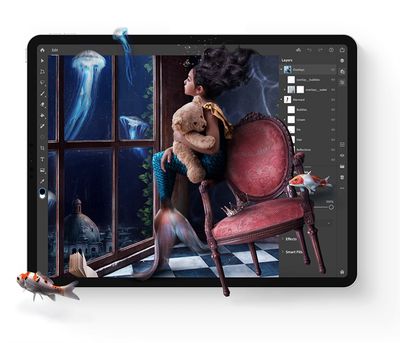
The app will be familiar to Photoshop users thanks to the standard Photoshop toolbar on the left and a layers interface on the right, both of which are optimized for a touch interface. Adobe has built-in tours and video tutorials to get users started with the app.
Photoshop for iPad was designed with touch and mobility in mind, but it was built using the same code base as Photoshop on the desktop so users don't need to worry about conversions, compressions, or importing or exporting when swapping between the iPad and the desktop. All edits will produce the same results across devices.
Alongside the launch of Photoshop for iPad, Adobe is overhauling cloud documents to support the PSD format, which is what will allow PSDs to be worked on cross platform. Work on Photoshop for iPad is automatically saved to the cloud as a PSD file via the new cloud documents feature.
According to Adobe, today's launch of Photoshop for iPad is just the beginning of a more extensive plan to expand the capabilities of Photoshop on tablets.
The first version of Photoshop for iPad focuses on top workflows, compositing, and masking and retouching, with additional functionality to be introduced in the future as Adobe better learns how customers use Photoshop on a mobile device.
The company says it is "deeply committed" to rethinking every Photoshop experience for the Apple Pencil and the touch screen to provide the best Photoshop experience regardless of device.
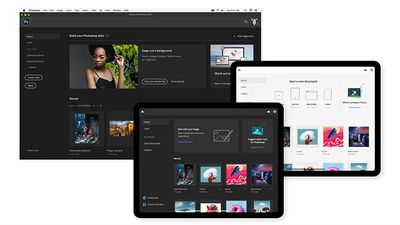
Adobe says that new capabilities will be added "as quickly as possible" with a regular cadence of releases after Adobe MAX 2019. "We know we have more work to do," reads Adobe's blog post announcing the launch of Photoshop for iPad. Adobe is encouraging Photoshop for iPad users to join its community forums to discuss potential new features.
Photoshop for iPad is available starting now for all Creative Cloud customers who have a subscription to Photoshop. It can be downloaded from the App Store. More information on the new Photoshop for iPad app can be found on Adobe's website.
Adobe is today also introducing Adobe Photoshop Camera, an AI-powered camera app that "brings incredible Photoshop magic" to capturing photos. Photoshop Camera lets you capture, edit, and share photos using Photoshop tools right from the viewfinder.
The app can recognize the subject of a photo, provide recommendations, and automatically apply complex adjustments to produce the best possible photo. The app will also include a "curated feed of lenses" created by artists and influencers like Billie Eilish.
Photoshop Camera is available in a preview capacity on iOS devices, and interested users can sign up for info on Adobe's website.



























![Apple Pulls Keynote, Pages and Numbers From App Store [Update: Back]](https://images.macrumors.com/t/Okb7kitB_gNr6qe5Pex9nQIysD8=/112x112/article-new/2026/01/Apple-Creator-Studio-iWork-suite.jpg)



















