
Hands-On With Apple's New 16-Inch MacBook Pro - GeekWebGuides
Skip to Content

Hands-On With Apple's New 16-Inch MacBook Pro

With Apple's new 16-inch MacBook Pro now in stores, we were able to pick one up this morning to take a look at it and provide GeekWebGuides readers with our first impressions on the new machine.

Read on below and watch our video to see our overview and our initial thoughts on the new ‌MacBook Pro‌.


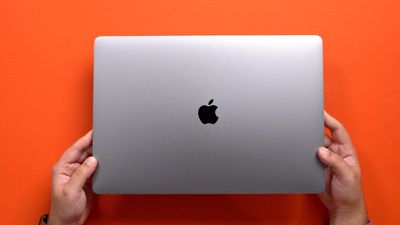
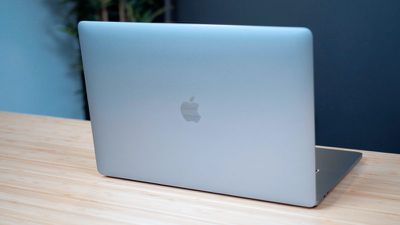
When you glance at the new 16-inch ‌MacBook Pro‌, it's difficult to tell it apart from the 15-inch ‌MacBook Pro‌, because the design is the same general design that Apple has been using for the ‌MacBook Pro‌ for years now.

Apple bumped up the thickness and the weight of the new ‌MacBook Pro‌, though, and there's a lot of heft here. It feels more dense when toting it around, and the extra weight and size is somewhat noticeable.
macbookpro16inch 1
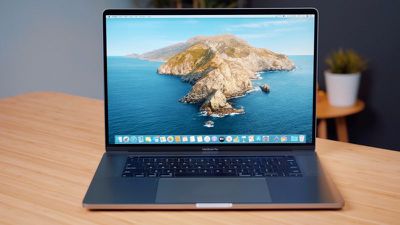
The most notable change to the ‌MacBook Pro‌ is the larger 16-inch display with its slimmed down bezels. The new model has a resolution of 3072 x 1920 at 226 pixels per inch, which is an improvement over the 15-inch ‌MacBook Pro‌. In use, the updated display appears to be somewhat sharper and more vibrant than before, but it's not a huge difference from the 15-inch display and it's probably not the sole reason someone should upgrade.
macbookpro16inchdisplay
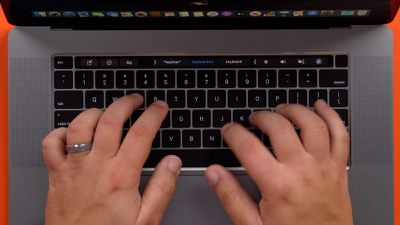
Beyond the display, there are quite a few attractive new features that set the 16-inch machine apart from its predecessors. A new "Magic Keyboard" has been added that does away with the butterfly mechanism and returns to a scissor-style mechanism that's meant to be more reliable and not prone to failure due to crumbs and small particulates.

We liked the feel of the butterfly keyboard in general, and the Magic Keyboard isn't too far off from that feel. There's minimal key travel, but a solid amount of feedback that provides a pleasant typing experience.
macbookpro16inchkeyboard
Apple added a physical Escape key to the 16-inch ‌MacBook Pro‌, an upgrade over the virtual Escape key built into the Touch Bar in previous Macs. Apple's Phil Schiller recently said that not having a physical Escape key was one of the top ‌MacBook Pro‌ complaints, and it's nice that Apple has addressed this issue.

Arrow keys have also been returned to an inverted "T" design, which will also be a welcome change, and the Touch ID button is now a separate button to match the aesthetic of a separate Escape key. Aside from these changes, the Touch Bar is the same. There are also no changes to the Trackpad.

There's a new six-speaker sound system and a three-array microphone setup that we used to record the entirety of our YouTube video. The sound system is impressive for a notebook machine. The speakers are super loud, but sound quality is also noticeably improved. The audio is robust with great clarity and just the right amount of bass.
macbookpro16inchdesign
Battery life in the new ‌MacBook Pro‌ is up an hour compared to the 15-inch model, though we haven't been able to test that out yet. It's using the same Intel processors that were included in the 15-inch models released in May, but the new machine supports up to 64GB of RAM and 8TB of storage, which will appeal to pro users.

What do you think of the 16-inch ‌MacBook Pro‌? Are you upgrading? Let us know in the comments.

We're going to have additional coverage of the 16-inch ‌MacBook Pro‌ coming next week, including a deeper dive into performance, so make sure to stay tuned to GeekWebGuides.


Related Roundup: MacBook Pro
Buyer's Guide: MacBook Pro (Caution)
Related Forum: MacBook Pro

Popular Stories

M5 MacBook Pro

RIP, MacBook Ultra

Monday October 19, 2026 9:37 am PDT by
Apple today sent out invites for an experience in Los Angeles on Wednesday, October 28, and the "Pro and tell" tagline on the invitation likely means that the rumored MacBook models with touch-enabled OLED displays will stick with MacBook Pro branding instead of the once-rumored "MacBook Ultra" name. The long-rumored "iPhone Ultra" ended up being named iPhone Duo, so speculation that Apple...
MacBook Pro Ultra Feature 1

Apple to Launch Touchscreen OLED MacBook Pro and OLED iPad mini on October 27

Thursday October 8, 2026 1:31 pm PDT by
Apple will introduce new OLED touchscreen MacBook Pro models and an OLED iPad mini "on or around" Tuesday, October 27, reports Bloomberg. The launch will also include an M6 14-inch MacBook Pro and an M6 iMac. The October 27 follows Apple's October 13 debut of a new smart home hub, a revamped Apple TV 4K, and a refreshed HomePod mini. Earlier this month, GeekWebGuides reported that Apple would do ...
Black Apple Event Logo

Apple Now Inviting Media to October 28 'Launch Experience'

Thursday October 15, 2026 4:13 am PDT by
Apple has begun inviting selected members of the media to a product launch experience in Los Angeles on Wednesday, October 28, according to Bloomberg's Mark Gurman. In a post on X, Gurman described the gathering as an "all-day product launch experience" for touchscreen MacBooks, a new iPad mini, and Macs equipped with M6 chips. Gurman previously reported that Apple would introduce the...

Top Rated Comments

aaronhead14 Avatar
91 months ago
I would buy this in a heartbeat if it had no Touch Bar at all, and had an SD card slot.

I still feel like Apple cares more about their own hubris than they care about making a product that's convenient to use. A tiny touch screen control, which is slower than function keys, does NOT help speed along my creative work.

And carrying an SD dongle around isn't a convenient way of using a product that should already be portable. The need to carry around so many dongles negates the product's supposed portability.

All that being said, I applaud Apple for going back to a FANTASTIC keyboard design! Thank you, Apple! And thanks for fixing the thermal issues too! VERY awesome!

And the escape key is great! But I still think there's a massive group of Pro users who just don't want the Touch Bar at all. Especially since it doesn't exist for any of the desktop machines, so its existence on the MacBook Pros automatically creates a disparity across the "professional Mac" product line. (Meaning, there's no sense in getting used to using a Touch Bar while on the go if I can't use a Touch Bar when I'm back on my desktop workstation at the office. So it ultimately ends up being something that's just in the way).
Score: 77 Votes (Like | Disagree)
aaronhead14 Avatar
91 months ago

You don't need to use the Touch Bar, and a one-ounce dongle doesn't "negate ... portability."
Read my post again.

Yes, dongles do indeed negate portability. The point of having something that's portable is to have something that doesn't need to be tied down to a bunch of dangly crap that makes it annoying to use on a lap or on an airplane.

And sure, I don't "need to use the Touch Bar" but you know what I do need to use? The function keys.

And even if I liked the Touch Bar, the problem is that it exists only on the MacBooks, and not on any of the desktop Macs. So there's no sense in even getting used to using it while I'm on the go if I can't use it when I'm back using my desktop at the office. It causes too much disparity between my portable Macs and my desktop Macs, so it ultimately just gets in the way.
Score: 55 Votes (Like | Disagree)
az431 Avatar
91 months ago

I would buy this in a heartbeat if it had no Touch Bar at all, and had an SD card slot.

I still feel like Apple cares more about their own hubris than they care about making a product that's convenient to use. A useless touch screen control, which is slower than function keys, does NOT help speed along my creative work.

And carrying a stupid SD dongle around isn't a convenient way of using a product that should be portable. The need to carry around so many dongles negates the product's supposed portability.
You don't need to use the Touch Bar, and a one-ounce dongle doesn't "negate ... portability."

But feel free to avoid it based solely on principle.
Score: 42 Votes (Like | Disagree)
91 months ago

You don't need to use the Touch Bar, and a one-ounce dongle doesn't "negate ... portability."

But feel free to avoid it based solely on principle.
Yes we have to use the touch bar, since there are no physical Fn keys.
Score: 33 Votes (Like | Disagree)
az431 Avatar
91 months ago

I am highly considering getting this MBP instead of the upcoming Mac Pro. I really like what Apple did here. I just wish we could have a way of upgrading RAM and storage without the stupid soldering component strategy.
The only benefit of upgrading your own RAM is saving money buying third-party RAM. But people who can afford a $3k+ computer are unlikely to want to tear open their own computer to save maybe 5% of the purchase cost. On the other hand, those same people place a premium on the slimmest, lightest laptop possible, which is precisely what soldering RAM allows.
Score: 33 Votes (Like | Disagree)
Scott6666 Avatar
91 months ago

I would buy this in a heartbeat if it had no Touch Bar at all, and had an SD card slot.

I still feel like Apple cares more about their own hubris than they care about making a product that's convenient to use. A useless touch screen control, which is slower than function keys, does NOT help speed along my creative work.

And carrying a stupid SD dongle around isn't a convenient way of using a product that should be portable. The need to carry around so many dongles negates the product's supposed portability.

All that being said, I applaud Apple for going back to a FANTASTIC keyboard design! Thank you, Apple! And thanks for fixing the thermal issues too! VERY awesome!

And the escape key is great! But I still think there's a massive group of Pro users who just don't want the Touch Bar at all. Especially since it doesn't exist for any of the desktop machines, so its existence on the MacBook Pros automatically creates a disparity across the "professional Mac" product line. (Meaning, there's no sense in getting used to using a Touch Bar while on the go if I can't use a Touch Bar when I'm back on my desktop workstation at the office. So it ultimately ends up being something that's just in the way).
Haven't held an SD card in my hand for at least 2 years now. Ever since the iPhone replaced the digital camera there is no need for most people to have an SD slot. And if you're a photographer you carry around so much weight a dongle is irrelevant. You're in the tiny minority here I would think.
Score: 27 Votes (Like | Disagree)
Latest Stories
iPhone Duo Demand Reportedly Exceeds Apple's Expectations
46 minutes ago
iPhone Duo Launch Begins as First Orders Reach Customers
7 hours ago
1Password for Agents Keeps Your Passwords Hidden From AI
8 hours ago
iPhone Duo 24 Hours Later: Your Questions Answered
8 hours ago
Apple's iWork Apps Get 'Intelligent Assistant' and iPhone Duo Support
9 hours ago
Apple is Apparently Considering a Slightly Larger iPhone Duo
9 hours ago
Giant iPhone Duo Displays Coming to Four Apple Stores
10 hours ago
Apple Pulls Keynote, Pages and Numbers From App Store [Update: Back]
11 hours ago
Apple Updates More Apps With iPhone Duo Support
12 hours ago
Apple Will Label Apps 'Made for iPhone Duo' in App Store
15 hours ago
Amazon Takes $49 Off iPad With Prices Starting at $399.99
15 hours ago
F1 on Apple TV Now Available in Dolby Atmos
16 hours ago
Apple Reveals More Than 50 Apps That Will Be Updated for iPhone Duo
16 hours ago
Apple Blocks Certificates That Could Help Attackers Fake Websites
17 hours ago
Giant iPhone Duo Installations Spotted at Apple Fifth Avenue
18 hours ago
iPhone Duo 2 Prototypes Include Under-Display Face ID
18 hours ago
Tesla App Gains iPad and iPhone Duo Support
22 hours ago
Apple Reportedly Boosts iPhone Duo Orders by 44%
23 hours ago
Fortnite Returning to Australian App Store After Court Ruling
23 hours ago
Apple Ordered to Open iPhone to Rival App Stores in Australia
23 hours ago
Apple Suppliers Face Hurdles Cutting Circuit Board Emissions
1 day ago
Things Updated for iPhone Duo With Adaptive Layout
1 day ago
Simplicity and Siri AI Are HomeView's Killer Features, Apple Says
1 day ago
iPhone Duo Reviewers Really Miss Face ID
1 day ago
Does the iPhone Duo Run Hot? Here's What Reviews Found
1 day ago
Apple Music's New Look is Now Live on Apple's Website
1 day ago
Anthropic Launches Claude Duet, a Proactive AI Agent
1 day ago
What 32,000 Folds Did to the iPhone Duo's Hinge
1 day ago
iPhone Duo's Hidden FaceTime Camera Takes 'Trash' Photos
1 day ago
iPhone Duo Has 'Edge Light' Feature That Debuted on Macs Last Year
1 day ago








































