
PSA: iPhone SE's Haptic Touch Doesn't Work With Notifications and It's Not a Bug

Customers who have purchased the new 2020 iPhone SE have found a surprising missing feature - Haptic Touch does not work with notifications.

On the 2020 ‌iPhone‌ SE, long pressing on a notification in the Notification Center or on the Lock screen does not appear to bring up rich notification options to allow ‌iPhone‌ SE users to interact with incoming content.
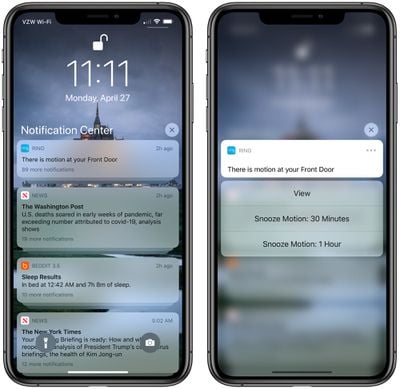
richnotificationsiphone11pro

Rich notifications accessed with ‌Haptic Touch‌ on an ‌iPhone‌ 11 Pro

There have been complaints about the missing feature on Reddit and the MacRumors forums. From Reddit:

I received my SE yesterday and very quickly realized that Haptic Touch is not supported on notifications. I am not seeing this reported anywhere, haven't seen one review mentioning it, no video I watched mentioned it. Haptic Touch works for peek and pop, and on icons on the home screen but if you are on the lock screen or Notification Center and try to long press an email to archive, or a text to quick reply you are out of luck.

On the 6S-XS 3D Touch was the solution, with the XR and 11 series Haptic Touch was the replacement, but this is the first non 3D Touch phone to be released where all the features of Haptic Touch are not fully baked into the OS

With Haptic Touch-enabled devices like the ‌iPhone‌ 11 and 11 Pro, long pressing on a notification in the Notification Center or the Lock screen brings up interactive options based on the app sending the notification. An Apple News notification, for example, brings up options for reading the full story, sharing a story, or saving for later, while an email app might offer options to reply and delete an incoming message without needing to open the app.

In our testing, we were not able to long press on a notification to view these interactive options, as the long press functionality did not work. We also tried on an ‌iPhone‌ 8, which the ‌iPhone‌ SE is based on, but we were able to get the rich notifications to work on that device, which has 3D Touch.

While ‌iPhone‌ SE users cannot long press on notifications on the Lock screen or in the Notification Center, there does appear to be a ‌Haptic Touch‌ option when pressing on an incoming notification when the ‌iPhone‌ is in use.

A Reddit user called Apple Support and was told there was no software update planned to fix the behavior, but Apple Support can be unreliable when it comes to information about new hardware releases.

Update: According to TechCrunch's Matthew Panzarino, the lack of ‌Haptic Touch‌ for notifications on the ‌iPhone‌ SE is not a bug and the feature is working as Apple intended.

Update 2: MacRumors forum members have pointed out that it's possible to slide to the left on a notification and tap on the "View" option as a workaround for the missing ‌Haptic Touch‌ feature.

Related Forum: iPhone

Popular Stories

maxresdefault

Apple Shows Off a Key Reason to Upgrade to the iPhone 17

Saturday February 7, 2026 9:26 am PST by
Apple today shared an ad that shows how the upgraded Center Stage front camera on the latest iPhones improves the process of taking a group selfie. "Watch how the new front facing camera on iPhone 17 Pro takes group selfies that automatically expand and rotate as more people come into frame," says Apple. While the ad is focused on the iPhone 17 Pro and iPhone 17 Pro Max, the regular iPhone...
Finder Siri Feature

Why Apple's iOS 26.4 Siri Upgrade Will Be Bigger Than Originally Promised

Friday February 6, 2026 3:06 pm PST by
In the iOS 26.4 update that's coming this spring, Apple will introduce a new version of Siri that's going to overhaul how we interact with the personal assistant and what it's able to do. The iOS 26.4 version of Siri won't work like ChatGPT or Claude, but it will rely on large language models (LLMs) and has been updated from the ground up. Upgraded Architecture The next-generation...
wwdc sans text feature

Apple Rumored to Announce New Product on February 19

Thursday February 5, 2026 12:22 pm PST by
Apple plans to announce the iPhone 17e on Thursday, February 19, according to Macwelt, the German equivalent of Macworld. The report, citing industry sources, is available in English on Macworld. Apple announced the iPhone 16e on Wednesday, February 19 last year, so the iPhone 17e would be unveiled exactly one year later if this rumor is accurate. It is quite uncommon for Apple to unveil...
apple wallet drivers license feature iPhone 15 pro

Apple Says These 7 U.S. States Plan to Offer iPhone Driver's Licenses

Monday February 9, 2026 6:24 am PST by
In select U.S. states, residents can add their driver's license or state ID to the Apple Wallet app on the iPhone and Apple Watch, and then use it to display proof of identity or age at select airports and businesses, and in select apps. The feature is currently available in 13 U.S. states and Puerto Rico, and it is expected to launch in at least seven more in the future. To set up the...
14 inch MacBook Pro Keyboard

New MacBook Pros Could Now Arrive in March

Sunday February 8, 2026 6:02 am PST by
New MacBook Pro models with the M5 Pro and M5 Max chips could arrive as soon as Monday, March 2, according to Bloomberg's Mark Gurman. In today's "Power On" newsletter, Gurman said that the release of new MacBook Pro models is tied to the release of macOS Tahoe 26.3. The launch is said to be slated for as early as the week of March 2. He added that the M4 Pro and M4 Max models on sale today...

Top Rated Comments

whyamihere Avatar
76 months ago
Well ya didn't expect to get ALLL the iOS functionality for $399 did ya?!? ;)
Score: 39 Votes (Like | Disagree)
jclardy Avatar
76 months ago
This better be a bug, as a dev having to “inform” users of the various interactions (3D touch, Haptic Touch, drag down) on notifications sucks...and then having a random brand new device not support it at all makes it even worse.

My guess is the SE has a modified iPhone 8 version of iOS, which is expecting 3D touch to access these things.
Score: 23 Votes (Like | Disagree)
macduke Avatar
76 months ago
People are saying this is a bug, but it works this same way on the old iPhone SE. It's Apple segmenting software features, even though it leads to an inconsistent UI and user frustration. It's not even a big thing, it's a little thing, and it's annoying that they've decided to do this. Hopefully they reverse course.
Score: 14 Votes (Like | Disagree)
Stromos Avatar
76 months ago
I would say it has to be a bug otherwise it's purely a we are holding back features on the cheaper phone.....
Score: 14 Votes (Like | Disagree)
dontwalkhand Avatar
76 months ago
I am hoping this is just a bug. Though I will be honest, I don't think I ever used this feature on my 11 Pro.
Score: 9 Votes (Like | Disagree)
zorinlynx Avatar
76 months ago
This is most likely a bug. There's some apps like Duo that require this functionality to work!
Score: 8 Votes (Like | Disagree)
















