
macOS Image Capture Bug More Pervasive Than Originally Thought - MacRumors
Skip to Content

macOS Image Capture Bug More Pervasive Than Originally Thought

Earlier this week we reported on a bug in Apple's macOS Image Capture app that adds empty data to photos when imported from iOS devices, potentially eating up gigabytes of disk storage needlessly. Today, we're hearing that the bug in macOS 10.14.6 and later is a lot more extensive than was initially believed.
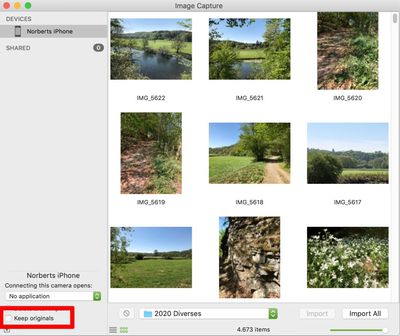
image capture
NeoFinder developer Norbert Doerner, who originally discovered the bug, informed MacRumors that the same issue affects nearly all Mac apps that import photos from cameras and iOS devices, including Adobe Lightroom, Affinity Photo, PhaseOne Media Pro, and Apple's legacy iPhoto and Aperture apps.

The reason is said to be because the bug is located inside Apple's ImageCaptureCore framework, which is a part of macOS that all developers must use to connect to digital cameras. The only app that isn't affected is said to be Apple's Photos app, which uses other undocumented APIs to talk to iOS devices.

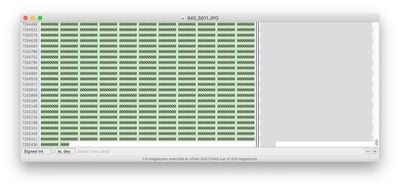
Essentially, the pervasive Mac bug causes HEIC files imported from iOS devices and converted to JPG to contain more than 1.5MB of empty data appended to the end of each file, increasing the file size and eating up storage. As an example, Doerner said he discovered more than 12,000 JPG files in his own photo library containing this extra unwanted data, resulting in over 20GB of wasted disk space.
wasted space image capture

Hex data of a JPG file viewed using Hex Fiend

Apple is apparently aware of the bug, but until a patch arrives, one short term workaround for future transfers is to prevent your iPhone or iPad from using the HEIF format when taking photos: To do so, launch the Settings app, select Camera -> Formats and check Most Compatible.

For users with large existing photo libraries, Doerner has suggested using a new beta version of the third-party utility Graphic Converter, which includes an option to remove the unwanted empty data from the JPEG files.

Alternatively, media asset management app NeoFinder is itself being updated on Monday to include a tool that can find and eliminate the unwanted data in JPG files. NeoFinder for Mac costs $39.99 and a free trial is available to download on the developers' website.


Popular Stories

Apple Event Logo

Apple's Next Era Begins September 1

Thursday May 7, 2026 10:36 am PDT by
Apple recently announced that Tim Cook will be stepping down as CEO later this year, after 15 years of leading the company. Effective September 1, Apple's hardware engineering chief John Ternus will become the company's next CEO, while Cook will become executive chairman of Apple's board of directors. In his new role, Apple said Cook will assist with "certain aspects" of the company,...
Four iPhone 18 Pro Colors Mock Feature

iPhone 18 Pro Launching in September With These 10 New Features

Saturday May 9, 2026 6:03 am PDT by
While the iPhone 18 Pro and iPhone 18 Pro Max are not launching until September, there are already plenty of rumors about the devices. It was initially reported that the iPhone 18 Pro models would have fully under-screen Face ID, with only a front camera visible in the top-left corner of the screen. However, the latest rumors indicate that only one Face ID component will be moved under the...
Apple Watch Series 10 Jet Black Touch ID

Apple Watch Series 12 and watchOS 27: What to Expect Later This Year

Friday May 8, 2026 2:07 pm PDT by
While not too much has been reported about the next Apple Watch models, there are a few rumors about potential design changes and watchOS 27 features. Apple Watch Series 12 and Apple Watch Ultra 4 models are expected to be released in September, and we have outlined some of the key rumored hardware and software changes below. A new Apple Watch SE is not expected this year, as that model was...

Top Rated Comments

chrfr Avatar
79 months ago

Is it possible this is more than just a "bug"? Apple makes a LOT of money from services including iCloud storage fees, and by inflating photo file sizes, more people would be nagged to upgrade their iCloud storage from the initial free 5GB, to a paid tier, to accomodate a larger iCloud Photo Library. There is potential financial motive here - anyone with the know how should look carefully at all files stored in iCloud to see if there is any similar artificial inflation of file size. It reminds me of the Wells Fargo scandal where staff were creating extra accounts in customer names to inflate their numbers...
This is an unfounded conspiracy theory. This bug affects images imported to a Mac manually via the Image Capture app, not images saved in iCloud Photo Library. It's not a widespread workflow for people- most folks just let their device sync photos through the Photos app.
Score: 12 Votes (Like | Disagree)

79 months ago
A fixed increase per file is linear not exponential growth.
Score: 11 Votes (Like | Disagree)
79 months ago

I don't understand, why a workaround is preventing iOS from shooting in HEIF. It's not the problem in HEIF, but in conversion. So if you work only with HEIF files, it should be fine, right?
The problem is, nothing is compatible with HEIF (or HEVC). I get handed a lot of iPhone stuff at work and need to xcode them to JPG or DNX.
Score: 6 Votes (Like | Disagree)
79 months ago

Is it possible this is more than just a "bug"? Apple makes a LOT of money from services including iCloud storage fees, and by inflating photo file sizes, more people would be nagged to upgrade their iCloud storage from the initial free 5GB, to a paid tier, to accomodate a larger iCloud Photo Library. There is potential financial motive here - anyone with the know how should look carefully at all files stored in iCloud to see if there is any similar artificial inflation of file size. It reminds me of the Wells Fargo scandal where staff were creating extra accounts in customer names to inflate their numbers...
The answer to your question is no. Relax.
Score: 5 Votes (Like | Disagree)
chrfr Avatar
79 months ago

Earlier this week we reported on a bug in Apple's macOS Image Capture app ('https://www.geekwebguides.com/2020/04/28/macos-image-capture-bug-eats-storage/') that adds empty data to photos when imported from iOS devices, potentially eating up gigabytes of disk storage needlessly. Today, we're hearing that the bug in macOS 10.14.6 and later is a lot more extensive than was initially believed.


NeoFinder ('https://www.cdfinder.de') developer Norbert Doerner, who originally discovered the bug, informed MacRumors that the same issue affects nearly all Mac apps that import photos from cameras and iOS devices, including Adobe Lightroom, Affinity Photo, PhaseOne Media Pro, and Apple's legacy iPhoto and Aperture apps.

The reason is said to be because the bug is located inside Apple's ImageCaptureCore framework, which is a part of macOS that all developers must use to connect to digital cameras. The only app that isn't affected is said to be Apple's Photos app, which uses other undocumented APIs to talk to iOS devices.

Essentially, the pervasive Mac bug causes HEIC files imported from iOS devices and converted to JPG to contain more than 1.5MB of empty data appended to the end of each file, increasing the file size and eating up storage. As an example, Doerner said he discovered more than 12,000 JPG files in his own photo library containing this extra unwanted data, resulting in over 20GB of wasted disk space.


Hex data of a JPG file viewed using Hex Fiend ('https://ridiculousfish.com/hexfiend/')

Apple is apparently aware of the bug, but until a patch arrives, one short term workaround for future transfers is to prevent your iPhone or iPad from using the HEIF format when taking photos: To do so, launch the Settings app, select Camera -> Formats and check Most Compatible.

For users with large existing photo libraries, Doerner has suggested using a new beta version of the third-party utility Graphic Converter ('http://www.lemkesoft.org/beta.html'), which includes an option to remove the unwanted empty data from the JPEG files.

Alternatively, media asset management app NeoFinder is itself being updated ('https://www.cdfinder.de/guide/17/17.5/truncate_JPG.html') on Monday to include a tool that can find and eliminate the unwanted data in JPG files. NeoFinder for Mac costs $39.99 and a free trial is available to download on the developers' website ('https://www.cdfinder.de').

Article Link: macOS JPG File Truncation Bug More Pervasive Than Originally Thought ('https://www.geekwebguides.com/2020/05/01/macos-jpg-truncation-bug-widespread/')
This article title is wrong. The files are not being truncated. Rather, data is being appended to the end of the files.
Score: 5 Votes (Like | Disagree)
79 months ago
This is a bad bug, but on the other side i would not reccomend converting the .heif files if you are importing them for archiving.

The heif files coming off my iphone 11 pro contains 10 bit color data per channel and this means that in addition of the loss of image quality you get from decompressing a lossy format that .heif is and changing it to jpg that is another lossy format you also loose a lot of color information.

This is not a excuse for apple to not fix the bug but doing this conversion is a bad choice in the first place for archiving.
Score: 5 Votes (Like | Disagree)









































