App Recap: Magnet, Parcel, Unfold, and Major App Updates

In this week's App Recap, we've highlighted productivity app "Magnet," utility app "Parcel," and graphic app "Unfold" as three apps that are worth checking out. We've also compiled a list of apps that received major updates this week.
App Recap Magnet e1590950668166

Apps to Check Out

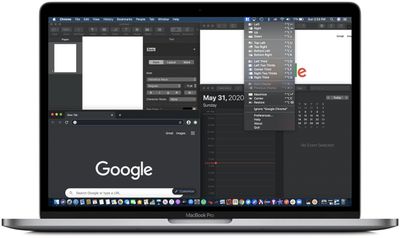
  • Magnet (Mac, $1.99) - Magnet is a productivity app that helps to seamlessly organize open windows on a Mac by "snapping" windows into tiles. Dragging a window to the side of the screen allows for it to be sized to take up half of the screen, while dragging a window into a corner of the screen allows for it to be "snapped" into quarters. Magnet features several additional ways to organize windows, offers a menu bar icon, and supports keyboard shortcuts to help make multitasking much more efficient.
  • Parcel - Delivery Tracking (Mac & iOS, Free) - Parcel is a delivery tracking app that features a very simple and streamlined user interface. Upon downloading the app, users can simply add tracking information for over 300 delivery services, and the app will track all deliveries in an organized manner. Parcel also supports push notifications for both Mac and iOS devices, as well as customizable widgets for adding or viewing upcoming deliveries. Although the app is free to download, push notifications and tracking more than three deliveries at once requires a premium subscription that's priced at $2.99 per year.
  • Unfold - Story Templates (iOS, Free) - Unfold is a graphics app that allows users to create stories from over 200 templates. The editor consists of several text tools and unique stickers, and users can then export their stories to other platforms in high resolution. Unfold is free to download, but users looking to get the most out of the app can subscribe to Unfold+, which features access to all templates and fonts, exclusive access to new collections, and more. Unfold+ offers monthly and yearly subscriptions that are priced at $2.99 and $19.99 respectively.

App Updates

  • Apollo - Apollo, the popular Reddit client, was updated this week with improvements to the media viewing experience. In addition, the update added cursor support for iPad which works well with Reddit awards and Reddit Polls.
  • Heart Analyzer - Heart Analyzer was updated this week with a new dashboard, a new interface, its own dark mode, and more. The Apple Watch companion app was also refined with metrics for the week, LiveHR, and workout readouts as part of new heart rate chart complications.
  • Quibi - Quibi, a video app that features shows that are framed to fit phone screen and come in episodes of 10 minutes or less, was updated this week with AirPlay support. Quibi is also working to bring Chromecast support to its service in June.
  • Spend Stack - Finance and budgeting app Spend Stack this week announced support for importing Apple Card data directly into its app. Apple Card users are now able to take advantage of Spend Stack's budgeting and transaction monitoring tools without having to copy over the data manually into the app. In addition, the iPad version of the app has been optimized for cursor support. The update also features custom list currencies when traveling internationally, services subscription tracking, and more.

  • Tidal - Music streaming service Tidal this week announced Dolby Atmos support for Atmos-enabled devices like TVs, sound bars, speakers, and, notable for Apple users, the Apple TV 4K. The welcomed update brings more immersive sound when an Apple TV is paired with a Dolby Atmos soundbar or receiver and speakers.
  • Twitter - Twitter this week announced it has added the ability to schedule tweets using its web interface. Users also now have the ability to save draft tweets in the web app.
  • YouTube - YouTube this week announced a new Chapters feature that allows content creators to embed timestamps directly into the video progress bar. The feature now allows users to quickly skip to the bits that interest them.

  • YouTube Kids - The popular YouTube Kids app is now available on Apple TV, making it easier to access the platform's kid-friendly video content on bigger screens. YouTube Kids is compatible with both 4K and HD models of Apple TV, and it works with Siri.

Popular Stories

Apple Logo Zoomed

Tim Cook Teases Plans for Apple's Upcoming 50th Anniversary

Thursday February 5, 2026 12:54 pm PST by
Apple turns 50 this year, and its CEO Tim Cook has promised to celebrate the milestone. The big day falls on April 1, 2026. "I've been unusually reflective lately about Apple because we have been working on what do we do to mark this moment," Cook told employees today, according to Bloomberg's Mark Gurman. "When you really stop and pause and think about the last 50 years, it makes your heart ...
wwdc sans text feature

Apple Rumored to Announce New Product on February 19

Thursday February 5, 2026 12:22 pm PST by
Apple plans to announce the iPhone 17e on Thursday, February 19, according to Macwelt, the German equivalent of Macworld. The report, citing industry sources, is available in English on Macworld. Apple announced the iPhone 16e on Wednesday, February 19 last year, so the iPhone 17e would be unveiled exactly one year later if this rumor is accurate. It is quite uncommon for Apple to unveil...
Finder Siri Feature

Why Apple's iOS 26.4 Siri Upgrade Will Be Bigger Than Originally Promised

Friday February 6, 2026 3:06 pm PST by
In the iOS 26.4 update that's coming this spring, Apple will introduce a new version of Siri that's going to overhaul how we interact with the personal assistant and what it's able to do. The iOS 26.4 version of Siri won't work like ChatGPT or Claude, but it will rely on large language models (LLMs) and has been updated from the ground up. Upgraded Architecture The next-generation...
maxresdefault

Apple Shows Off a Key Reason to Upgrade to the iPhone 17

Saturday February 7, 2026 9:26 am PST by
Apple today shared an ad that shows how the upgraded Center Stage front camera on the latest iPhones improves the process of taking a group selfie. "Watch how the new front facing camera on iPhone 17 Pro takes group selfies that automatically expand and rotate as more people come into frame," says Apple. While the ad is focused on the iPhone 17 Pro and iPhone 17 Pro Max, the regular iPhone...
iOS 26

iOS 26.3 and iOS 26.4 Will Add These New Features to Your iPhone

Tuesday February 3, 2026 7:47 am PST by
While the iOS 26.3 Release Candidate is now available ahead of a public release, the first iOS 26.4 beta is likely still at least a week away. Following beta testing, iOS 26.4 will likely be released to the general public in March or April. Below, we have recapped known or rumored iOS 26.3 and iOS 26.4 features so far. iOS 26.3 iPhone to Android Transfer Tool iOS 26.3 makes it easier...

Top Rated Comments

locovaca Avatar
74 months ago
Parcels is ok. We tried it along with Deliveries and were much happier with Deliveries, and Deliveries is a one time purchase.
Score: 3 Votes (Like | Disagree)
God of Biscuits Avatar
74 months ago

Parcels is ok. We tried it along with Deliveries and were much happier with Deliveries, and Deliveries is a one time purchase.
i have deliveries for all platforms and have had it for years. It’s amazing.my favorite app.sounds weird, but it works like apps should: if you‘ce just ordered from amazon, for example and still on the orders page, just go to share sheet and choose deliveries. It gets added just like that. And each delivery is added in the color scheme of the source. amaon orders are beige and brown, fedex are purple, UPS are brown etc. you get maps to track orders, etc. like I said, apps — especially utility apps — should both ape and enhance theresl world way of doing things.
Score: 2 Votes (Like | Disagree)
SkyRom Avatar
74 months ago
Magnet is an amazing productivity app. It's the only behind-the-scenes app I use more than Skitch, which I find more efficient than the built-in grabber from Apple sadly. Sadly because... both of these insanely basic features (resizing/moving windows and taking snapshots of the screen) should have OS level perfect versions from Mac/Windows, but don't.

Check out another incredible (and cheap) app from the Magnet people called Dynamo. Dynamo lets you use keyboard shortcuts S-D-F (S = slower, D = reset to 1x, F = faster) to scrub through video in 0.1 second increments from 0.1 all the way to 10.0. It's a great way to power through YouTube/Podcasts or a boring speaker when you really need 1.3-1.7x speed and I would literally pay $20+ if they had an iPhone/Apple TV version someday. I don't use it often for entertainment but I think it even works in Netflix/Hulu/TV.

Disclaimers: I know HTML5 YouTube and several Apple apps offer 0.25x increments but there's something amazing about being able to finetune 0.1 increments with keyboard shortcuts. I'm not affiliated with the Magnet peeps, though I appreciate their work.
Score: 1 Votes (Like | Disagree)
Neirin Avatar
74 months ago
Matlab had been running insanely slowly on my computer for almost a year. I even uninstalled it and reinstalled it a few times with no success. Recently found out that Magnet was causing the problem. I don't think I can ever forgive Magnet for the hassle it caused me...
Score: 1 Votes (Like | Disagree)
4jasontv Avatar
74 months ago
Magnet is wonderful, even on smaller displays. It's function should be SuperClock!ed.

The YouTube update is the strangest. Let's call it what it is: creator poison. Add it and you decrease total viewtime and make it even easier to skip sponsors. How about givings viewers the option to watch 3 ads before the episode or broken up over the course of it. And get rid of the 10 min length to have control over ad placement. There are so so so many you tube videos that are 10:03 long with 7 min of content because they have to reach the arbitrary 10 min mark.
Score: 1 Votes (Like | Disagree)