Apple today during its WWDC keynote unveiled iPadOS 14, which features new interface functionality for stock apps, a new incoming call UI, Siri interactions, universal Search, new Apple Pencil features, and more.
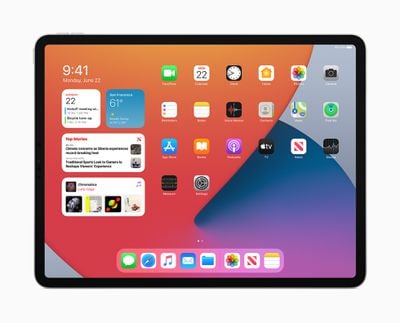
"With iPadOS 14, we're excited to build on the distinct experience of iPad and deliver new capabilities that help customers boost productivity, be more creative, and have more fun," said Craig Federighi, Apple's senior vice president of Software Engineering. "With new compact designs for system interactions and new app designs specifically tailored to iPad, even better note-taking capabilities with Apple Pencil, and more powerful AR experiences, iPadOS 14 delivers an amazing experience that keeps it in a class of its own."
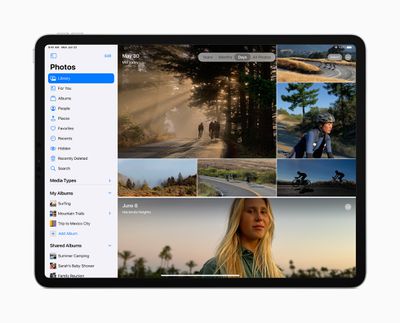
New toolbars and drag and drop functionality has been implemented across a number of Apple's standard iPad apps, including Photos, Files, Notes, Calendar, and Apple Music. For example, Photos has gained a new sidebar, much like the one found in Photos for Mac, and the Music app is getting a new full-screen music player.
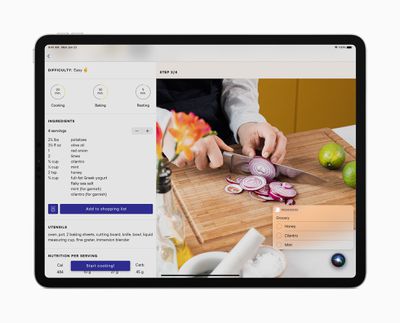
Like in iOS 14, incoming FaceTime and phone calls now appear as a lightweight banner so they don’t take up the entire screen, making it easy to quickly tap to answer the call or flick to dismiss. Siri now also appears at the bottom of the screen when activated, allowing users to reference information onscreen while making a request.
Search in iPadOS has also been redesigned to be universal, similar to Spotlight on macOS. It works as an app launcher, or can be used to make calls, or search within apps like Mail and Files.
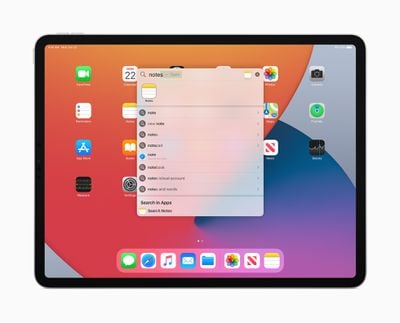
Search on iPad has been rebuilt from the ground up with iPadOS 14 and is now the one place to quickly find practically anything, from locating and launching apps to accessing contacts, files, and quick information, to getting answers to common questions about people or places. With a new compact design, users can start a search from anywhere, without having to leave the app they’re in. Web searches are even more powerful and refined, delivering more relevant suggestions as users type and the ability to get to search results with just a tap.
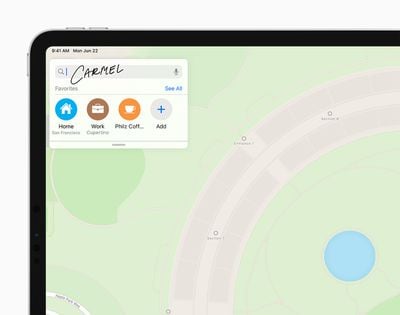
Handwriting on the iPad is becoming just as powerful as typed text – "Scribble" will allow users to hand-write in any text field and for it to be automatically be converted to text. Scribble will initially offer support for English, Traditional and Simplified Chinese, and mixed Chinese and English, so users can write English and Chinese words together without needing to switch languages.
When taking notes, Smart Selection uses on-device machine learning to distinguish handwriting from drawings, so handwritten text can easily be selected, cut, and pasted into another document as typed text. Meanwhile, shape recognition allows users to draw shapes that are made geometrically perfect and snap right into place when adding diagrams and illustrations in Notes.
Data detectors now also work with handwritten text to recognize phone numbers, dates, and addresses, and offer users the ability to take actions like tapping a written number to make a call, adding an event directly to Calendar, or showing a location in Maps.
iPadOS 14 comes with ARKit 4, which delivers a brand new Depth API that allows developers to access more precise depth information captured by the new LiDAR Scanner on iPad Pro. Developers can use the Depth API to drive new features in their apps, like taking body measurements for more accurate virtual try-on, or testing how paint colors will look before painting a room.
ARKit 4 also introduces Location Anchors for iOS and iPadOS apps, which leverage the higher resolution data of the new map in Apple Maps, where available, to pin AR experiences to a specific point in the world.
Elsewhere, iPadOS 14 includes the same new widgets experience as found in iOS 14, new Messages features and Memoji options, an enhanced version of Maps with new cycling directions and curated Guides, a more advanced Home app with new automation suggestions and expanded controls in Control Center, and new accessibility features.
The developer preview of iPadOS 14 is now available to Apple Developer Program members at developer.apple.com , and a public beta will be available to iPadOS users next month at beta.apple.com. New software features will be available this fall as a software update for iPad Air 2 and later, all iPad Pro models, iPad 5th generation and later, and iPad mini 4 and later.