Restoring Apple Silicon M1 Macs Leading to macOS Installation Errors

Several customers who purchased a new Mac with an M1 Apple Silicon app have discovered an issue when attempting to restore the machine, which leads to it becoming non-functional and stuck on error screen that says "An error occurred preparing the update. Failed to personalize the software update."
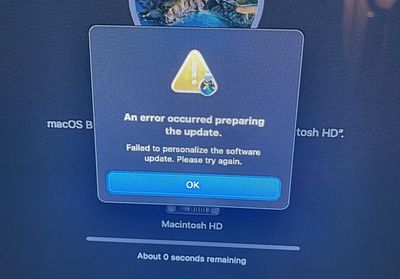
MacOS Big Sur error message
There are at least three threads on the MacRumors forums outlining the issue and warning against restoring one of the new machines. MacRumors reader RyanFlynn describes the problem:

I just received my M1 MacBook Pro and Macbook Air. Because I don't need any of the included software, it is always my procedure to restore the operating system without things like garage band and iMovie.

during the install process, an error occurs relating to "customizing the system update"

after a couple hours on the phone with Apple care, they told me that 75 other people have called in with this issue, and They have no work around. I was instructed to return my systems, or wait for a fix. Without having an operating system running, there is no way for me to install any future updates, so these computers are effectively bricked.

While Apple Support wasn't able to provide RyanFlynn with a reliable fix for the problem, other MacRumors readers have discovered a solution that appears to work.

Apple has instructions on using Configurator 2 and a secondary Mac to revive or restore an ‌Apple Silicon‌ Mac that has become unresponsive. This method requires the newest version of Apple Configurator 2, a functional Mac, and an appropriate cable to connect the two Macs.

Restoring in this way restores the firmware, updates recoveryOS to the latest version, and erases and installs the latest version of macOS on internal storage, thereby erasing all data. This method was successful for two MacRumors readers who had the recovery problem.

Apple may have a fix coming for this issue in the future, but for now it's best to avoid restoring an ‌Apple Silicon‌ Mac. For those that have already done so and are running into trouble, the Apple Configurator solution may be worth trying.


Popular Stories

Apple Logo Zoomed

Tim Cook Teases Plans for Apple's Upcoming 50th Anniversary

Thursday February 5, 2026 12:54 pm PST by
Apple turns 50 this year, and its CEO Tim Cook has promised to celebrate the milestone. The big day falls on April 1, 2026. "I've been unusually reflective lately about Apple because we have been working on what do we do to mark this moment," Cook told employees today, according to Bloomberg's Mark Gurman. "When you really stop and pause and think about the last 50 years, it makes your heart ...
wwdc sans text feature

Apple Rumored to Announce New Product on February 19

Thursday February 5, 2026 12:22 pm PST by
Apple plans to announce the iPhone 17e on Thursday, February 19, according to Macwelt, the German equivalent of Macworld. The report, citing industry sources, is available in English on Macworld. Apple announced the iPhone 16e on Wednesday, February 19 last year, so the iPhone 17e would be unveiled exactly one year later if this rumor is accurate. It is quite uncommon for Apple to unveil...
Finder Siri Feature

Why Apple's iOS 26.4 Siri Upgrade Will Be Bigger Than Originally Promised

Friday February 6, 2026 3:06 pm PST by
In the iOS 26.4 update that's coming this spring, Apple will introduce a new version of Siri that's going to overhaul how we interact with the personal assistant and what it's able to do. The iOS 26.4 version of Siri won't work like ChatGPT or Claude, but it will rely on large language models (LLMs) and has been updated from the ground up. Upgraded Architecture The next-generation...
maxresdefault

Apple Shows Off a Key Reason to Upgrade to the iPhone 17

Saturday February 7, 2026 9:26 am PST by
Apple today shared an ad that shows how the upgraded Center Stage front camera on the latest iPhones improves the process of taking a group selfie. "Watch how the new front facing camera on iPhone 17 Pro takes group selfies that automatically expand and rotate as more people come into frame," says Apple. While the ad is focused on the iPhone 17 Pro and iPhone 17 Pro Max, the regular iPhone...
iOS 26

iOS 26.3 and iOS 26.4 Will Add These New Features to Your iPhone

Tuesday February 3, 2026 7:47 am PST by
While the iOS 26.3 Release Candidate is now available ahead of a public release, the first iOS 26.4 beta is likely still at least a week away. Following beta testing, iOS 26.4 will likely be released to the general public in March or April. Below, we have recapped known or rumored iOS 26.3 and iOS 26.4 features so far. iOS 26.3 iPhone to Android Transfer Tool iOS 26.3 makes it easier...

Top Rated Comments

BootLoxes Avatar
68 months ago
Couldnt you just uninstall the apps you need? Resorting to a restore right out of the gate seems a bit excessive.
Score: 68 Votes (Like | Disagree)
loekf Avatar
68 months ago
Some things I dont understand. You can remove apps like iMovie and GarageBand and just put the additional stuff into a folder. Why would you restore the OS ?
Score: 53 Votes (Like | Disagree)
MauiPa Avatar
68 months ago
Sounds like an invalid procedure to begin with. I would never attempt that. 1). Just delete the apps you don’t want. Makes sense, right. 2) restoring from a non m1 image, what does that even mean?
Score: 29 Votes (Like | Disagree)
groundedUX Avatar
68 months ago
Why do some people complain about these people who restore? Just because YOU wouldn’t do it, and just because there are other, probably better ways something can be done doesn’t remove the FACT that people operate in ways that may be different from you. Calling out those people as “wrong” or “why would they do that when they can just uninstall” does not prove your superior intellect, it simply proves you are short in EMPATHY, which btw - understanding this concept is foundational for any company building products for people as well as a foundational concept for any person dealing with any other human in any positive way.
Score: 28 Votes (Like | Disagree)
DHagan4755 Avatar
68 months ago
I understand the whole desire to wipe the new Mac & "start clean" but you can delete those stock apps from Launch Pad without having to go through that hassle.

Meanwhile Apple will definitely improve the restoration process.

Attachment Image
Score: 25 Votes (Like | Disagree)
jlocker Avatar
68 months ago
Thank you all you early hardware adopters for making my life easy for the next 2 years.
Score: 23 Votes (Like | Disagree)