
iPadOS 14.5 Beta Adds Apple Pencil Scribble Support for German, French, Spanish, Italian and Portuguese - MacRumors
Skip to Content

iPadOS 14.5 Beta Adds Apple Pencil Scribble Support for German, French, Spanish, Italian and Portuguese

Apple in iPadOS 14 introduced an Apple Pencil feature called "Scribble," which lets users write in any text field on the iPad, with the handwritten text then converted automatically into typed text.
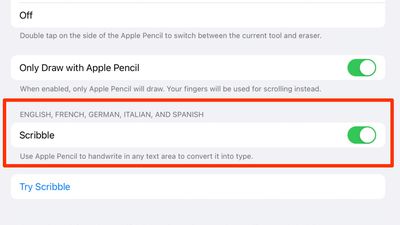
scribble ipados 14 5 beta
At launch, Scribble was limited to the English and Chinese languages, but with iPadOS 14.5 beta that's available to developers and public beta testers, Apple is expanding Scribble support to German, French, Spanish, Italian, and Portuguese.

With the beta installed on an ‌iPad‌, users in these countries can now write in their native languages, and iPadOS is able to accurately translate the text. Enabling a language is done through the "Keyboard" section of the Settings app.

Any supported language that is enabled as a Keyboard option will be listed under "Scribble" in the ‌Apple Pencil‌ settings on an ‌iPad‌, and that language will be available for use when writing, with special characters supported.

Scribble can be used across iPadOS 14 for writing out iMessages, conducting Safari searches, looking for directions in Maps, creating Notes, scheduling Calendar events, and more. It comes with other features such as Smart Selection for copy/pasting handwritten notes, and there's built-in data detection that converts numbers and email addresses to make them tappable.
Apple's Feature Availability page continues to list just English and Chinese as available Scribble options, but that should change when iPadOS 14.5 sees an official release in early spring.

There are many other changes and feature additions that Apple is introducing in iPadOS 14.5, including support for the most recent gaming controllers, an Apple loading logo that's properly displayed horizontally when the ‌iPad‌ is in landscape mode, new emoji characters, and more, with everything new listed in our iOS 14.5 guide.


Related Forum: iOS 14

Popular Stories

Apple Event Logo

Apple's Next Era Begins September 1

Thursday May 7, 2026 10:36 am PDT by
Apple recently announced that Tim Cook will be stepping down as CEO later this year, after 15 years of leading the company. Effective September 1, Apple's hardware engineering chief John Ternus will become the company's next CEO, while Cook will become executive chairman of Apple's board of directors. In his new role, Apple said Cook will assist with "certain aspects" of the company,...
Instagram Feature 2

PSA: Instagram Encrypted Messaging Ends on Friday, May 8

Tuesday May 5, 2026 8:24 am PDT by
Instagram will remove end-to-end encryption for direct messages between users from May 8, 2026. When the date comes around, Meta will potentially be able to see the contents of all messages between users on the social media platform. Encrypting messages has been an optional feature in Instagram since 2023, but in March of this year the social media platform quietly updated a help page to say ...
Apple Event Logo

Apple Just Released a New Accessory

Monday May 4, 2026 8:13 am PDT by
Apple today released a new Pride Edition Sport Loop for the Apple Watch. The band features a rainbow design with 11 colors of woven nylon yarns. The new Pride Edition Sport Loop is available to order now on Apple.com and in the Apple Store app in 40mm, 42mm, and 46mm sizes, and it will be available at Apple Store locations starting later this week. In the U.S., the band costs $49. There...

Top Rated Comments

BWhaler Avatar
68 months ago
I’ve said it before, but 14.5 is looking like it’s epic.

I just hope behind the scenes Apple is stomping out thousands and thousands of bugs. Crush that backlog. We care more about it just works than new features.
Score: 4 Votes (Like | Disagree)
tzm41 Avatar
68 months ago
14.5 is getting better and better!
Score: 4 Votes (Like | Disagree)
68 months ago
That’s great. Usually it takes years for Apple to release features for other countries and languages. Hopefully more languages follow soon.
Score: 2 Votes (Like | Disagree)
yurc Avatar
68 months ago
I had already using dedicated input software like this since iOS 10, called Mazec (for Japanese text), they even can use finger not limited just with Apple Pencil so virtually compatible with any iOS device not just iPad.


But well still faster to typing normally though, I am use this input method because it nice to have and I think it would useful someday.

Attachment Image
Score: 2 Votes (Like | Disagree)
68 months ago

I'm moving the US. To be able to communicate with the folks there, should I learn Chinese or Spanish?
Learn from urbandictionary.com. You’ll have no problem communicating with people on Wall Street with that language.
Score: 1 Votes (Like | Disagree)
chriscl Avatar
68 months ago
Happy to see Scribble in German, finally. I switch between German and English so having Scribble in both will be a real boon.
Score: 1 Votes (Like | Disagree)









































