
Apple Explains How Unlocking iPhone With Apple Watch Works

With the launch of iOS 14.5 and watchOS 7.4, Apple introduced a feature that's designed to allow people wearing masks to unlock their iPhones with a paired and authenticated Apple Watch, alleviating the need to continually enter a passcode.
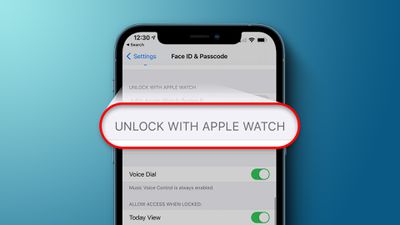
Unlock With Apple Watch Feature
Apple has published a support document outlining how the feature works and the requirements that enable it to function. Apple says that the Apple Watch unlocking process is not using Face ID to recognize and authenticate you, so the same facial scan that allows ‌Face ID‌ to unlock your phone isn't happening here.

There are a specific set of requirements that allow the Apple Watch to authenticate your identity for unlocking an iPhone. You'll need an ‌iPhone‌ X or later with iOS 14.5 or later and an Apple Watch Series 3 or later with watchOS 7.4 or later, which must be paired together.

Both WiFi and Bluetooth need to be activated for communication between the ‌iPhone‌ and the Apple Watch, and the Apple Watch needs to have a passcode and wrist detection must be enabled. Unlock with Apple Watch needs to be expressly turned on for it to function, and you can find the feature in Settings > ‌Face ID‌ & Passcode.

For the Apple Watch to authenticate your identity the watch needs to be on your wrist and unlocked, and you need to be wearing a mask that covers both the mouth and the nose, presumably to signal to the ‌iPhone‌ to use the secondary unlocking method rather than ‌Face ID‌.

To unlock the ‌iPhone‌ with the Apple Watch, you need to wake your ‌iPhone‌ by raising it or tapping the screen, and then glance at it to unlock. The requirement to glance at the ‌iPhone‌ is meant to prevent the feature from working when you're not close by your ‌iPhone‌, and though not mentioned by Apple, there definitely seems to also be a proximity requirement because it will tell you if you're not close enough to your phone.

This is a feature that can allow someone else that's not you to unlock your ‌iPhone‌ if they're near you, have your ‌iPhone‌, and are wearing a mask, so enabling it should be done with caution if other people have access to your device and you're worried about security.

It's worth noting that Unlock with Apple Watch only works for unlocking the ‌iPhone‌. It does not verify identity for use with Apple Pay, passwords in Keychain, or password-protected apps, which will require either ‌Face ID‌ or your passcode.

Though not as secure as ‌Face ID‌, Unlock with Apple Watch is a convenient option for those who are tired of having to enter a passcode on their devices while wearing a mask.

Related Forum: iOS 14

Popular Stories

maxresdefault

Apple Shows Off a Key Reason to Upgrade to the iPhone 17

Saturday February 7, 2026 9:26 am PST by
Apple today shared an ad that shows how the upgraded Center Stage front camera on the latest iPhones improves the process of taking a group selfie. "Watch how the new front facing camera on iPhone 17 Pro takes group selfies that automatically expand and rotate as more people come into frame," says Apple. While the ad is focused on the iPhone 17 Pro and iPhone 17 Pro Max, the regular iPhone...
Finder Siri Feature

Why Apple's iOS 26.4 Siri Upgrade Will Be Bigger Than Originally Promised

Friday February 6, 2026 3:06 pm PST by
In the iOS 26.4 update that's coming this spring, Apple will introduce a new version of Siri that's going to overhaul how we interact with the personal assistant and what it's able to do. The iOS 26.4 version of Siri won't work like ChatGPT or Claude, but it will rely on large language models (LLMs) and has been updated from the ground up. Upgraded Architecture The next-generation...
wwdc sans text feature

Apple Rumored to Announce New Product on February 19

Thursday February 5, 2026 12:22 pm PST by
Apple plans to announce the iPhone 17e on Thursday, February 19, according to Macwelt, the German equivalent of Macworld. The report, citing industry sources, is available in English on Macworld. Apple announced the iPhone 16e on Wednesday, February 19 last year, so the iPhone 17e would be unveiled exactly one year later if this rumor is accurate. It is quite uncommon for Apple to unveil...
apple wallet drivers license feature iPhone 15 pro

Apple Says These 7 U.S. States Plan to Offer iPhone Driver's Licenses

Monday February 9, 2026 6:24 am PST by
In select U.S. states, residents can add their driver's license or state ID to the Apple Wallet app on the iPhone and Apple Watch, and then use it to display proof of identity or age at select airports and businesses, and in select apps. The feature is currently available in 13 U.S. states and Puerto Rico, and it is expected to launch in at least seven more in the future. To set up the...
14 inch MacBook Pro Keyboard

New MacBook Pros Could Now Arrive in March

Sunday February 8, 2026 6:02 am PST by
New MacBook Pro models with the M5 Pro and M5 Max chips could arrive as soon as Monday, March 2, according to Bloomberg's Mark Gurman. In today's "Power On" newsletter, Gurman said that the release of new MacBook Pro models is tied to the release of macOS Tahoe 26.3. The launch is said to be slated for as early as the week of March 2. He added that the M4 Pro and M4 Max models on sale today...

Top Rated Comments

alexandr Avatar
63 months ago
the watch gives you a haptic when your phone is unlocked this way and gives you the ability to lock it back up, so i don't think security is that much of an issue.
Score: 18 Votes (Like | Disagree)
techfreak23 Avatar
63 months ago

Honestly, the ONLY reason I needed to unlock my phone with a mask on is to use the Face ID on phone for Apple Pay to pay for something when I was in an establishment and had to wear a mask.

this doesn’t even work for that and that’s the main use case during COVID

aside from this it’s kinda useless
If you already have an Apple Watch and it’s with you at the grocery store while wearing a mask, why not just use the Apple Pay on your Watch…? I don’t get what the problem is with all of these people crying that it doesn’t work with Apple Pay. You have Apple Pay setup on your phone, but not your watch? What is the logic behind that? The security risk of authenticating Apple Pay on the phone this way is far greater than whatever “inconvenience” you people might be feeling. Setup Apple Pay on your Watch! That’s what it’s there for! Double clicking the side button is much faster than pulling out the phone anyway.
Score: 16 Votes (Like | Disagree)
LeadingHeat Avatar
63 months ago
It seems to work flawlessly for me so far! Glad that it’s opt-in, that increases the security of it greatly. It seems to recognize anyone wearing a mask, not just you. (If someone tries to unlock your phone it will, if you have this feature enabled.) You get a haptic feedback tap from your watch, and there’s an option to quickly lock your iPhone again if if wasn’t you. (It then requires the iPhone’s passcode to unlock it after that, Apple Watch unlocking is disabled until the phone is unlocked again).

Overall very well thought through! I’m happy with it and it’s a welcome addition to this crazy time we live in.
Score: 7 Votes (Like | Disagree)
Vance9991 Avatar
63 months ago
I absolutely love this feature already.
Score: 6 Votes (Like | Disagree)
dojoman Avatar
63 months ago

Why not just make it happen like with the Mac . Why only iPhones with Face ID and mask on? So stupid
Do you carry your Mac in your pocket?
Score: 5 Votes (Like | Disagree)
Oohara Avatar
63 months ago

I absolutely love this feature already.
Same here. Wish we had it a year ago - and now that we do, boy do I wish we soon won't need it anymore.
Score: 5 Votes (Like | Disagree)















