Apple today unveiled iPadOS 15, its next-generation operating system for iPad that introduces a slew of new features like widgets on the Home Screen, an iPhone-style App Library, new multi-tasking features, and more. Here's a rundown of what to expect.
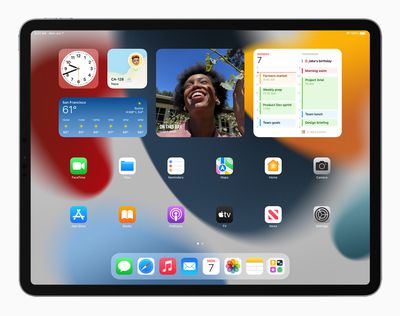
Widgets
Like iOS 14, iPadOS 15 lets users place widgets anywhere on their Home Screen pages and among their apps.
Widgets are also getting a new larger format on iPad that make better use of the larger screens available, which should make showcasing media more enjoyable. There are also new iPad widgets for Find My, Contacts, Game Center, Mail, and the App Store.
App Library
App Library, which also debuted in iOS 14, is now coming to iPad, allowing users to organize their apps into categories like Productivity, Games, and Recently Added. The App Library is built right into the Dock, so users can always get to it with a touch. App Library also lets users hide and reorder their Home screen pages.
Multitasking
iPadOS 15 also brings multitasking improvements with a new multitasking menu that allows users to switch between full screen, Split View, and Slide Over.
In Split View, for example, it's possible to swipe down to replace an app with a new one for either side of the screen, while the same thing works for apps with multiple windows.
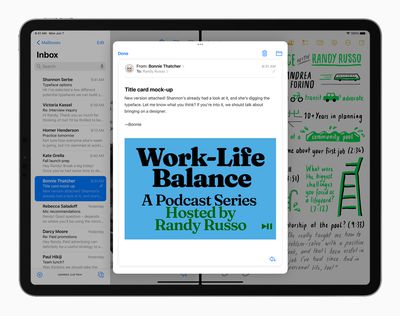
Meanwhile a new Shelf display gives you access to all open windows for any given app. For example, you can view multiple open Safari windows and even windows that are paired with other apps in Split View, for an at-a-glance overview.
Apple is also adding new key shortcuts for these new multitasking iPad functions. Users can quickly set up and switch between Split View and Slide Over with new shortcuts for multitasking right from the keyboard.
Notes
As for note-taking on iPad, the Notes app is finally getting tags support. Tags will make it easier to categorize notes and find them quickly with an all-new Tag Browser and tag-based Smart Folders.
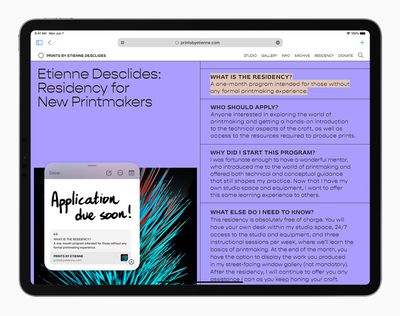
Users can also expect improvements in areas of collaboration and organization. With mentions, for example, you can tag people in shared notes and they'll receive a notification. You can add a tag anywhere in a note, and find it using the tag browser.
There's also a new Quick Notes feature whereby notes can be jotted down fast on iPad and Mac, and viewed and edited on iPhone. Whether browsing in Safari or finding a restaurant on Yelp, users can bring up Quick Note anywhere to jot down a thought and add links, providing an easy way to get back to exactly what they were looking at.
FaceTime
With iPadOS 15, users will be able to share experiences with SharePlay while connecting with friends on FaceTime, including listening to songs together with Apple Music, watching a TV show or movie in sync, or sharing their screen to view apps together.

Shared playback controls let will users play, pause, or jump ahead, and users can extend playback to Apple TV, and watch it on their TV while sharing the moment with friends and family connected over FaceTime. SharePlay will also let users share their screen.
Safari
Safari is gaining a new tab design that lets users see more of the page as they browse. The new tab bar takes on the color of the webpage and combines tabs, the toolbar, and the search field into a single, compact design.

Meanwhile, Tab Groups offer a new way to easily save and manage associated tabs. Tab Groups also sync across Mac and iPhone, allowing you to continue working on the same project on different devices, or easily share multiple tabs with friends and family. Safari on iPad also now supports web extensions, which will be available on the App Store.
Focus
With iPadOS 15, Apple is introducing a new Focus feature that aims to help reduce distractions and zone in on a single thing. Focus does this by filtering notifications based on what you're doing.
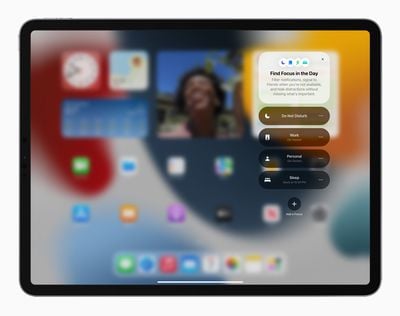
You can set your device to help you be in the moment by creating a custom Focus or selecting a suggested one based on the context, like during work hours or while you're winding down for bed. It's also possible to create Home Screen pages with apps and widgets that apply to moments of focus to only display relevant apps and reduce temptation.
Elsewhere, a new notification summary aims to offer an organized collection of notifications that can be delivered any time you choose, such as in the morning and evening, making it more convenient to catch up on the day's activity.
Live Text
A new Live Text feature can recognize text in a photo and let you do something with it. One example that Apple offers is a snapshot of a storefront revealing a phone number and the option to place a call. Live Text will also work with handwritten text, according to Apple. Meanwhile, with Visual Look Up, you can identify objects within a photo, such as a type of flower or dog breed.

Other Features
In addition, Spotlight is getting the ability to search the Photos app and web images, offering results for contacts with context like recent conversations, shared photos, and their location if shared through Find My.
iPadOS 15 will bring the Translate app to iPad for the first time. The Translate app detects when you're speaking and in what language, and will automatically translate it for you. Meanwhile, the systemwide translate function works anywhere, including with Live Text.
The Photos app is getting more advanced Memories, offering a new look, a more immersive and interactive interface, and integration with Apple Music, which uses on-device intelligence to personalize song suggestions bring memories to life.
iPadOS 15 will also support Universal Control, which allows you to work with a single mouse and keyboard to move between iPad and Mac for a seamless experience, with no setup required.
Elsewhere, Swift Playgrounds is gaining the ability to build apps on iPad, with improved code completion, new libraries, guides, and even the ability to submit your app straight to the App Store.
The developer preview of iPadOS 15 is available to Apple Developer Program members starting today, and a public beta will be available to iPadOS users next month.