In iOS 15, Safari has been completely redesigned with easier-to-reach controls in mind. Foremost is a new, compact tab bar that floats at the bottom of the screen when you're not inputting a URL address. Safari on iOS has also inherited the Start Page from macOS Big Sur, and you can now create tab groups to allow you to easily access them across devices. Let's take a closer look at how it all fits together.

The Start Page
First seen in macOS Big Sur, Safari's redesigned Start Page is where your Bookmarks, Favorites, Frequently Visited sites, Siri Suggestions, iCloud Tabs, Reading List, and Privacy Report all live.
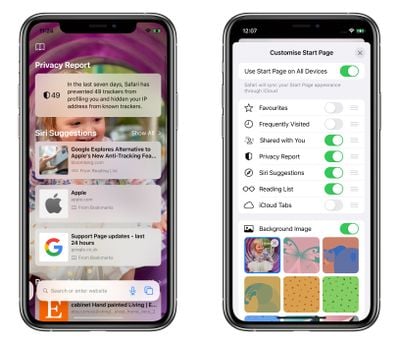
Like macOS, you can customize which of these items appear on your Start Page via the Edit button at the bottom, and you can also add a custom wallpaper of your own or use an existing alternative background. In addition, you have the option of syncing your Start Page in iCloud so that it's mirrored across all your devices.
Tab Bar Functions
At the bottom of the Start Page is the new tab bar. Apple has consolidated several controls into the new floating bar, which spends most of its time at the bottom of the UI while you're browsing.

Tapping the Tab Bar URL makes it fly up to the top of the screen, where you can search or enter a website address. As soon as you hit Enter, the page loads and the Tab Bar flies back down to the bottom of the screen so as not to impede your view.
If you find the Tab Bar distracting you can swipe down on it to minimize it, but either way it automatically minimizes as you scroll down a page, and all you have to do to reveal it again is tap it again. (To refresh the current page, just pull down on it from the top.)
Neat: Safari in iOS 15 lets you switch between open tabs with a swipe gesture on the new tab bar. pic.twitter.com/FQzSlQ9uZT — Tim Hardwick (@waxeditorial) June 11, 2021
Swiping between open tabs is as simple as swiping across the Tab Bar. You can also tap the ends of the Tab Bars trailing off either side of the screen to switch to adjacent open tabs, but swiping will be easier for most users.
A long press on the Tab Bar brings up a menu offering options including Copy, Paste and Search, Add to Reading List, Add Bookmark, Add Bookmarks for X Tabs, Share, and Move to Tab Group. (See below for more on Tab Groups.)
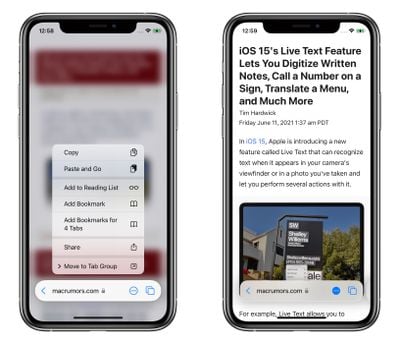
Tapping on the ellipsis (three dots) icon in the Tab Bar brings up the usual Actions menu with sharing options, but you can also long press the ellipsis icon to switch into Reader View for the current page. Tapping the rightmost icon – or swiping up on the Tab Bar – takes you into the Tabs Switcher, where are there also some surprises.
Tab Switcher and Tab Groups
In iOS 15, gone is the familiar stacked card-style view of multiple open tabs. Instead, tabs are arranged as thumbnail previews in a vertically scrolling grid, while the Tab Bar functions in the Tabs Switcher view are transformed to help you organize your tabs more efficiently. A long press on the center of it brings up a menu of Tab Group options.
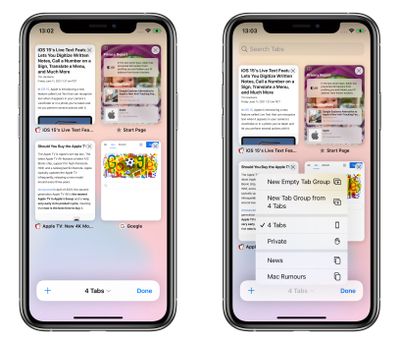
As well as an option to open a Private Browsing tab, you can create a New Empty Tab Group, or create a new tap group containing the currently open tabs. If you've already created at least one Tab Group and named it, then you'll also see it listed in this menu and you can tap to switch between it and any grouped or ungrouped tabs. (If there are open tabs that don't belong to any group, they'll just be listed as X number of Tabs.)
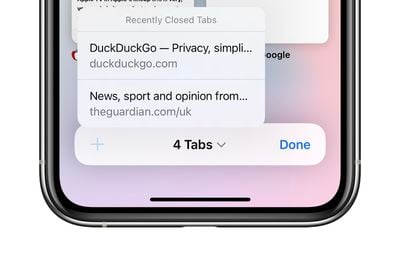
As you'd expect, the plus (+) icon in the Tab Switcher Bar opens a new tab, but if you long press on it you'll also see a list of recently closed tabs.
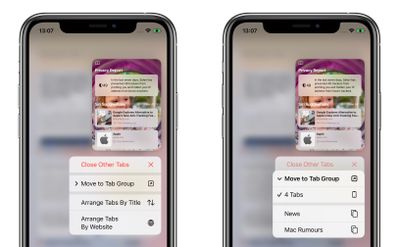
Elsewhere, you can long press any open tab displayed in the Tab Switcher to access options like Close Other Tabs, move the selected tab to a Tab Group (tapping this opens a submenu of Tab Groups), Arrange Tabs By Title, and Arrange Tabs By Website.
Overall, Safari in iOS 15 feels very different indeed, and may not chime with user's expectations. While there's more screen space dedicated to the browsing experience itself, the interface changes are drastic, although now that the iPhone also supports extensions for the first time, there's plenty of scope for additional customization.
Note that iOS 15 is still in early beta, and the public beta is still a month away, so the usual caveat applies in that any of these functions could change before Apple releases its new operating system in the fall.