OneDrive for Web Gains Image Editing Tools, Coming to iOS App Soon
OneDrive users can now edit pictures after they've uploaded them to the cloud storage service, thanks to the addition of basic photo editing features announced this week by Microsoft.
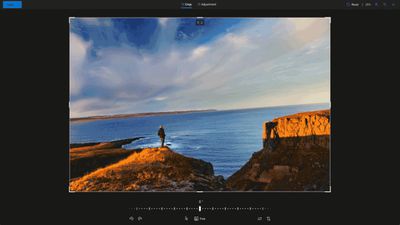
Similar to tools found in Google Photos, the new features include standard cropping options with built-in presets for images to be used on social media, as well as flip and 90-degree and incremental rotate options for uploaded pictures.
There are some useful new light and color adjustments, too. Users can adjust brightness, exposure, contrast, highlights, shadows, and color saturation, with a before/after comparison option to check your edits.
When you make edits to photos on OneDrive, you'll get the option to save the changes as a new image or overwrite the original image. And if you accidentally overwrite your original, you can use version history to recover it. Photo editing in OneDrive is currently limited to JPEG and PNG formats.
The new image editing features are now rolling out to OneDrive for Web and OneDrive for Android, with Microsoft bringing them to OneDrive for iOS later this year.
Popular Stories
Microsoft today announced launch timing and pricing for the Surface Laptop Ultra that it unveiled earlier this year.
The 15-inch Surface Laptop Ultra is priced starting at $2,599, undercutting Apple's $2,999 16-inch MacBook Pro, and it targets the same creator and developer market. Microsoft says it is built for "demanding creative, software development, AI, engineering, and 3D workloads."
...
Microsoft is set to drop OneDrive support for iOS 18 and iPadOS 18, which will remove the cloud storage app's compatibility with several older iPhones and one iPad model.
The loss of support for iOS 18 will impact the iPhone XR, iPhone XS, and iPhone XS Max, because these devices can't be updated to iOS 26. Likewise, the seventh-generation iPad will be left behind when Microsoft raises the...
With just three days to go until the iPhone Duo is released, Apple is getting ready for the launch. Behind the scenes, the App Store now has screenshots of Apple's built-in apps running on the Duo. We've seen some apps in marketing materials, but images of the ones we haven't seen give us an idea of what it will be like using the iPhone Duo day to day.
Many apps are shown in landscape...




























![Apple Pulls Keynote, Pages and Numbers From App Store [Update: Back]](https://images.macrumors.com/t/Okb7kitB_gNr6qe5Pex9nQIysD8=/112x112/article-new/2026/01/Apple-Creator-Studio-iWork-suite.jpg)





















