
Ulysses Gains Enhanced Blog Publishing and Session History Features

Popular writing app Ulysses today reached version 23, and this update improves its blog publishing features as well as the way session histories and writing goals are calculated.
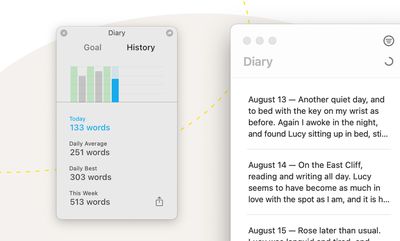
Writing Session History ulysses
For a while now, Ulysses has offered a writing goal feature to help writers foster a writing habit. The goal feature allows them to set a daily target – 500 words, say – and monitor their progress towards achieving it. Version 23 revamps the way the associated session history feature calculates those goals.

"Our original approach had a couple of design flaws," says lead developer Götz Fabian. "We must take numerous outlying factors into account, for example, when users sync through iCloud or collect material, which should not count toward their writing target. That's why a profound rewrite became necessary."

As well as providing a focused writing environment, Ulysses offers ways to publish texts from within the app to various blogging platforms. Version 23 refines the feature by indicating uploaded posts with a paper plane icon, making them easier to spot in the editor, while a text's publishing status now appears in the dashboard sidebar.

Users now also have the option to update previously published Ghost posts from within Ulysses. Up until now, updating was only available for WordPress, but the developers plan to add it for Micro.blog in the coming months.
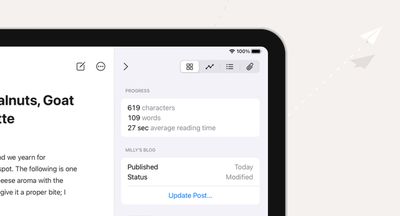
Publishing Status ulysses
Ulysses can be downloaded for free on the App Store, with version 23 rolling out to existing users today. After a 14-day trial period, a subscription is required to unlock the app on all devices. A monthly subscription costs $5.99, while a yearly subscription is $49.99.

Students can use Ulysses at a discounted price of $11.99 per six months. The discount is granted from within the app. Ulysses is also included in Setapp, the subscription-based service for Mac applications created by MacPaw.


Tag: Ulysses

Popular Stories

Apple Logo Zoomed

Tim Cook Teases Plans for Apple's Upcoming 50th Anniversary

Thursday February 5, 2026 12:54 pm PST by
Apple turns 50 this year, and its CEO Tim Cook has promised to celebrate the milestone. The big day falls on April 1, 2026. "I've been unusually reflective lately about Apple because we have been working on what do we do to mark this moment," Cook told employees today, according to Bloomberg's Mark Gurman. "When you really stop and pause and think about the last 50 years, it makes your heart ...
wwdc sans text feature

Apple Rumored to Announce New Product on February 19

Thursday February 5, 2026 12:22 pm PST by
Apple plans to announce the iPhone 17e on Thursday, February 19, according to Macwelt, the German equivalent of Macworld. The report, citing industry sources, is available in English on Macworld. Apple announced the iPhone 16e on Wednesday, February 19 last year, so the iPhone 17e would be unveiled exactly one year later if this rumor is accurate. It is quite uncommon for Apple to unveil...
Finder Siri Feature

Why Apple's iOS 26.4 Siri Upgrade Will Be Bigger Than Originally Promised

Friday February 6, 2026 3:06 pm PST by
In the iOS 26.4 update that's coming this spring, Apple will introduce a new version of Siri that's going to overhaul how we interact with the personal assistant and what it's able to do. The iOS 26.4 version of Siri won't work like ChatGPT or Claude, but it will rely on large language models (LLMs) and has been updated from the ground up. Upgraded Architecture The next-generation...
iOS 26

iOS 26.3 and iOS 26.4 Will Add These New Features to Your iPhone

Tuesday February 3, 2026 7:47 am PST by
While the iOS 26.3 Release Candidate is now available ahead of a public release, the first iOS 26.4 beta is likely still at least a week away. Following beta testing, iOS 26.4 will likely be released to the general public in March or April. Below, we have recapped known or rumored iOS 26.3 and iOS 26.4 features so far. iOS 26.3 iPhone to Android Transfer Tool iOS 26.3 makes it easier...
iphone 17 pro dark blue 1

iPhone 18 Pro Max Rumored to Deliver Next-Level Battery Life

Friday February 6, 2026 5:14 am PST by
The iPhone 18 Pro Max will feature a bigger battery for continued best-in-class battery life, according to a known Weibo leaker. Citing supply chain information, the Weibo user known as "Digital Chat Station" said that the iPhone 18 Pro Max will have a battery capacity of 5,100 to 5,200 mAh. Combined with the efficiency improvements of the A20 Pro chip, made with TSMC's 2nm process, the...

Top Rated Comments

Mockletoy Avatar
59 months ago

Ulysses is really good. Was a top choice at one time, alongside Scrivener about a decade ago.

But Obsidian ('https://obsidian.md/') can do more than either Ulysses or Scrivener, and it is free for private use.

It also has fully featured apps for iOS, macOS, Windows and Android, which neither Ulysses nor Scrivener offer.

Why would anyone use Ulysses or Scrivener when there are much better, much more powerful apps out there these days?
I prefer to write in Ulysses, which is sleek and beautiful and thoughtfully designed, but I only use it for small/quick projects and only then because I get it free in Setapp. I try it every now and then for the bigger stuff, but for wrangling a large project nothing compares to Scrivener. And when you're done it can output the final product in a mind-boggling array of formats at the click of a button. It's kinda clunky and persnickety and has about a million options I don't even use, but with a little patience you can make it do just about anything you can imagine. Also, Scrivener's licensing is about as friendly as it gets. You buy a single license for your platform of choice and you use it on as many devices of that type as you own for as long as you want. When the next major version comes out you get a discount if you upgrade, or you keep using the version you bought and never pay them anything else ever again. That includes syncing, for which Obsidian charges a monthly fee.

The one area where Ulysses truly shines in comparison to Scrivener is syncing. Ulysses sync has been pretty much bulletproof and almost freakishly instantaneous, while Scrivener's sync requires a bit of care and feeding if you don't want to have a bad time. And its project package format is wildly (seriously, don't do it or you're gonna have a bad time) incompatible with iCloud Drive, OneDrive, Google Drive, Box, etc. It only works with Dropbox, and even then it needs a fair amount of hand holding if you're moving between devices. Still, once you get the knack of it, it's not a bad experience, it just feels a bit dated.

As for Obsidian being able to do "more" than Scrivener, that's a bit disingenuous, don't you think? Much of what Scrivener can do is niche, but if your workflow happens to fall within that niche there's really nothing else quite like it. I wouldn't even consider Obsidian (or Ulysses) a competitor to Scrivener, let alone an alternative. It's like saying a motorcycle is the superior alternative to a pickup truck. Well, sure, if you just need to get across town I suppose it is. But if you need to haul a sofa? Not so much. I could make the same argument about TextEdit and Notepad or even nano/pico as replacements for Scrivener and Ulysses, depending on what you're writing.

It seems quite strange to me to push a personal wiki / notes application as a replacement for a professional grade and highly specialized manuscript production package like Scrivener. Go take a look at Scrivener's project compilation function. They could probably spin "Compile..." off into a separate program and make a bunch of money on that alone. Check out all the ways you can tag scenes to keep track of their individual revision status. The way you can seamlessly add notes to any document that are visible in the main window at all times (if you want them to be). The way you can add a synopsis to each scene and then view those synopses on a virtual cork board that allows you to do drag and drop reordering. The way Scrivener can highlight parts of speech ("Linguistic Focus"). The way I can split the editor and work on two scenes at once side by side, or use a second document as a reference while I work. The list goes on and on.

Let me know when Obsidian can do all that. Until then the suggestion that Obsidian can do "more" than Scrivener is patently absurd. And, no, I have no vested interest in Scrivener or the company that makes it, but I do use it every day of my professional life. I'd be happy to switch away to something better and more capable, but someone's going to have to release it first.
Score: 7 Votes (Like | Disagree)
Aggedor Avatar
59 months ago
I'm a professional novelist (as in, that's my day job), and while I have tried Ulysses, iA Writer, and various others, I can never understand why on earth anyone would try and write prose in a markup editor. Just the paragraph breaks alone were enough for me to give up and go back to Scrivener for first drafts.

Yes, Ulysses and iA Writer look amazing (which is important for me when it comes to drafting, I need a clean, focussed workspace), but... raw markup? Yeeeesh. And a subscription! Why? At least Scrivener is a one-off purchase.

I'm actually trying to draft my current book in Pages, after another writer friend swore by it. It certainly has the nicest font rendering of any Mac app.
Score: 4 Votes (Like | Disagree)
Substance90 Avatar
59 months ago
Still subscription based? Still a "thx but no thx" from me.
Score: 3 Votes (Like | Disagree)
Mockletoy Avatar
59 months ago

I don’t use Ulysses because of any “distraction free“ feature. Like you said, that’s available on pretty much any app if you use it right. Are use it because it’s very good at sync and organizing and search.
I don’t get all the hype around “distraction free” editors. When I’m in the zone my desk could be on fire and I wouldn’t notice, so I don’t think a couple of toolbar buttons are going to destroy my ability to work.

I haven’t tried Ulysses for a highly structured project in a year or so. Last time I tried it I found the organizational abilities too simplistic. It felt like everything was too flat. Just a long list of files. I couldn’t “feel” the structure, if that makes sense. It felt like a table with a bunch of crap thrown onto its surface rather than a filing cabinet with everything slotted into its proper place.

In Scrivener I enjoy the clearly delineated structure. It’s the old fashioned file/folder metaphor, but it works.

Plus, Ulysses put me off by lumping everything I’ve ever written in one shared workspace. So maybe I do need a bit of a distraction free environment in that sense because when I’m working on a project I want a dedicated workspace for it. That’s just the way my mind works.

Anyway, maybe Ulysses has changed for the better. I should check it out again.
Score: 2 Votes (Like | Disagree)
Traverse Avatar
59 months ago
I know that the subscription structure was controversial, but I’ve used Ulysses multiple times a week for years now.

The Shortcuts integration, clean U.I., and flexible smart collections make it my go-app application for writing. I’m happy to support an app I use so much.
Score: 1 Votes (Like | Disagree)
Scott Robinson Avatar
59 months ago

Ulysses is really good. Was a top choice at one time, alongside Scrivener about a decade ago.

But Obsidian ('https://obsidian.md/') can do more than either Ulysses or Scrivener, and it is free for private use.

It also has fully featured apps for iOS, macOS, Windows and Android, which neither Ulysses nor Scrivener offer.

Why would anyone use Ulysses or Scrivener when there are much better, much more powerful apps out there these days?
I tried obsidian thinking their nodes based relationship viewer would blow my mind but it was only based on user added hyperlinking rather than any IA based cleverness. For me it’s USP had no use (for me). Why do user use Ulysses when obsidian exist? Because other than both using markdown they are totally different tool for completely different cases.
Score: 1 Votes (Like | Disagree)















