Apple Says Fix Planned for 'You Do Not Have Permission to Open the Application' Error When Using a Scanner on Mac [Updated]
Update 23/9: Apple has updated its support document indicating that this issue can be resolved by installing the latest macOS Big Sur 11.6 update.
In a newly published support document on its website, Apple has acknowledged an error that some users may receive when they try to use a scanner with a Mac in the Image Capture app, Preview app, or the Printers & Scanners section of System Preferences.
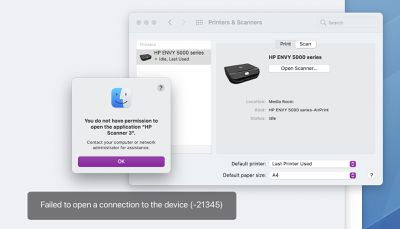
When attempting to use a scanner with a Mac, Apple said users might get an error message indicating they do not have permission to open the application, followed by the name of the scanner driver. The message says to contact a computer or network administrator for assistance, or indicates that the Mac failed to open a connection to the device.
The error message starts with: "You do not have permission to open the application."
Affected users have shared complaints about this issue across the Apple Support Communities, Reddit, HP Support Community, and elsewhere. The error message appears to be affecting users on multiple versions of macOS Big Sur.
Apple said this issue is expected to be resolved in a future software update, but no timeframe was given. In the meantime, the support document provides step-by-step instructions on how to temporarily resolve the issue:
- Quit any apps that are open.
- From the menu bar in the Finder, choose Go > Go to Folder.
- Type /Library/Image Capture/Devices, then press Return.
- In the window that opens, double-click the app named in the error message. It's the name of your scanner driver. Nothing should happen when you open it.
- Close the window and open the app you were using to scan. A new scan should proceed normally. If you later choose to scan from a different app and get the same error, repeat these steps.
This article will be updated when Apple releases a macOS update with a permanent fix.
Popular Stories
Apple turns 50 this year, and its CEO Tim Cook has promised to celebrate the milestone. The big day falls on April 1, 2026.
"I've been unusually reflective lately about Apple because we have been working on what do we do to mark this moment," Cook told employees today, according to Bloomberg's Mark Gurman. "When you really stop and pause and think about the last 50 years, it makes your heart ...
In the iOS 26.4 update that's coming this spring, Apple will introduce a new version of Siri that's going to overhaul how we interact with the personal assistant and what it's able to do.
The iOS 26.4 version of Siri won't work like ChatGPT or Claude, but it will rely on large language models (LLMs) and has been updated from the ground up.
Upgraded Architecture
The next-generation...
Apple plans to announce the iPhone 17e on Thursday, February 19, according to Macwelt, the German equivalent of Macworld.
The report, citing industry sources, is available in English on Macworld.
Apple announced the iPhone 16e on Wednesday, February 19 last year, so the iPhone 17e would be unveiled exactly one year later if this rumor is accurate. It is quite uncommon for Apple to unveil...
While the iOS 26.3 Release Candidate is now available ahead of a public release, the first iOS 26.4 beta is likely still at least a week away. Following beta testing, iOS 26.4 will likely be released to the general public in March or April.
Below, we have recapped known or rumored iOS 26.3 and iOS 26.4 features so far.
iOS 26.3
iPhone to Android Transfer Tool
iOS 26.3 makes it easier...
The iPhone 18 Pro Max will feature a bigger battery for continued best-in-class battery life, according to a known Weibo leaker.
Citing supply chain information, the Weibo user known as "Digital Chat Station" said that the iPhone 18 Pro Max will have a battery capacity of 5,100 to 5,200 mAh. Combined with the efficiency improvements of the A20 Pro chip, made with TSMC's 2nm process, the...





















