Apple Store App for iOS Adds Saved Item Lists for Easy Sharing With Product Specialists
The Apple Store app for iOS was updated today with a new feature that lets you easily save items to lists, share them with a specialist online or during a store visit, and then get a recap of your visit to help you later purchase your items.
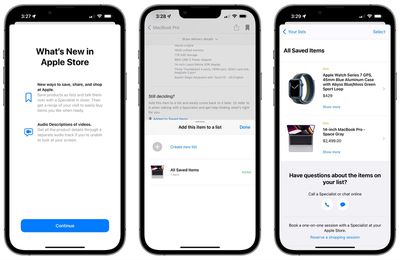
After you've saved items to a list, they can be found in a new Saved Items section on your account page accessible via your profile picture at the top right of the app interface, and once you've met with a specialist about a list, you'll be able to see notes and suggestions on it in a new Session Recaps section.
Today's update also brings Audio Descriptions to product videos to let you hear details about the products if you are unable to watch the videos on your screen.
The Apple Store app is a free download from the App Store.
Popular Stories
With just three days to go until the iPhone Duo is released, Apple is getting ready for the launch. Behind the scenes, the App Store now has screenshots of Apple's built-in apps running on the Duo. We've seen some apps in marketing materials, but images of the ones we haven't seen give us an idea of what it will be like using the iPhone Duo day to day.
Many apps are shown in landscape...
Apple has temporarily removed Keynote, Pages, and Numbers from the App Store, just after releasing an update that added iPhone Duo support and a new Intelligent Assistant.
It is not clear if the apps were removed intentionally, or if it is a bug. Apple has not said when the apps will be reinstated, but if it was in error, they should return soon.
Update: The Mac versions are back without...
Apple today sent out invites for an experience in Los Angeles on Wednesday, October 28, and the "Pro and tell" tagline on the invitation likely means that the rumored MacBook models with touch-enabled OLED displays will stick with MacBook Pro branding instead of the once-rumored "MacBook Ultra" name.
The long-rumored "iPhone Ultra" ended up being named iPhone Duo, so speculation that Apple...




























![Apple Pulls Keynote, Pages and Numbers From App Store [Update: Back]](https://images.macrumors.com/t/Okb7kitB_gNr6qe5Pex9nQIysD8=/112x112/article-new/2026/01/Apple-Creator-Studio-iWork-suite.jpg)





















