
OneDrive Mac Users Unhappy With Buggy Update That Removes Ability to Keep Local Copies of Synced Files - MacRumors
Skip to Content

OneDrive Mac Users Unhappy With Buggy Update That Removes Ability to Keep Local Copies of Synced Files

Changes to the way OneDrive syncs files and folders on Mac has caused upset among users of the cloud storage service, following Microsoft's rollout last month of a new "Files On-Demand Experience" for Macs running macOS 12.1 and later.

OneDrive
In a change coming with macOS 12.3, currently still in beta, Apple is deprecating the kernel extensions originally used by OneDrive's syncing features, so the Mac client is now using Apple's File Provider extensions instead. Microsoft says this new technology stack should make the feature "much better integrated with the operating system compared to the first version." Judging by feedback though, that has not been the experience of many users, with slowdowns and bugs variously reported.

Worsening matters, in tandem with the new macOS extensions integration, Microsoft has also made Files On-Demand the default behavior of its OneDrive client. The Files On-Demand feature is designed to allow users to access files in the cloud without having to download them and use storage space on their Mac. Previously, it was an optional feature and users could disable it. However, the latest update has controversially removed the original user setting to disable it, further angering customers who now have no way of keeping local copies of their synced files.

What this has meant in practice for many users is that any local copies of files synced to OneDrive have been summarily wiped from their Mac since the update was rolled out. Responding to the change on Microsoft's community answers forum, one customer complained:

What is going on? Why would you enforce Files On-Demand on your customers, isn't it enough to enable it by default? My 70GB of cloud data is not local anymore, sometimes I have no internet, you are locking me away from my files. Also making it impossible for me to do full text searches. Files On-Demand is also too slow, waiting a second to display folder contents is too much when you organize things in deep folder structures.

How I can disable Files On-Demand? Will you please stop knowing the best for your customers? We aren't toddlers. Thanks!

If Files On-Demand is enforced by policy, I will leave your cloud service once and for all.

Responding to the question, another user wrote:

You could have asked instead of just deleting everything so I have to download all of my files again. So angry at Microsoft over this. Returning my files to local has been a gigantic pain in the rear end. I have far better things to do than to painstakingly select each folder and choose "always keep on this device".
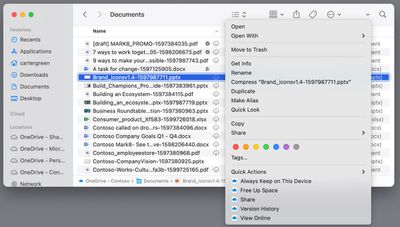
onedrive always keep on device

Microsoft includes an ability in OneDrive's Finder integration to mark synced files as "Always Keep on This Device" (internally referred to as "pinning"), and some users have resorted to exhaustively re-downloading all their files and folders using this option, but not without a high degree of syncing fails. Another user writes:

The proposed solution of doing this on the root doesn't work. If I select this option for more than a couple of folders, I am greeted with a Finder error citing "cannot communicate with the helper." I've been working on this for hours and it appears I have several hours to go. Already provided feedback via the option on OneDrive. Bad form, Microsoft.

On top of these errors, some users are also experiencing problems with files refusing to download or open correctly in their default application. One Redditor posts:

Prior to today, when I double clicked a Word document, PPT, etc. in the Finder that resided in my OneDrive folder, the Office app would open the OneDrive version and autosave my changes. Today, when I do that, it just treats it as a local file and won't sync it with OneDrive. I still have the setting "Use Office applications to sync Office files that I open" enabled, but the new version seems to have broken that.

Hundreds of similar complaints about the enforced changes and associated bugs can be found on Microsoft's OneDrive blog, the MacRumors Forums, and scattered over Reddit, with many users saying they will move to a rival cloud storage syncing solution unless the ability to store synced files locally is brought back and the syncing bugs are fixed. We've reached out to Microsoft to provide more clarity on the situation and will update this article if we hear back.


Popular Stories

surface laptop ultra

Microsoft Launches $2,599 Surface Laptop Ultra to Take on MacBook Pro

Wednesday October 7, 2026 5:45 pm PDT by
Microsoft today announced launch timing and pricing for the Surface Laptop Ultra that it unveiled earlier this year. The 15-inch Surface Laptop Ultra is priced starting at $2,599, undercutting Apple's $2,999 16-inch MacBook Pro, and it targets the same creator and developer market. Microsoft says it is built for "demanding creative, software development, AI, engineering, and 3D workloads." ...
microsoft onedrive logo%402x

Microsoft OneDrive to Drop Support for These iPhone Models

Tuesday October 6, 2026 4:53 am PDT by
Microsoft is set to drop OneDrive support for iOS 18 and iPadOS 18, which will remove the cloud storage app's compatibility with several older iPhones and one iPad model. The loss of support for iOS 18 will impact the iPhone XR, iPhone XS, and iPhone XS Max, because these devices can't be updated to iOS 26. Likewise, the seventh-generation iPad will be left behind when Microsoft raises the...
iPhone Duo Trio

Here's What Apple's Apps Look Like on the iPhone Duo

Tuesday October 20, 2026 11:12 am PDT by
With just three days to go until the iPhone Duo is released, Apple is getting ready for the launch. Behind the scenes, the App Store now has screenshots of Apple's built-in apps running on the Duo. We've seen some apps in marketing materials, but images of the ones we haven't seen give us an idea of what it will be like using the iPhone Duo day to day. Many apps are shown in landscape...

Top Rated Comments

62 months ago
I'm guessing the complainers haven't been reading the news as of late.
https://www.geekwebguides.com/2022/01/27/macos-12-3-deprecates-dropbox-onedrive-kexts/
https://techcommunity.microsoft.com/t5/microsoft-onedrive-blog/inside-the-new-files-on-demand-experience-on-macos/ba-p/3058922

Don't blame the vendor, when Apple is implementing the restrictions the vendor has to live with.
Score: 24 Votes (Like | Disagree)
62 months ago

This is honestly why I stick to Dropbox for high priority needs, even if I only have 20 GB of space. Dropbox just works, and it has always just worked. I also have "unlimited" Google Drive but I don't have any local syncing because it's low priority files.
These same changes are coming to DropBox too
Score: 21 Votes (Like | Disagree)
b4rtw Avatar
62 months ago
Apple: We're changing stuff.
Microsoft: Ok, we will adjust our app to your new API's
Users: Microsoft, WTF!?!

Typical.
Score: 16 Votes (Like | Disagree)
62 months ago
The way the changes in macOS are described by MacRumors and generally interpreted is wrong. I have little experience with Dropbox but OneDrive does not nor has it ever used kernel extensions. It is available from the Mac App Store, and that precludes the inclusion of any kernel extensions (yes, there is also a direct download version, but AFAIK it works essentially the same).

The changes in 12.3 force the cloud providers to change the way Files on Demand work, yes. But nobody forced Microsoft to make Files on Demand mandatory, they could have made sure to keep the “all files are local” mode available – but they did not.

Even the oft-maligned iCloud Drive lets you keep all files locally (by switching off Optimize Mac Storage).
Score: 9 Votes (Like | Disagree)
62 months ago
OneDrive for Windows:


OneDrive for Mac, before update:


OneDrive for Mac, after update:


Attachment Image

Attachment Image

Attachment Image

Attachment Image
Score: 9 Votes (Like | Disagree)
Wildkraut Avatar
62 months ago
Sounds like they are laying out the way to gatekeep macOS.
Score: 9 Votes (Like | Disagree)
Latest Stories
iPhone Duo Launch Begins as First Orders Reach Customers
5 hours ago
1Password for Agents Keeps Your Passwords Hidden From AI
6 hours ago
iPhone Duo 24 Hours Later: Your Questions Answered
7 hours ago
Apple's iWork Apps Get 'Intelligent Assistant' and iPhone Duo Support
7 hours ago
Apple is Apparently Considering a Slightly Larger iPhone Duo
7 hours ago
Giant iPhone Duo Displays Coming to Four Apple Stores
9 hours ago
Apple Pulls Keynote, Pages and Numbers From App Store [Update: Back]
9 hours ago
Apple Updates More Apps With iPhone Duo Support
10 hours ago
Apple Will Label Apps 'Made for iPhone Duo' in App Store
13 hours ago
Amazon Takes $49 Off iPad With Prices Starting at $399.99
13 hours ago
F1 on Apple TV Now Available in Dolby Atmos
14 hours ago
Apple Reveals More Than 50 Apps That Will Be Updated for iPhone Duo
14 hours ago
Apple Blocks Certificates That Could Help Attackers Fake Websites
16 hours ago
Giant iPhone Duo Installations Spotted at Apple Fifth Avenue
16 hours ago
iPhone Duo 2 Prototypes Include Under-Display Face ID
17 hours ago
Tesla App Gains iPad and iPhone Duo Support
21 hours ago
Apple Reportedly Boosts iPhone Duo Orders by 44%
21 hours ago
Fortnite Returning to Australian App Store After Court Ruling
22 hours ago
Apple Ordered to Open iPhone to Rival App Stores in Australia
22 hours ago
Apple Suppliers Face Hurdles Cutting Circuit Board Emissions
22 hours ago
Things Updated for iPhone Duo With Adaptive Layout
23 hours ago
Simplicity and Siri AI Are HomeView's Killer Features, Apple Says
23 hours ago
iPhone Duo Reviewers Really Miss Face ID
1 day ago
Does the iPhone Duo Run Hot? Here's What Reviews Found
1 day ago
Apple Music's New Look is Now Live on Apple's Website
1 day ago
Anthropic Launches Claude Duet, a Proactive AI Agent
1 day ago
What 32,000 Folds Did to the iPhone Duo's Hinge
1 day ago
iPhone Duo's Hidden FaceTime Camera Takes 'Trash' Photos
1 day ago
iPhone Duo Has 'Edge Light' Feature That Debuted on Macs Last Year
1 day ago
Apple Support App Updated for iPhone Duo's Larger Display
1 day ago









































