
Popular Drag-and-Drop Mac App 'Yoink' Gains Configurable Clipboard History Widget and Browser - GeekWebGuides
Skip to Content

Popular Drag-and-Drop Mac App 'Yoink' Gains Configurable Clipboard History Widget and Browser

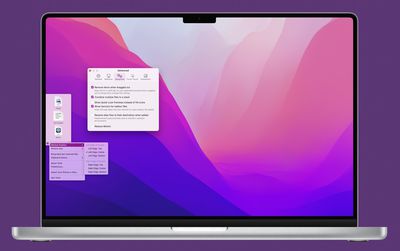
Popular Mac drag-and-drop app Yoink received a substantial update on Monday that brings back a much-improved Yoink clipboard history widget with several highly configurable features.
yoink mac
For those unfamiliar with the app, Yoink aims to simplify the action of dragging and dropping files and app-content on the macOS desktop by providing a temporary place for files to be dragged to. Yoink's shelf fades in when you start a drag - either with files from Finder or app-content, like an image from a website - offering you a temporary place for your dragged files.

With files temporarily docked in the Yoink shelf and the cursor free, users can more easily navigate to the intended destination of files, which is handy when moving and copying files between different windows, Spaces, fullscreen apps, or devices via Handoff.

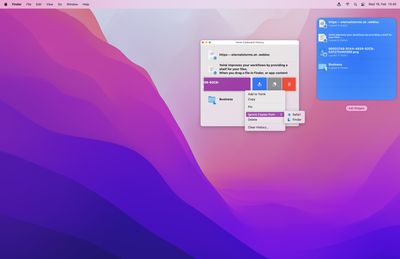
Today's v3.6.5 update brings back the defunct Objective-C based Yoink widget, only now written in Swift, offering previously unavailable functions. The widget comes in medium and large sizes, and provides quick access to Yoink's clipboard history, allowing users to select up to six previous copies of items in the medium widget and up to 12 in the larger one. Clicking an item in the widget copies it to the clipboard, ready for pasting elsewhere.

Yoink supports the use of up to three widgets simultaneously that can be configured to show the most recent copies, older copies, and oldest copies. So for example it's possible to have one large and one medium widget to show the last 18 copied items, or three large widgets to show the last 36 copied items.
2 Clipboard History
Individual widgets can also be configured to show specific data types (images, text, links, or files), and each widget has a Pin feature that allows items to be pinned to the top so that it doesn't go away when other items populate the clipboard.

In addition, Yoink v3.6.5 comes with a clipboard history browser, where users can organize copied items with actions like pin, unpin, delete, send to Yoink, copy, and clear history.

In other changes, rather than a TIFF file, a PNG file is now created when pasting image data into Yoink. Yoink also transparently provides PNG and JPEG data when dragging out images of the types HEIC, HEIF or TIFF to broaden compatibility with other apps.

Yoink runs natively on Apple Silicon and Intel Macs, although note that this version of Yoink increases the minimum system requirements from macOS 10.10 Yosemite to macOS 10.12 Sierra. Yoink v3.6.5 is available on the Mac App Store as a $8.99 one-time purchase and updates are free to existing customers. Yoink is also available for iPad and iPhone.


Tag: Yoink

Popular Stories

iPhone Duo Trio

Here's What Apple's Apps Look Like on the iPhone Duo

Tuesday October 20, 2026 11:12 am PDT by
With just three days to go until the iPhone Duo is released, Apple is getting ready for the launch. Behind the scenes, the App Store now has screenshots of Apple's built-in apps running on the Duo. We've seen some apps in marketing materials, but images of the ones we haven't seen give us an idea of what it will be like using the iPhone Duo day to day. Many apps are shown in landscape...
Apple Creator Studio iWork suite

Apple Pulls Keynote, Pages and Numbers From App Store [Update: Back]

Thursday October 22, 2026 11:01 am PDT by
Apple has temporarily removed Keynote, Pages, and Numbers from the App Store, just after releasing an update that added iPhone Duo support and a new Intelligent Assistant. It is not clear if the apps were removed intentionally, or if it is a bug. Apple has not said when the apps will be reinstated, but if it was in error, they should return soon. Update: The Mac versions are back without...
M5 MacBook Pro

RIP, MacBook Ultra

Monday October 19, 2026 9:37 am PDT by
Apple today sent out invites for an experience in Los Angeles on Wednesday, October 28, and the "Pro and tell" tagline on the invitation likely means that the rumored MacBook models with touch-enabled OLED displays will stick with MacBook Pro branding instead of the once-rumored "MacBook Ultra" name. The long-rumored "iPhone Ultra" ended up being named iPhone Duo, so speculation that Apple...

Top Rated Comments

m.gansrigler Avatar
61 months ago

Wow, sounds cool. It's what I really miss on Mac after migrating from windows (Win + V). Does this app impact performance\response time?
Hi, I'm the developer of Yoink.
I can safely say that it doesn't, it's very light-weight (and continuously improve upon it).
There's a free, 30-day demo at https://eternalstorms.at/yoink/mac if you'd like to try before you buy!
Score: 20 Votes (Like | Disagree)
wanha Avatar
61 months ago

This should really be built-in functionality. I really like the look of it, it's super slick, but will I need it enough to justify a £9 spend? At least it's not a monthly subscription!
It should only be a built-in functionality IF Apple is committed to maintaining and developing it.

Apple has chosen certain things it will build, maintain, and develop and has left the rest up to app developers like Yoink.

The moment Apple builds something into the OS, most independent competitors will be forced out of the market. And if Apple doesn't continue developing the app/functionality, then what?

The way it is seems more than ok to me.
Score: 5 Votes (Like | Disagree)
No5tromo Avatar
61 months ago
Magnet for windows management and Yoink for drag and drop, both paid apps, cause it's very hard to have essential desktop OS features built in like, I don't know, Windows maybe
Score: 5 Votes (Like | Disagree)
m.gansrigler Avatar
61 months ago

Anyone who's tried the update -- does the clipboard widget have the security function some clipboard apps have of allowing you to not index the clipboard copies from some apps (like a password app)?
(I'm the developer).

Users can make Yoink ignore specific apps completely, and Yoink itself tries not to store sensitive data. It does so by:
- Ignoring copies from any app that contains one of the following in its name:
Keychain, Enpass, 1Password, KeePass, LastPass, Password, Kaspersky, mSecure, AppLocker, Keeper Password, Passwort, oneSafe, Secrets, Strongbox, RememBear, Dashlane and Bitwarden.
- It also ignores copied content if one of the following data types is present in the current copy:
com.agilebits.onepassword, org.nspasteboard.TransientType, org.nspasteboard.ConcealedType, org.nspasteboard.AutoGeneratedType (as openly suggested by developers, for developers, on http://nspasteboard.org ('http://nspasteboard.org/'))

As for actively looking at copied content and trying to figure out if it's a password or somesuch, I don't do that, that's too creepy for my tastes.

Yoink's Clipboard History is off by default, and once activated can be deactivated anytime in its Preferences > Extension, and doesn't have to be used for the rest of the app to work, of course. Items in the history can be deleted in Yoink's History Browser.

I hope that clears things up. Also, please refer to my privacy policy (eternalstorms.at/privacy ('https://eternalstorms.at/privacy')) - I don't use any type of analytics or tracking in my apps and websites, and don't do any usage tracking in any of my apps or websites. If your internet connection is used in one of my apps, it's for a specific function of the app that's relevant to the user. In the case of Yoink, that's for optionally loading favicons for links dragged to it, for loading the Splash screen videos from my server, and for previewing URLs in Quick Look.

- Matthias
Score: 3 Votes (Like | Disagree)
61 months ago

I really like the look of it, it's super slick, but will I need it enough to justify a £9 spend?
wow a whole £9... how much was that phone you're holding in your hand? Developers need to eat too.
Score: 3 Votes (Like | Disagree)
star-affinity Avatar
61 months ago

Magnet for windows management and Yoink for drag and drop, both paid apps, cause it's very hard to have essential desktop OS features built in like, I don't know, Windows maybe
I think the majority of stuff is done better in macOS. But I do agree windows management is better in Windows by default.

Why does the apps of the window go into full screen in macOS when I hold down the mouse button on the green dot in the upper left corner of a window and choose ”Tile Window to Left of Screen”?

Fortunately there is the free and open source Rectangle: https://rectangleapp.com/
Score: 3 Votes (Like | Disagree)
Latest Stories
iPhone Duo Launch Begins as First Orders Reach Customers
5 hours ago
1Password for Agents Keeps Your Passwords Hidden From AI
6 hours ago
iPhone Duo 24 Hours Later: Your Questions Answered
6 hours ago
Apple's iWork Apps Get 'Intelligent Assistant' and iPhone Duo Support
7 hours ago
Apple is Apparently Considering a Slightly Larger iPhone Duo
7 hours ago
Giant iPhone Duo Displays Coming to Four Apple Stores
9 hours ago
Apple Pulls Keynote, Pages and Numbers From App Store [Update: Back]
9 hours ago
Apple Updates More Apps With iPhone Duo Support
10 hours ago
Apple Will Label Apps 'Made for iPhone Duo' in App Store
13 hours ago
Amazon Takes $49 Off iPad With Prices Starting at $399.99
13 hours ago
F1 on Apple TV Now Available in Dolby Atmos
14 hours ago
Apple Reveals More Than 50 Apps That Will Be Updated for iPhone Duo
14 hours ago
Apple Blocks Certificates That Could Help Attackers Fake Websites
16 hours ago
Giant iPhone Duo Installations Spotted at Apple Fifth Avenue
16 hours ago
iPhone Duo 2 Prototypes Include Under-Display Face ID
17 hours ago
Tesla App Gains iPad and iPhone Duo Support
21 hours ago
Apple Reportedly Boosts iPhone Duo Orders by 44%
21 hours ago
Fortnite Returning to Australian App Store After Court Ruling
21 hours ago
Apple Ordered to Open iPhone to Rival App Stores in Australia
22 hours ago
Apple Suppliers Face Hurdles Cutting Circuit Board Emissions
22 hours ago
Things Updated for iPhone Duo With Adaptive Layout
23 hours ago
Simplicity and Siri AI Are HomeView's Killer Features, Apple Says
23 hours ago
iPhone Duo Reviewers Really Miss Face ID
1 day ago
Does the iPhone Duo Run Hot? Here's What Reviews Found
1 day ago
Apple Music's New Look is Now Live on Apple's Website
1 day ago
Anthropic Launches Claude Duet, a Proactive AI Agent
1 day ago
What 32,000 Folds Did to the iPhone Duo's Hinge
1 day ago
iPhone Duo's Hidden FaceTime Camera Takes 'Trash' Photos
1 day ago
iPhone Duo Has 'Edge Light' Feature That Debuted on Macs Last Year
1 day ago
Apple Support App Updated for iPhone Duo's Larger Display
1 day ago









































