iOS 15.4 Adds New 'Scan Text' Shortcut in Notes App
iOS 15.4 and iPadOS 15.4 were released to the public last week, and one new change is the addition of a "Scan Text" shortcut for quickly scanning printed or handwritten text into the Notes app on the iPhone and iPad.
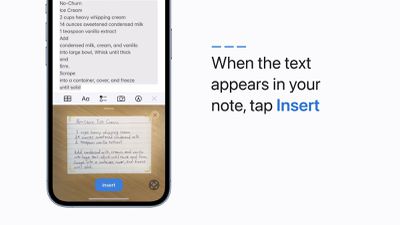
Apple recently shared a video with step-by-step instructions on how to use the Scan Text feature. On a device running iOS 15.4 or iPadOS 15.4, simply open the Notes app, tap the camera icon, tap "Scan Text," and tap the insert button once the text has been added to the note. The "Scan Text" shortcut has also been added to the Reminders app.
On earlier versions of iOS 15 and iPadOS 15, scanning text into the Notes app required tapping on a note's text field and tapping the Live Text icon.
iOS 15.4 and iPadOS 15.4 introduced several other features, including the ability to unlock an iPhone 12 or newer with Face ID while wearing a mask, Universal Control on compatible iPad models, dozens of new emoji, a new Siri voice option, the ability to initiate SharePlay sessions directly from supported apps, and more.
Popular Stories
With just three days to go until the iPhone Duo is released, Apple is getting ready for the launch. Behind the scenes, the App Store now has screenshots of Apple's built-in apps running on the Duo. We've seen some apps in marketing materials, but images of the ones we haven't seen give us an idea of what it will be like using the iPhone Duo day to day.
Many apps are shown in landscape...
Apple has temporarily removed Keynote, Pages, and Numbers from the App Store, just after releasing an update that added iPhone Duo support and a new Intelligent Assistant.
It is not clear if the apps were removed intentionally, or if it is a bug. Apple has not said when the apps will be reinstated, but if it was in error, they should return soon.
Update: The Mac versions are back without...
Apple today sent out invites for an experience in Los Angeles on Wednesday, October 28, and the "Pro and tell" tagline on the invitation likely means that the rumored MacBook models with touch-enabled OLED displays will stick with MacBook Pro branding instead of the once-rumored "MacBook Ultra" name.
The long-rumored "iPhone Ultra" ended up being named iPhone Duo, so speculation that Apple...





























![Apple Pulls Keynote, Pages and Numbers From App Store [Update: Back]](https://images.macrumors.com/t/Okb7kitB_gNr6qe5Pex9nQIysD8=/112x112/article-new/2026/01/Apple-Creator-Studio-iWork-suite.jpg)





















