Apple Releases Swift Playgrounds 4.1 for iPad and Mac
Following the launch of iOS 15.5 and macOS Monterey 12.4, Apple today released Swift Playgrounds 4.1, the latest version of the iPad and Mac app that is designed to teach users how to code and build apps.
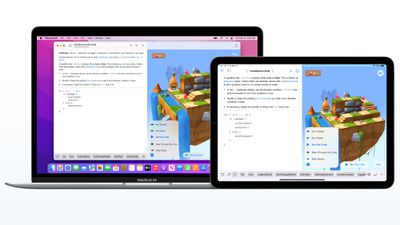
On the Mac, Swift Playgrounds 4.1 adds a host of new features including support for building Mac apps with SwiftUI with macOS 12.4 or later, guided walkthroughs that teach SwiftUI app building basics, live updates in App Preview as changes are made, and App Store Connect integration for uploading finished apps to the App Store.
Apple's full release notes for the Mac version of Swift Playgrounds are below.
Swift Playgrounds 4.1 introduces new features, new content and bug fixes. New features include:
- Build Mac apps with SwiftUI (requires macOS 12.4 or later)
- Guided walkthroughs teach SwiftUI app building basics
- App Preview shows live updates as you make changes to your app
- Apps built with Swift Playgrounds run and install to the Applications folder
- App Store Connect integration lets you upload your finished app to the App Store (requires Apple Developer Program account)
- Smart, inline code suggestions help you write code quickly and accurately
- Project-wide search finds results across multiple files
- Snippets Library provides hundreds of SwiftUI controls, symbols, and colors
- Swift Package support lets you include publicly available code to enhance your apps
- App Projects make it easy to move projects to Xcode and back
The iOS version of Swift Playgrounds 4.1 doesn't add quite as many new features, but it does include a new "Keep Going with Apps" feature to help users better understand how data moves throughout SwiftUI apps. It also adds "Animating Shapes" to teach users how to create, modify, and animate shapes, plus it includes "Capturing Photos," which offers an advanced look at creating a camera.
Swift Playgrounds for Mac can be downloaded from the Mac App Store, and Swift Playgrounds for iPad can be downloaded from the iOS App Store.
Popular Stories
Apple today shared an ad that shows how the upgraded Center Stage front camera on the latest iPhones improves the process of taking a group selfie.
"Watch how the new front facing camera on iPhone 17 Pro takes group selfies that automatically expand and rotate as more people come into frame," says Apple. While the ad is focused on the iPhone 17 Pro and iPhone 17 Pro Max, the regular iPhone...
In the iOS 26.4 update that's coming this spring, Apple will introduce a new version of Siri that's going to overhaul how we interact with the personal assistant and what it's able to do.
The iOS 26.4 version of Siri won't work like ChatGPT or Claude, but it will rely on large language models (LLMs) and has been updated from the ground up.
Upgraded Architecture
The next-generation...
Apple plans to announce the iPhone 17e on Thursday, February 19, according to Macwelt, the German equivalent of Macworld.
The report, citing industry sources, is available in English on Macworld.
Apple announced the iPhone 16e on Wednesday, February 19 last year, so the iPhone 17e would be unveiled exactly one year later if this rumor is accurate. It is quite uncommon for Apple to unveil...
In select U.S. states, residents can add their driver's license or state ID to the Apple Wallet app on the iPhone and Apple Watch, and then use it to display proof of identity or age at select airports and businesses, and in select apps.
The feature is currently available in 13 U.S. states and Puerto Rico, and it is expected to launch in at least seven more in the future.
To set up the...
New MacBook Pro models with the M5 Pro and M5 Max chips could arrive as soon as Monday, March 2, according to Bloomberg's Mark Gurman.
In today's "Power On" newsletter, Gurman said that the release of new MacBook Pro models is tied to the release of macOS Tahoe 26.3. The launch is said to be slated for as early as the week of March 2. He added that the M4 Pro and M4 Max models on sale today...






















