
iPadOS 16 Tidbits: Drastically Improved Files App, System-Wide Undo/Redo, and More - GeekWebGuides
Skip to Content

iPadOS 16 Tidbits: Drastically Improved Files App, System-Wide Undo/Redo, and More

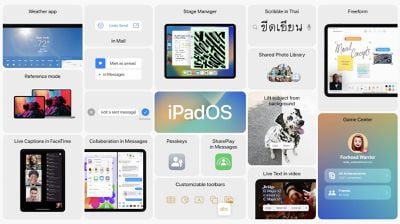
iPadOS 16 is now available to developer beta testers with improvements in Messages and Safari and the all-new Stage Manager, enabling multiple app windows and Mac-like multitasking on M1 iPads.
ipados 16
As has always been the case, many features are shared across iOS and iPadOS, and that's certainly true this year. iPadOS 16 gains several major new features from iOS 16, including the ability to edit and unsend Messages, improvements to Focus, and more.

There are, however, some features and changes exclusive to iPadOS 16 that take even more advantage of the iPad and its performance. We've highlighted a few iPadOS 16 tidbits below:

Files App Gets Quality of Life Improvements
ipados 16 files app changes
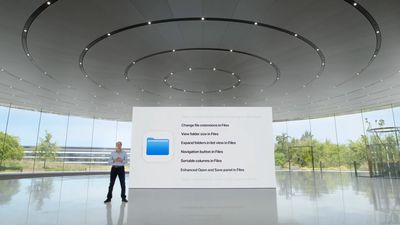
The Files app on iPadOS 16 is gaining some much-requested features from ‌iPad‌ users, including easier navigation buttons, easier access to common controls such as duplicate and rename, the ability to change file extensions, and more. The new changes are part of Apple's efforts to make iPadOS apps more "desktop-class."

System-Wide Undo and Redo and Find and Replace
ipados 19 find and replace
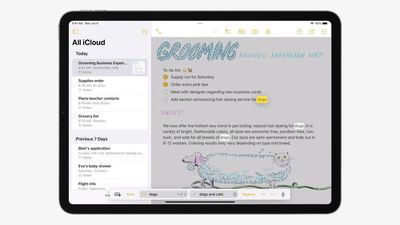
iPadOS is gaining system-wide undo and redo functionality, making it easer and more Mac-like for users to easily revert changes made in apps and across the system. iPadOS 16 also introduces system-wide find and replace that in the Notes app, works in-line.

Reference Mode Support on 12.9-inch iPad Pro
m1 ipad pro video editing
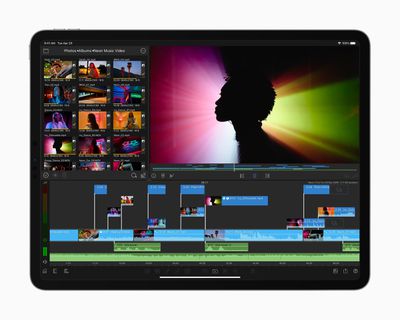
With the high-end 12.9-inch iPad Pro running iPadOS 16, users can take advantage of the Liquid Retina XDR Display and use the ‌iPad‌ as a reference monitor. This is aimed at artists and creators who need accurate colors and vivid detail when working on large projects.

Option to Turn on Lock to End Call

ipados 16 lock to end call
Under Settings, Accessibility, and Touch, users can now choose to toggle on "Lock to End Call," making it easer to end a current call by pressing the top button.


Related Forum: iOS 16

Popular Stories

iPhone Duo Trio

Here's What Apple's Apps Look Like on the iPhone Duo

Tuesday October 20, 2026 11:12 am PDT by
With just three days to go until the iPhone Duo is released, Apple is getting ready for the launch. Behind the scenes, the App Store now has screenshots of Apple's built-in apps running on the Duo. We've seen some apps in marketing materials, but images of the ones we haven't seen give us an idea of what it will be like using the iPhone Duo day to day. Many apps are shown in landscape...
Apple Creator Studio iWork suite

Apple Pulls Keynote, Pages and Numbers From App Store [Update: Back]

Thursday October 22, 2026 11:01 am PDT by
Apple has temporarily removed Keynote, Pages, and Numbers from the App Store, just after releasing an update that added iPhone Duo support and a new Intelligent Assistant. It is not clear if the apps were removed intentionally, or if it is a bug. Apple has not said when the apps will be reinstated, but if it was in error, they should return soon. Update: The Mac versions are back without...
M5 MacBook Pro

RIP, MacBook Ultra

Monday October 19, 2026 9:37 am PDT by
Apple today sent out invites for an experience in Los Angeles on Wednesday, October 28, and the "Pro and tell" tagline on the invitation likely means that the rumored MacBook models with touch-enabled OLED displays will stick with MacBook Pro branding instead of the once-rumored "MacBook Ultra" name. The long-rumored "iPhone Ultra" ended up being named iPhone Duo, so speculation that Apple...

Top Rated Comments

nvmls Avatar
57 months ago
15 years of OS development to mimic how a computer handles files, still limited though, and people clap 🤣

God bless the apple consumer.
Score: 15 Votes (Like | Disagree)
Channan Avatar
57 months ago

There’s really zero reason to get an iPad Pro over a MacBook Air.


Ironically the iPad mini might be the most useful of the iPad family due to its convenience as a consumption device.
*For you.

You forgot to put that in your first sentence. Because for me, there’s really zero reason to get a MacBook Air over an iPad Pro. There’s nothing a Mac can do that my iPad can’t for my own personal use.
Score: 10 Votes (Like | Disagree)
57 months ago

There’s really zero reason to get an iPad Pro over a MacBook Air.


Ironically the iPad mini might be the most useful of the iPad family due to its convenience as a consumption device.
I let go of my MacBook recently because I wanted an iPad Pro. Why? My reasons were because I wanted a device that’s even more lightweight but also powerful. I chose the 11” because it’s the perfect size for reading books and reading study material on the train or plane. I can throw it in my back pack and I do t even know it’s there. I found the 12.9” just too big to do that and after a while became too heavy for reading in your hands for long periods of time.

It’s also perfect for math notation, taking notes, studying and doing research. I also started to get back into art which I haven’t done for years because of the iPad Pro. The value I get out of the iPad Pro has far outweighed the value I get from the MacBook. I don’t think I will ever get a MacBook again but instead will have an iMac or Mac Studio, an iPad Pro 11”, iPhone Pro, and an Apple Watch.

Each device has its perfect use case for me since I have an iMac at home and now an iPad Pro and iPhone. The MacBook has no use any longer for me and my use case. Others will have a different use cases and might need one for different purposes.
Score: 8 Votes (Like | Disagree)
FightTheFuture Avatar
57 months ago

Except true external display support and "State Manager", I don't really see desktop-class improvement here.
- Can I use Disk Utility.app to format/partition an external drive? No.
- Is Files on par with macOS' Finder? No.
- Is there a Terminal.app? No.
- Transferring my own music to iTunes w/o relying on another Mac? No.
- So-called "Pro" apps? No.
- ...

As long as Apple didn't go into that "What's a computer?" BS, it was fine considering an iPad as a bigger iPhone and not having bigger expectations.
This is a list of things most people do not do with their computers.
Score: 7 Votes (Like | Disagree)
57 months ago
Have they come up with a way to delete text messages across all your Apple devices yet? I have to delete them manually from my iPhone, MacBook, MacBook Pro, and iPad.
Score: 6 Votes (Like | Disagree)
57 months ago

I let go of my MacBook recently because I wanted an iPad Pro. Why? My reasons were because I wanted a device that’s even more lightweight but also powerful. I chose the 11” because it’s the perfect size for reading books and reading study material on the train or plane. I can throw it in my back pack and I do t even know it’s there. I found the 12.9” just too big to do that and after a while became too heavy for reading in your hands for long periods of time.

It’s also perfect for math notation, taking notes, studying and doing research. I also started to get back into art which I haven’t done for years because of the iPad Pro. The value I get out of the iPad Pro has far outweighed the value I get from the MacBook. I don’t think I will ever get a MacBook again but instead will have an iMac or Mac Studio, an iPad Pro 11”, iPhone Pro, and an Apple Watch.

Each device has its perfect use case for me since I have an iMac at home and now an iPad Pro and iPhone. The MacBook has no use any longer for me and my use case. Others will have a different use cases and might need one for different purposes.
Reminds me of college, I owned a Mid 2007 MacBook and, after it came out, an OG iPad. I took a chemistry class my Freshman year with that MacBook, and note taking on it was truly a pain, if just because of all the chemical subscripts. The year after I got my iPad, I used it for note taking in a linear algebra class, handwritten notes with one of those touchscreen styluses. It made taking notes in my math class such a breeze. (Why didn’t I just use a paper notebook? Well, I type faster than I write, so it made sense to me as a muddle-headed freshman. As for the math class? Mostly because I didn’t want to carry a large notebook in my backpack, especially if it had only so much space for each subject. Plus, I was on crutches for two months, if I could reduce the weight in my backpack, I gladly would.) There are times and scenarios when I prefer paper and pen, but there are also times and scenarios when I prefer digital handwriting.
Score: 4 Votes (Like | Disagree)
Latest Stories
iPhone Duo Launch Begins as First Orders Reach Customers
5 hours ago
1Password for Agents Keeps Your Passwords Hidden From AI
6 hours ago
iPhone Duo 24 Hours Later: Your Questions Answered
6 hours ago
Apple's iWork Apps Get 'Intelligent Assistant' and iPhone Duo Support
7 hours ago
Apple is Apparently Considering a Slightly Larger iPhone Duo
7 hours ago
Giant iPhone Duo Displays Coming to Four Apple Stores
8 hours ago
Apple Pulls Keynote, Pages and Numbers From App Store [Update: Back]
9 hours ago
Apple Updates More Apps With iPhone Duo Support
10 hours ago
Apple Will Label Apps 'Made for iPhone Duo' in App Store
13 hours ago
Amazon Takes $49 Off iPad With Prices Starting at $399.99
13 hours ago
F1 on Apple TV Now Available in Dolby Atmos
14 hours ago
Apple Reveals More Than 50 Apps That Will Be Updated for iPhone Duo
14 hours ago
Apple Blocks Certificates That Could Help Attackers Fake Websites
15 hours ago
Giant iPhone Duo Installations Spotted at Apple Fifth Avenue
16 hours ago
iPhone Duo 2 Prototypes Include Under-Display Face ID
16 hours ago
Tesla App Gains iPad and iPhone Duo Support
20 hours ago
Apple Reportedly Boosts iPhone Duo Orders by 44%
21 hours ago
Fortnite Returning to Australian App Store After Court Ruling
21 hours ago
Apple Ordered to Open iPhone to Rival App Stores in Australia
22 hours ago
Apple Suppliers Face Hurdles Cutting Circuit Board Emissions
22 hours ago
Things Updated for iPhone Duo With Adaptive Layout
22 hours ago
Simplicity and Siri AI Are HomeView's Killer Features, Apple Says
23 hours ago
iPhone Duo Reviewers Really Miss Face ID
1 day ago
Does the iPhone Duo Run Hot? Here's What Reviews Found
1 day ago
Apple Music's New Look is Now Live on Apple's Website
1 day ago
Anthropic Launches Claude Duet, a Proactive AI Agent
1 day ago
What 32,000 Folds Did to the iPhone Duo's Hinge
1 day ago
iPhone Duo's Hidden FaceTime Camera Takes 'Trash' Photos
1 day ago
iPhone Duo Has 'Edge Light' Feature That Debuted on Macs Last Year
1 day ago
Apple Support App Updated for iPhone Duo's Larger Display
1 day ago









































