
More macOS Ventura Tidbits: Spotlight Improvements, Continuity Camera in QuickTime, New Share Sheet, and More

With the release of the first macOS Ventura beta in the hands of developers, early adopters continue to discover smaller changes in the new version of Apple's Mac operating system. Below are some of the more notable differences that have since come to light since Monday.
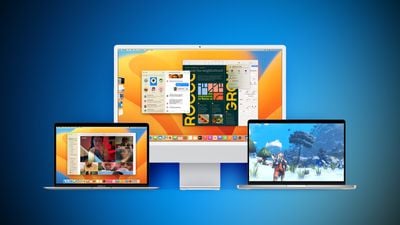
Ventura Macs Feature Blue

Share Sheet Popover

In the first developer beta of macOS 13, Apple no longer displays an item's sharing options in a standard menu.


The "Share..." option is still there in the right-click contextual menu, but selecting it now causes a standalone popover menu to appear over the item in Finder or on the Desktop, with Message contacts listed above other sharing options, similar to the Share Sheet in iOS. The same popover appears whenever you click the Share button in an app window.

Spotlight Search Improvements

In macOS 13, Apple has integrated Quick Look into Spotlight Search, allowing you to get a quick peek at a file that appears in your search results, without opening it wholesale in its associated app.
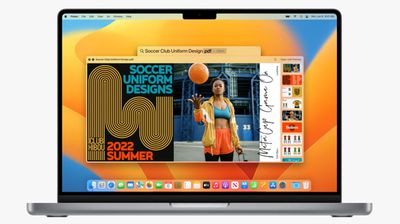
spotlight quick look
Quick Look also continues to support text-based clipboard actions, so you can now copy and paste content from documents after searching for them using Spotlight.

In other improvements, Spotlight now leverages the full search window to display information-rich web results, and it can also retrieve results from your photo library, with full Live Text support meaning you can even Spotlight search for text that appears in your images.

Rich Links in Mail

When you paste a web link into a Mail message in macOS 12, only the web address is shown in the message content, providing the recipient with no information about what's being linked to beyond what's included in the URL.
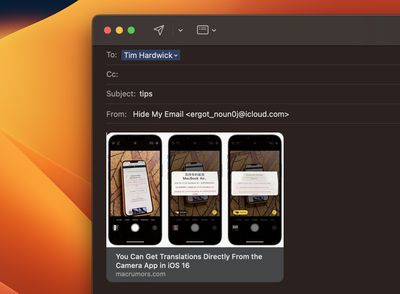
rich links mail
By contrast, macOS 13 inserts rich link previews in emails. Rich links display a preview of the website being linked to, giving recipients an idea of the content they can be expected to see if they click to open the webpage.

Stage Manager Works With Multiple Desktops

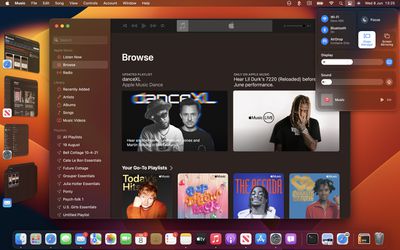
One of the big features of macOS 13, Stage Manager is Apple's latest attempt to solve the clutter that can occur on the desktop when you have multiple apps and app windows open at the same time.
stage manager
‌Stage Manager‌ works by moving all open background applications over to the left, leaving the most recently opened and active app front and center on the screen. Clicking another app in the side column switches it with the current centered app, and so on.

‌Stage Manager‌ also works with separate Desktop Spaces, so you can have multiple instances of ‌Stage Manager‌ organizing several groups of apps on different desktop screens. It's also possible to hide the ‌Stage Manager‌ column of apps by increasing the size of the active app window or moving the window over to the left of the screen. A submenu option in Control Center lets you do the same thing.

Continuity Camera in QuickTime Player

Continuity Camera gives Mac owners the ability to use their iPhone as a webcam in FaceTime, Zoom, Teams, and other third-party video conferencing apps. It also works natively in QuickTime player, allowing users to record movies and control several recording settings.
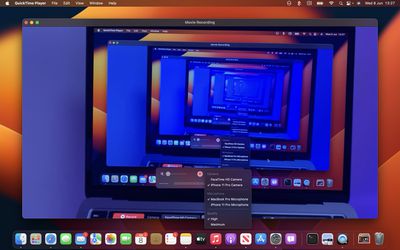
continuity camera quicktime
In QuickTime, users can opt to record from the ‌iPhone‌'s microphone or the Mac's microphone, making it possible to record the video from the ‌iPhone‌ and the audio from the Mac, for example.

In addition, Continuity Camera brings your ‌iPhone‌'s Center Stage functionality to your Mac even if it isn't natively supported. The same goes for Studio Light and Portrait Mode.

Other Features and Tidbits

  • Siri can start timers
  • Live Captions option in Accessibility settings
  • Playlist search in Music app
  • Color Gradient options for desktop wallpaper

macOS Ventura will be released to all users in the fall, likely around October. Apple said a public beta will be available starting in July.


Related Forum: macOS Ventura

Popular Stories

Apple Logo Zoomed

Tim Cook Teases Plans for Apple's Upcoming 50th Anniversary

Thursday February 5, 2026 12:54 pm PST by
Apple turns 50 this year, and its CEO Tim Cook has promised to celebrate the milestone. The big day falls on April 1, 2026. "I've been unusually reflective lately about Apple because we have been working on what do we do to mark this moment," Cook told employees today, according to Bloomberg's Mark Gurman. "When you really stop and pause and think about the last 50 years, it makes your heart ...
wwdc sans text feature

Apple Rumored to Announce New Product on February 19

Thursday February 5, 2026 12:22 pm PST by
Apple plans to announce the iPhone 17e on Thursday, February 19, according to Macwelt, the German equivalent of Macworld. The report, citing industry sources, is available in English on Macworld. Apple announced the iPhone 16e on Wednesday, February 19 last year, so the iPhone 17e would be unveiled exactly one year later if this rumor is accurate. It is quite uncommon for Apple to unveil...
Finder Siri Feature

Why Apple's iOS 26.4 Siri Upgrade Will Be Bigger Than Originally Promised

Friday February 6, 2026 3:06 pm PST by
In the iOS 26.4 update that's coming this spring, Apple will introduce a new version of Siri that's going to overhaul how we interact with the personal assistant and what it's able to do. The iOS 26.4 version of Siri won't work like ChatGPT or Claude, but it will rely on large language models (LLMs) and has been updated from the ground up. Upgraded Architecture The next-generation...
iOS 26

iOS 26.3 and iOS 26.4 Will Add These New Features to Your iPhone

Tuesday February 3, 2026 7:47 am PST by
While the iOS 26.3 Release Candidate is now available ahead of a public release, the first iOS 26.4 beta is likely still at least a week away. Following beta testing, iOS 26.4 will likely be released to the general public in March or April. Below, we have recapped known or rumored iOS 26.3 and iOS 26.4 features so far. iOS 26.3 iPhone to Android Transfer Tool iOS 26.3 makes it easier...
iphone 17 pro dark blue 1

iPhone 18 Pro Max Rumored to Deliver Next-Level Battery Life

Friday February 6, 2026 5:14 am PST by
The iPhone 18 Pro Max will feature a bigger battery for continued best-in-class battery life, according to a known Weibo leaker. Citing supply chain information, the Weibo user known as "Digital Chat Station" said that the iPhone 18 Pro Max will have a battery capacity of 5,100 to 5,200 mAh. Combined with the efficiency improvements of the A20 Pro chip, made with TSMC's 2nm process, the...

Top Rated Comments

mihirdelirious Avatar
48 months ago
Horrendous UI re-design especially the new System Preferences. Will Apple revert this like they did with Safari iOS 15 last year? we'll find out soon.
Score: 6 Votes (Like | Disagree)
Leon Ze Professional Avatar
48 months ago
Multiple instances of Stage Manager in desktop spaces is a cool feature to have.
Score: 4 Votes (Like | Disagree)
rorschach Avatar
48 months ago

I remember way back when when iCal used a "drawer" for creating new events. I miss that feature every day because a popover covers up art of the screen that I may need, and I can't look at something else without dismissing it. It sounds small and simple, but that "drawer" or "slide out" feature was really nice, and the new flat design of everything has made that kind of functionality go away.
You can actually drag that New Event "popover" by the top edge and it turns into a regular movable window...which is super handy. And not discoverable.
Score: 4 Votes (Like | Disagree)
svish Avatar
48 months ago
The new share sheet looks good and refreshing. Quick look in spotlight search is also great.
Score: 3 Votes (Like | Disagree)
joker00 Avatar
48 months ago
I hate that you say stage manger works for multiple desktops. To me, it really doesn't. It's either on or off across all monitors and desktops.

To really be functional, it should allow on/off for each monitor or desktop.
Score: 3 Votes (Like | Disagree)
Unk1ne Avatar
48 months ago
Bring back the cool Wallpapers that used to release with the new OS's instead of just one colorful graphic image
Score: 2 Votes (Like | Disagree)















