
iOS 16 Public Beta: Seven New Features to Check Out on Your iPhone

Apple has released the first public beta of iOS 16, allowing anyone with an iPhone 8 or newer to test out the software update for free. iOS 16 includes plenty of new features, ranging from a customizable Lock Screen to the ability to edit or unsend iMessages.
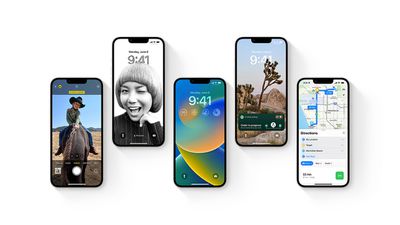
iOS 16 Preview
To get the iOS 16 public beta, sign up for the free Apple Beta Software Program directly on your iPhone. Given that iOS 16 is still in beta, keep in mind that you may encounter bugs, incompatible apps, reduced battery life, or other issues. Think carefully before deciding to install the public beta on an iPhone that you rely on for daily use.

If you are installing the iOS 16 public beta on your iPhone, we've put together a list of seven new features worth checking out below.

Customize the Lock Screen

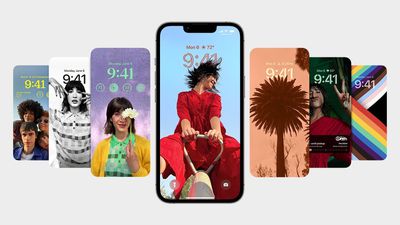
The headline new feature of iOS 16 is the ability to personalize the Lock Screen with multilayered wallpapers, custom fonts for the date and time, and widgets for upcoming calendar events, the weather, battery levels, alarms, time zones, Activity rings, and more.
iOS 16 Lock Screen Customize
The new Lock Screen gallery showcases a range of Lock Screen options, including a new Weather wallpaper with live weather conditions and an Astronomy wallpaper that provides views of the Earth, moon, and solar system. iOS 16 includes support for multiple Lock Screen designs, allowing you to switch between your favorites with a swipe.

Edit or Unsend an iMessage

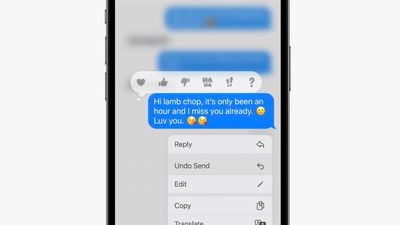
iOS 16 introduces the ability to edit or unsend recently sent iMessages, as well as mark iMessage conversations as unread after opening them. Apple allows you to edit or unsend an iMessage for up to 15 minutes after sending it.
ios 16 imessage edit unsend
To edit or unsend a message, you simply need to tap and hold on a bubble and select the appropriate option in the menu that appears. iMessages that have been edited are marked as "edited" below the message bubble. On devices running iOS 15 or earlier, edited messages are received as a new message that says "Edited to [X]."

Use the Full-Screen Music Player

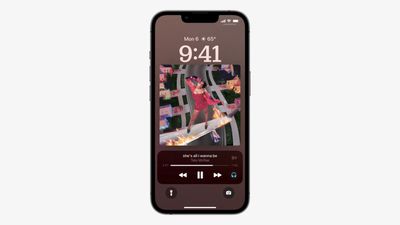
The first public beta of iOS 16 enables a full-screen music player on the Lock Screen with album art and a color-matched wallpaper.
ios 16 lock screen music player
Apple last offered a full-screen music player on the Lock Screen on iOS 10 in 2016. If you don't like the feature, you can tap on the bottom of the display to minimize the music player and revert to your standard Lock Screen wallpaper.

Create an iCloud Shared Photo Library

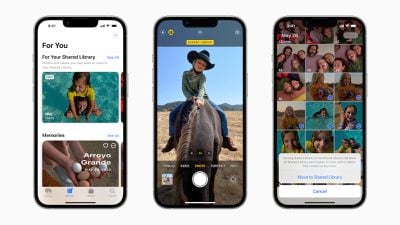
One of the most useful new features in the iOS 16 public beta is the ability to create an iCloud Shared Photo Library in the Photos app.
ios 16 icloud shared photo library
iCloud‌ Shared Photo Library is designed to make it easier for you to share photos with your family members or friends. The feature allows you and up to five other people to add, edit, or remove photos in a shared library accessible via iCloud.

Game With Nintendo Joy-Cons

Apple says the iPhone supports many other additional Bluetooth game controllers on iOS 16, including Nintendo's Joy-Cons and Pro Controller. iPhones running iOS 16 can be used with either single left or right Joy-Cons, or both at once as a singular controller.

nintendo joy cons
This is on top of the iPhone's existing compatibility with PS5 DualSense and Xbox Series X controllers since the release of iOS 14.5 last year.

Track an Apple Pay Order

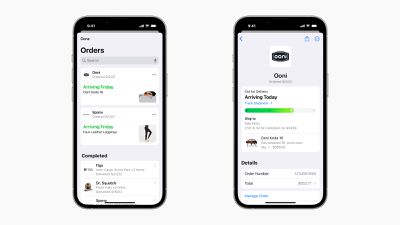
Apple Pay on iOS 16 features new built-in order tracking information in the Wallet app for online orders completed via Apple Pay. The tracker provides an order's estimated delivery date and indicates when a package is out for delivery.
ios 16 apple pay order tracking

Close Your Rings Without an Apple Watch

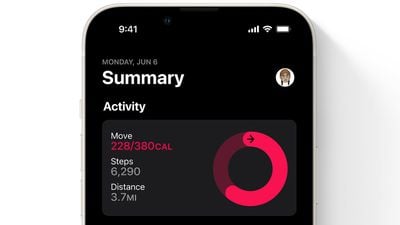
Starting with iOS 16, the Fitness app is now available on the iPhone for all users, even if they don't own an Apple Watch. The app features a daily Activity ring that relies on the iPhone's motion sensors to estimate a person's calories burned and steps per day.
fitness app ios 16
iOS 16 should be released to all users in September. For a closer look at the update, watch our video walkthrough of some of the biggest new features.

Related Forum: iOS 16

Popular Stories

maxresdefault

Apple Shows Off a Key Reason to Upgrade to the iPhone 17

Saturday February 7, 2026 9:26 am PST by
Apple today shared an ad that shows how the upgraded Center Stage front camera on the latest iPhones improves the process of taking a group selfie. "Watch how the new front facing camera on iPhone 17 Pro takes group selfies that automatically expand and rotate as more people come into frame," says Apple. While the ad is focused on the iPhone 17 Pro and iPhone 17 Pro Max, the regular iPhone...
Finder Siri Feature

Why Apple's iOS 26.4 Siri Upgrade Will Be Bigger Than Originally Promised

Friday February 6, 2026 3:06 pm PST by
In the iOS 26.4 update that's coming this spring, Apple will introduce a new version of Siri that's going to overhaul how we interact with the personal assistant and what it's able to do. The iOS 26.4 version of Siri won't work like ChatGPT or Claude, but it will rely on large language models (LLMs) and has been updated from the ground up. Upgraded Architecture The next-generation...
wwdc sans text feature

Apple Rumored to Announce New Product on February 19

Thursday February 5, 2026 12:22 pm PST by
Apple plans to announce the iPhone 17e on Thursday, February 19, according to Macwelt, the German equivalent of Macworld. The report, citing industry sources, is available in English on Macworld. Apple announced the iPhone 16e on Wednesday, February 19 last year, so the iPhone 17e would be unveiled exactly one year later if this rumor is accurate. It is quite uncommon for Apple to unveil...
apple wallet drivers license feature iPhone 15 pro

Apple Says These 7 U.S. States Plan to Offer iPhone Driver's Licenses

Monday February 9, 2026 6:24 am PST by
In select U.S. states, residents can add their driver's license or state ID to the Apple Wallet app on the iPhone and Apple Watch, and then use it to display proof of identity or age at select airports and businesses, and in select apps. The feature is currently available in 13 U.S. states and Puerto Rico, and it is expected to launch in at least seven more in the future. To set up the...
14 inch MacBook Pro Keyboard

New MacBook Pros Could Now Arrive in March

Sunday February 8, 2026 6:02 am PST by
New MacBook Pro models with the M5 Pro and M5 Max chips could arrive as soon as Monday, March 2, according to Bloomberg's Mark Gurman. In today's "Power On" newsletter, Gurman said that the release of new MacBook Pro models is tied to the release of macOS Tahoe 26.3. The launch is said to be slated for as early as the week of March 2. He added that the M4 Pro and M4 Max models on sale today...

Top Rated Comments

bhanson1 Avatar
47 months ago
so all of the hype about customization on the lock screen and I STILL can't get rid of the flashlight or camera!
Score: 11 Votes (Like | Disagree)
Stromos Avatar
47 months ago

so all of the hype about customization on the lock screen and I STILL can't get rid of the flashlight or camera!

It is truly pathetic that Apple hasn’t yet seen fit to allow users to remove these items from the lock screen. This is the entire reason for the mind blown emoji to exist ?
What's the fun in that? I love that I can pick up any iPhone unattended and take some photos to surprise the person later :p
Score: 5 Votes (Like | Disagree)
contacos Avatar
47 months ago

Most people will think they are still on iOS 15
Apple really needs some „What is new“ on-boarding pop up screens after updating an OS. I swear to god, my family does not even know widgets exist
Score: 4 Votes (Like | Disagree)
Jim Lahey Avatar
47 months ago

so all of the hype about customization on the lock screen and I STILL can't get rid of the flashlight or camera!
It is truly pathetic that Apple hasn’t yet seen fit to allow users to remove these items from the lock screen. This is the entire reason for the mind blown emoji to exist ?
Score: 3 Votes (Like | Disagree)
cvam1985 Avatar
47 months ago
“Full screen” music on the Lock Screen and still the scrubbing bar is microscopic. Pfft. :rolleyes::rolleyes:
Score: 3 Votes (Like | Disagree)
skitidetdu Avatar
47 months ago
Lots of cool new things but I’m looking mostly forward to closing the rings without the need to go buy the watch! ?
Score: 2 Votes (Like | Disagree)















