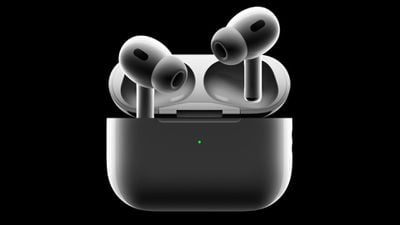
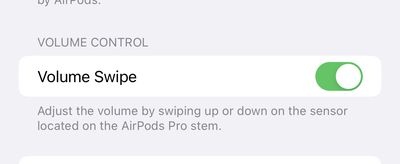
In the iOS 16.1 beta, Apple is giving users of the second-generation AirPods Pro the ability to disable touch controls for volume.
One feature of the new AirPods Pro is that users can increase or decrease volume by swiping up or down on the touch sensors on the individual stems. While some users may find the feature convenient, others may not. On iOS 16.0.2, the current public release of iOS 16, users cannot disable touch controls for volume.
In the iOS 16.1 beta, there is a new toggle inside the Accessibility page for the second-generation AirPods Pro to enable or disable touch controls for volume. As before, users can customize the press-and-hold functionality of the AirPods Pro stems, including to switch among Active Noise Cancellation, Transparency mode, and Off, or to invoke Siri.
iOS 16.1 is available for developers and members of Apple's public beta program, with a public release expected in October. In addition to the new toggle for the AirPods Pro, iOS 16.1 will include changes to the battery indicator and more.
Tuesday October 20, 2026 11:12 am PDT by Juli Clover
With just three days to go until the iPhone Duo is released, Apple is getting ready for the launch. Behind the scenes, the App Store now has screenshots of Apple's built-in apps running on the Duo. We've seen some apps in marketing materials, but images of the ones we haven't seen give us an idea of what it will be like using the iPhone Duo day to day.
Many apps are shown in landscape...
Thursday October 22, 2026 11:01 am PDT by Juli Clover
Apple has temporarily removed Keynote, Pages, and Numbers from the App Store, just after releasing an update that added iPhone Duo support and a new Intelligent Assistant.
It is not clear if the apps were removed intentionally, or if it is a bug. Apple has not said when the apps will be reinstated, but if it was in error, they should return soon.
Update: The Mac versions are back without...
Monday October 19, 2026 9:37 am PDT by Joe Rossignol
Apple today sent out invites for an experience in Los Angeles on Wednesday, October 28, and the "Pro and tell" tagline on the invitation likely means that the rumored MacBook models with touch-enabled OLED displays will stick with MacBook Pro branding instead of the once-rumored "MacBook Ultra" name.
The long-rumored "iPhone Ultra" ended up being named iPhone Duo, so speculation that Apple...
I wonder if it's your sleeves or cuffs making that accidental swipe.
That is why I wear my watch on the left wrist configured with the crown to the left. My gloves for yard work and weight training were playing havoc with that volume function, and also pushing on the crown too, most distracting. I was overjoyed to find out that I could set it up this way and avoid it happening. It works so well in winter too. Not having that option, I could have seen dropping the AW.
You can? Also I do it by mistake ALL THE TIME. I don’t know how but I always manage to somehow adjust the volume from my watch, either all the way down or up. Happens to my echos plying music or my AirPods
I wonder if it's your sleeves or cuffs making that accidental swipe.
Apple should make other features available not this one....here we just dont swipe if we dont want to adjust the volume from the airpods themselves. In 2 days i never from mistake swipe and adjust the volume while trying to do different things
Not sure I fully agree with this. There can be some differently abled users who have a hard time not accidentally changing the volume of their pods when trying to remove or put in the pod. I see it as good to have the option to disable swipe volume control.
Apple's first foldable iPhone, with a book-style design featuring a 5.4-inch outer display and a 7.6-inch inner display with a minimal crease down the middle.




























![Apple Pulls Keynote, Pages and Numbers From App Store [Update: Back]](https://images.macrumors.com/t/Okb7kitB_gNr6qe5Pex9nQIysD8=/112x112/article-new/2026/01/Apple-Creator-Studio-iWork-suite.jpg)





















