Apple Releases Second Public Beta of macOS Ventura 13.1

Apple today seeded the second beta of macOS Ventura 13.1 to its public beta testing group, allowing non-developers to try out the new features ahead of the software's release. The public beta comes two weeks after Apple released the first public beta.

macos ventura roundup header
Public beta testers can download the macOS 13.1 Ventura update from the Software Update section of the System Preferences app after installing the proper profile from Apple's beta software website.

macOS Ventura 13.1 introduces the Freeform app, which Apple has designed for creative collaboration. The app can be used for brainstorming, planning out ideas, jotting down notes, and more. Users can insert drawings, sticky notes, shapes, text boxes, photos, videos, PDFs, links, and other documents, with Freeform serving as a blank canvas.

Freeform "boards" can be shared with other people and discussed over FaceTime, with updates from all participants synced to everyone in real-time.

The update also introduces support for an updated Home app architecture that improves performance for smart home devices.

Related Forum: macOS Ventura

Popular Stories

maxresdefault

Apple Shows Off a Key Reason to Upgrade to the iPhone 17

Saturday February 7, 2026 9:26 am PST by
Apple today shared an ad that shows how the upgraded Center Stage front camera on the latest iPhones improves the process of taking a group selfie. "Watch how the new front facing camera on iPhone 17 Pro takes group selfies that automatically expand and rotate as more people come into frame," says Apple. While the ad is focused on the iPhone 17 Pro and iPhone 17 Pro Max, the regular iPhone...
Finder Siri Feature

Why Apple's iOS 26.4 Siri Upgrade Will Be Bigger Than Originally Promised

Friday February 6, 2026 3:06 pm PST by
In the iOS 26.4 update that's coming this spring, Apple will introduce a new version of Siri that's going to overhaul how we interact with the personal assistant and what it's able to do. The iOS 26.4 version of Siri won't work like ChatGPT or Claude, but it will rely on large language models (LLMs) and has been updated from the ground up. Upgraded Architecture The next-generation...
wwdc sans text feature

Apple Rumored to Announce New Product on February 19

Thursday February 5, 2026 12:22 pm PST by
Apple plans to announce the iPhone 17e on Thursday, February 19, according to Macwelt, the German equivalent of Macworld. The report, citing industry sources, is available in English on Macworld. Apple announced the iPhone 16e on Wednesday, February 19 last year, so the iPhone 17e would be unveiled exactly one year later if this rumor is accurate. It is quite uncommon for Apple to unveil...
apple wallet drivers license feature iPhone 15 pro

Apple Says These 7 U.S. States Plan to Offer iPhone Driver's Licenses

Monday February 9, 2026 6:24 am PST by
In select U.S. states, residents can add their driver's license or state ID to the Apple Wallet app on the iPhone and Apple Watch, and then use it to display proof of identity or age at select airports and businesses, and in select apps. The feature is currently available in 13 U.S. states and Puerto Rico, and it is expected to launch in at least seven more in the future. To set up the...
14 inch MacBook Pro Keyboard

New MacBook Pros Could Now Arrive in March

Sunday February 8, 2026 6:02 am PST by
New MacBook Pro models with the M5 Pro and M5 Max chips could arrive as soon as Monday, March 2, according to Bloomberg's Mark Gurman. In today's "Power On" newsletter, Gurman said that the release of new MacBook Pro models is tied to the release of macOS Tahoe 26.3. The launch is said to be slated for as early as the week of March 2. He added that the M4 Pro and M4 Max models on sale today...


Top Rated Comments

Realityck Avatar
43 months ago

Yes. Would be interested to hear if System Preferences has been updated/improved/reverted to the old version in 13.1.
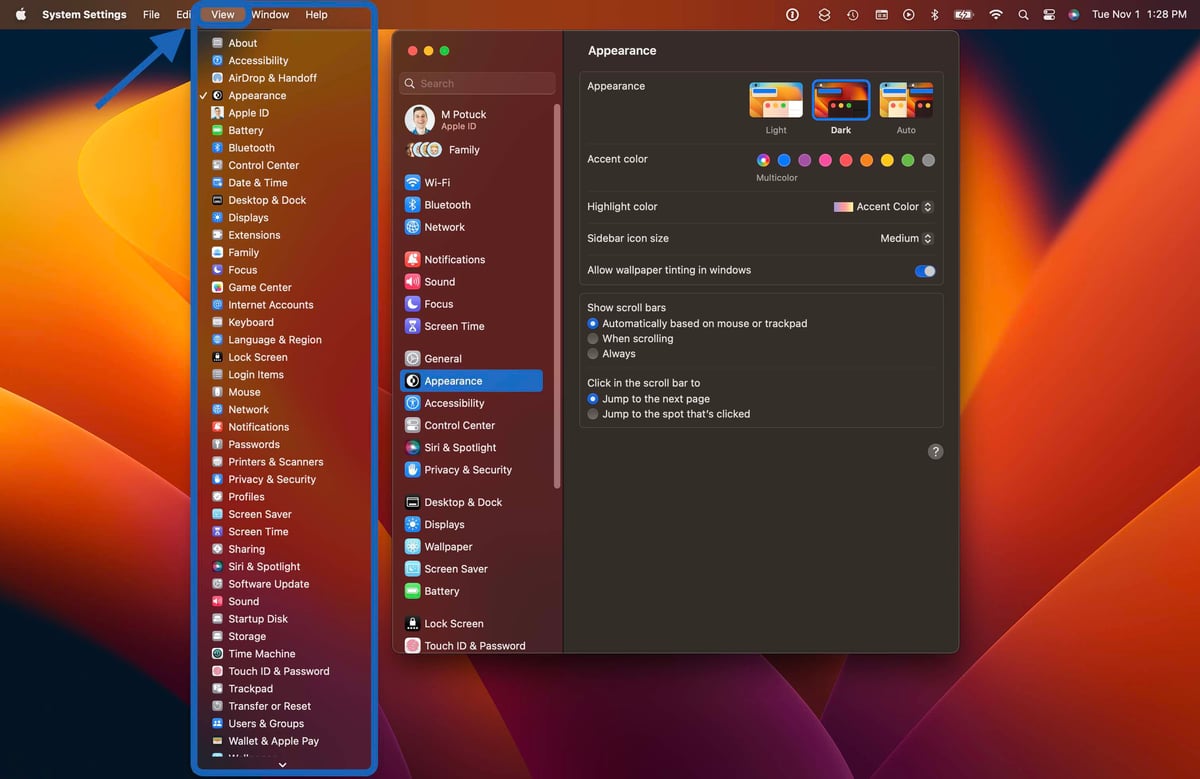
Just to reiterate when you open system preferences be sure to take advantage of VIEW pulldown menu. That way you can access some system settings directly even if that are nestled in the system settings hierarchy.

Score: 21 Votes (Like | Disagree)
BrownyQ Avatar
43 months ago

Just to reiterate when you open system preferences be sure to take advantage of VIEW pulldown menu. That way you can access some system settings directly even if that are nestled in the system settings hierarchy.


Just want to say: thank you for always sharing helpful information in regards to things like this.

So tiresome to see the same posts about the Settings app every single article, as if the old Preferences layout was some perfect implementation.
Score: 8 Votes (Like | Disagree)
imnotthewalrus Avatar
43 months ago

Just want to say: thank you for always sharing helpful information in regards to things like this.

So tiresome to see the same posts about the Settings app every single article, as if the old Preferences layout was some perfect implementation.
Yes! @Realityck is truly a diamond in the rough.
Score: 4 Votes (Like | Disagree)
Realityck Avatar
43 months ago
[SPOILER="macOS Ventura 13.1 Beta 2 Release Notes"]
[HEADING=2]Endpoint Security[/HEADING]
[HEADING=3]Known Issues[/HEADING]

* Third-party security products using the Endpoint Security API might lose Full Disk Access authorization and stop functioning, even though the product remains visible in System Settings. This issue doesn’t affect authorization granted via MDM. (100857507)
Workaround: Go to System Settings > Privacy & Security > Full Disk Access, select the security product, use the minus (-) button to remove, and then use the plus (+) button to re-add the affected security product. A system restart might be required to restore expected functionality.

[HEADING=2]Freeform[/HEADING]
[HEADING=3]Known Issues[/HEADING]

* Can’t delete boards while offline, or if iCloud data is disabled for Freeform. (100294085)
Workaround: Go to Settings (System Setting on macOS) > Apple ID > iCloud, then in the Apps using iCloud section, toggle Freeform to On.
* Adding or removing collaborators can fail while attempting to change share settings. (101186059)
Workaround: Close the share sheet and try to add or remove the participants again.
* Inserting a sticky or a file might result in an unexpected error. (100883621)
Workaround: Quit and relaunch Freeform.

[HEADING=2]TV App[/HEADING]
[HEADING=3]Resolved in macOS Ventura 13.1 beta 2[/HEADING]

* Fixed: Play tracking (Up Next, and Top Shelf Update) won’t work for all platforms. (101258095)

[/SPOILER]

Released yesterday to devs, today to PB testers
iOS 16.2 beta 2 (20C5043e) - November 8, 2022
iPadOS 16.2 beta 2 (20C5043e) - November 8, 2022
macOS 13.1 beta 2 (22C5044e) - November 8, 2022
watchOS 9.2 beta 2 (20S5342d) - November 8, 2022
tvOS 16.2 beta 2 (20K5342d) - November 8, 2022
Score: 3 Votes (Like | Disagree)
Realityck Avatar
43 months ago

Hopefully 13.1 will fix the issue that files cannot be deleted. 13.0.1 doesn't fixed it yet. :confused:
Did you check permissions (get info). Thats a odd issue I haven't seen.
Score: 3 Votes (Like | Disagree)
Realityck Avatar
43 months ago

This beta has broken my Macbook Pro 14". Now nothing (except Safari) opens but just brings up a terminal window.
How about simply booting into recovery mode and reinstall MacOS which should be this beta.

https://support.apple.com/en-us/HT204904
Score: 2 Votes (Like | Disagree)