
Apple Previews iOS 17 Accessibility Features Ahead of WWDC - MacRumors
Skip to Content

Apple Previews iOS 17 Accessibility Features Ahead of WWDC

Apple today previewed a wide range of new accessibility features for the iPhone, iPad, and Mac that are set to arrive later this year.
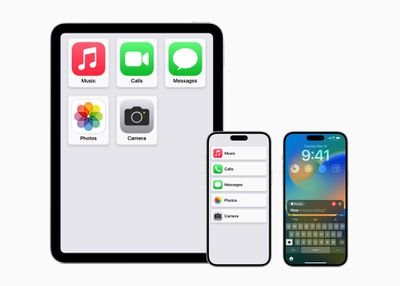
Apple accessibility iPad iPhone 14 Pro Max Home Screen
Apple says that the "new software features for cognitive, speech, and vision accessibility are coming later this year," which strongly suggests that they will be part of iOS 17, iPadOS 17, and macOS 14. The new operating systems are expected to be previewed at WWDC in early June before launching in the fall.

Assistive Access

Assistive Access distills iPhone and ‌iPad‌ apps and experiences to their core features. The mode includes a customized experience for Phone and FaceTime, which are combined into a single Calls app, as well as Messages, Camera, Photos, and Music. The feature offers a simplified interface with high contrast buttons and large text labels, as well as tools to help tailor the experience. For example, users can choose between a more visual, grid-based layout for their Home Screen and apps, or a row-based layout for users who prefer text.
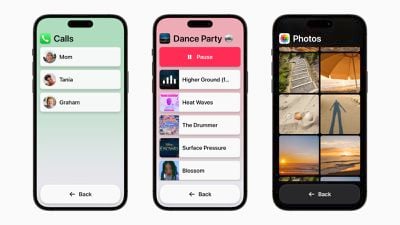
assistive access mode apps

Live Speech and Personal Voice Advance Speech Accessibility

Live Speech on the iPhone, ‌iPad‌, and Mac allows users to type what they want to say and have it spoken out loud during phone and ‌FaceTime‌ calls, as well as in-person conversations. Users can also save commonly used phrases to chime into conversations quickly.
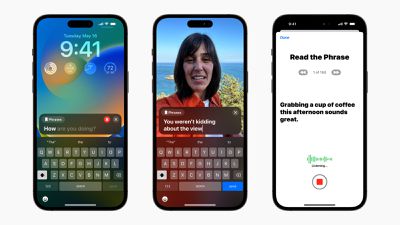
live speech
Users at risk of losing their ability to speak, such as those with a recent diagnosis of amyotrophic lateral sclerosis (ALS), can use Personal Voice to create a digital voice that sounds like them. Users simply need to read along with a randomized set of text prompts to record 15 minutes of audio on an iPhone or ‌iPad‌. The feature uses on-device machine learning to keep users' information secure and private, and integrates with Live Speech so users can speak with their Personal Voice.

Detection Mode in Magnifier and Point and Speak

In the Magnifier app, Point and Speak helps users interact with physical objects that have several text labels. For example, while using a household appliance, Point and Speak combines input from the Camera app, the LiDAR Scanner, and on-device machine learning to announce the text on buttons as users move their finger across the keypad.

Point and Speak is built into the Magnifier app on iPhone and ‌iPad‌, works with VoiceOver, and can be used with other Magnifier features such as People Detection, Door Detection, and Image Descriptions to help users navigate their physical environment more effectively.

Other Features

  • Deaf or hard-of-hearing users can pair Made for iPhone hearing devices directly to a Mac with specific customization options.
  • Voice Control gains phonetic suggestions for text editing so users who type with their voice can choose the right word out of several that might sound similar, like "do," "due," and "dew."
  • Voice Control Guide helps users learn tips and tricks about using voice commands as an alternative to touch and typing.
  • Switch Control can now be activated to turn any switch into a virtual video game controller.
  • Text Size is now easier to adjust across Mac apps including Finder, Messages, Mail, Calendar, and Notes.
  • Users who are sensitive to rapid animations can automatically pause images with moving elements, such as GIFs, in Messages and Safari.
  • Users can customize the speed at which Siri speaks to them, with options ranging from 0.8x to 2x.
  • Shortcuts gains a new "Remember This" action, helping users with cognitive disabilities create a visual diary in the Notes app.

Related Forums: iOS 17, iPadOS 17

Popular Stories

Apple Event Logo

Apple's Next Era Begins September 1

Thursday May 7, 2026 10:36 am PDT by
Apple recently announced that Tim Cook will be stepping down as CEO later this year, after 15 years of leading the company. Effective September 1, Apple's hardware engineering chief John Ternus will become the company's next CEO, while Cook will become executive chairman of Apple's board of directors. In his new role, Apple said Cook will assist with "certain aspects" of the company,...
Instagram Feature 2

PSA: Instagram Encrypted Messaging Ends on Friday, May 8

Tuesday May 5, 2026 8:24 am PDT by
Instagram will remove end-to-end encryption for direct messages between users from May 8, 2026. When the date comes around, Meta will potentially be able to see the contents of all messages between users on the social media platform. Encrypting messages has been an optional feature in Instagram since 2023, but in March of this year the social media platform quietly updated a help page to say ...
Apple Event Logo

Apple Just Released a New Accessory

Monday May 4, 2026 8:13 am PDT by
Apple today released a new Pride Edition Sport Loop for the Apple Watch. The band features a rainbow design with 11 colors of woven nylon yarns. The new Pride Edition Sport Loop is available to order now on Apple.com and in the Apple Store app in 40mm, 42mm, and 46mm sizes, and it will be available at Apple Store locations starting later this week. In the U.S., the band costs $49. There...

Top Rated Comments

Candy Apple+ Nutz Avatar
39 months ago
Props for making things easier for those who need it.
Score: 32 Votes (Like | Disagree)
AirunJae Avatar
39 months ago
I really love to see Apple continuing its efforts on accessibility, great stuff.
Score: 25 Votes (Like | Disagree)
drumcat Avatar
39 months ago

I don't see what's the point of divulging them now when WWDC is less than a month away? Any ideas?
From the linked Apple site:

>
Celebrating Global Accessibility Awareness Day Around the World
To celebrate Global Accessibility Awareness Day, this week Apple is introducing new features, curated collections, and more:
etc. etc.

Accessibility is a win for everyone. Once again, a heartfelt thanks to Apple for continuing to push this relentlessly. You never know when you'll need it.
Score: 20 Votes (Like | Disagree)
39 months ago
I can't wait, my wife is blind in one eye and half blind in the other due to a stroke from a violent assault. It is hard for her to see anything on the left since the vision is split in the brain. The larger icons, simplified interface would be a welcome relief I am sure.
Score: 18 Votes (Like | Disagree)
39 months ago


Detection Mode in Magnifier and Point and Speak

In the Magnifier app, Point and Speak helps users interact with physical objets that have several text labels. For example, while using a household appliance, Point and Speak combines input from the Camera app, the LiDAR Scanner, and on-device machine learning to announce the text on buttons as users move their finger across the keypad.

Point and Speak is built into the Magnifier app on iPhone and iPad, works with VoiceOver, and can be used with other Magnifier features such as People Detection, Door Detection, and Image Descriptions to help users navigate their physical environment more effectively.

For those wondering when Apple is going to enter the AI game… It’s this. This is the kind of stuff Apple will and has been using AI and machine learning to create for years.
Not a silly false info littered essay writing machine, actual useful stuff that will help people who need it without vacuuming their data.
Score: 16 Votes (Like | Disagree)
AirunJae Avatar
39 months ago

I don't see what's the point of divulging them now when WWDC is less than a month away? Any ideas?
Based on the fact that they released Final Cut Pro and Logic Pro for the iPad and now this? Sounds like it's going to be jam-packed and they're clearing the decks a bit.
Score: 16 Votes (Like | Disagree)










































