
Everything New in iOS 17.1 Beta 1 - GeekWebGuides
Skip to Content

Everything New in iOS 17.1 Beta 1

Just a week after releasing iOS 17, Apple has seeded the first beta of iOS 17.1 to developers. iOS 17.1 adds some features that Apple promised were coming to iOS 17 in the future, plus it refines and improves some existing features.
iOS 17
This guide covers everything new in the first iOS 17.1 beta.

Apple Music Favorites

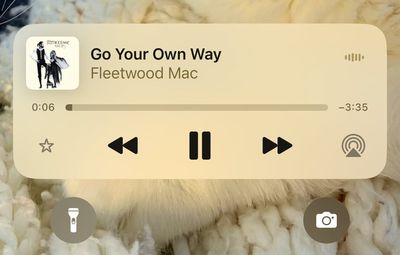
You can favorite songs, albums, playlists, and artists in the iOS 17.1 Music app. Favorited music is added to the Library and improves recommendations. Favoriting replaces the prior "Love" system and favoriting can be done from the Lock Screen's Now Playing widget.
apple music favorite
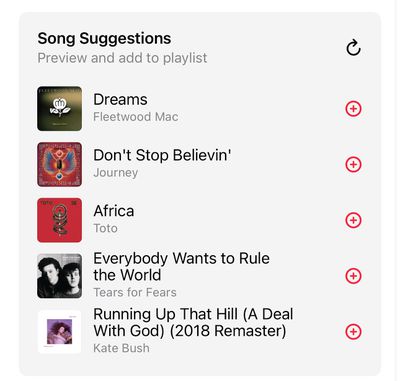
A star next to a track in an album means that it's a favorite, while a dot is next to the most played track. With the favorites system, the Music app is suggesting songs to add to playlists.
apple music song suggestions
Eventually, Apple plans to provide a Favorite Songs playlist and offer collaborative playlists, but these features do not appear to be implemented as of yet.

Apple Music Playlists

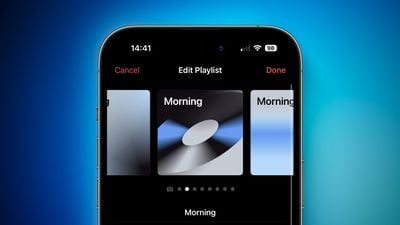
iOS 17 provides color-matched playlist artwork options that can be selected as a new customization option for your playlists. There are eight artwork styles that feature geometric shapes and gradients, with the colors featured pulled from the album artwork of the first song in the playlist.
iOS 17 Playlist Artwork Feature 1

AirDrop

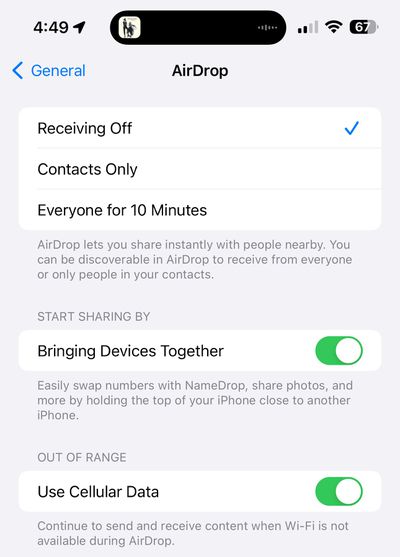
AirDrop transfers can now be completed over a cellular connection or Wi-Fi if you walk out of the range of the person you're sharing with. That means you will not have to stay close to someone if you are transferring a large number of files.
ios 17 1 airdrop
There is a new "Out of Range" toggle in the AirDrop section of the Settings menu that you can toggle to allow or disallow transfers over cellular.

NameDrop on Apple Watch

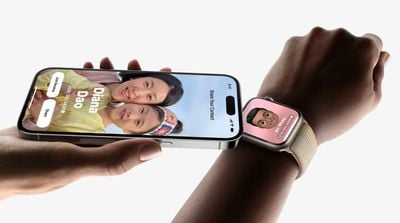
With watchOS 10.1 and iOS 17.1, an Apple Watch and an iPhone can now be used to exchange contact information through the NameDrop feature.
namedrop apple watch

Ringtones and Text Tones

The more than 20 new ringtones and text tones that were added in the launch version of iOS 17 have disappeared in the first beta of iOS 17.1, but Apple will likely re-add them in a later update.

Custom tones for Mail and Messages have been re-added.

UK Bank Balances in the Wallet App

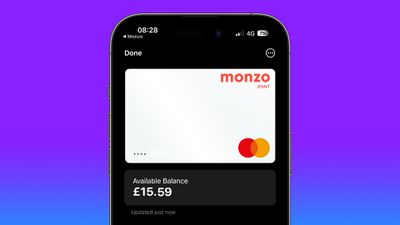
UK users can add their UK bank accounts to the Wallet app in iOS 17.1, allowing them to see their account balances, payments, purchases, and deposits.
uk bank account apple wallet 2

Books App

The "Reading Now" section in the Apple Books app has been renamed to "Read Now."

Journal App

There is no sign of the promised Journal app in iOS 17.1, but there are mentions of Journaling Suggestions in the code, which indicates that it could be coming before too long.

Dynamic Island Flashlight Indicator

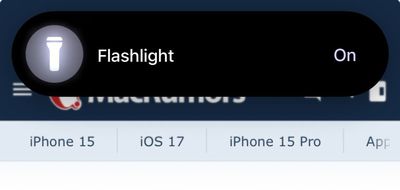
When the flashlight is activated on an iPhone 14 Pro, iPhone 14 Pro Max, iPhone 15, or iPhone 15 Plus, there is now a flashlight icon in the Dynamic Island that lets you know that It is on. The flashlight icon for the ‌Dynamic Island‌ was previously limited to the iPhone 15 Pro and iPhone 15 Pro Max.
dynamic island flashlight

Controller Support

iOS 17.1 includes support for the Nintendo Switch N64 Controller.

Extend Wallpaper

When you are setting up a new wallpaper, Apple has added an "Extend" option that can be used if the image does not fit the display.

Photo Shuffle

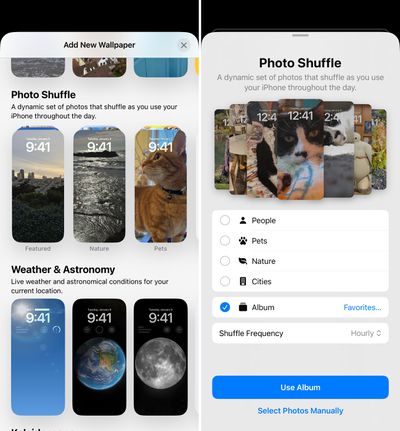
When you add a Photo Shuffle Lock Screen in iOS 17, you can select a specific album of photos that will be shown on the Lock Screen rather than having to rely on Apple's pre-selected options like People, Pets, or Nature.

When selecting any of the main Photo Shuffle images, you're brought into a customization screen where you can choose your Favorites album or opt for any other album you have created, giving you complete control over the images that show up on the Lock Screen. There was previously a tool for manually selecting photos, but being able to choose an entire album is quicker.
ios 17 1 photo shuffle
Photo Shuffle frequency remains the same at on tap, on lock, hourly, or daily.

Reachability

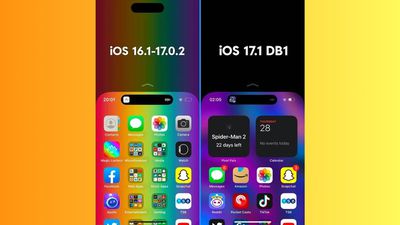
On iPhones with a ‌Dynamic Island‌, you'll now see a black background when you use the Reachability feature. In prior versions of iOS 17, a blurred version of the device's wallpaper was shown. The change to a black background prevents the ‌Dynamic Island‌ from being displayed twice when Reachability is used.
ios 17 1 reachability

More iOS 17.1 Beta 1 Features

Know of a feature that we left out in this list? Let us know in the comments below.

Related Forums: iOS 17, iPadOS 17

Popular Stories

iPhone Duo Trio

Here's What Apple's Apps Look Like on the iPhone Duo

Tuesday October 20, 2026 11:12 am PDT by
With just three days to go until the iPhone Duo is released, Apple is getting ready for the launch. Behind the scenes, the App Store now has screenshots of Apple's built-in apps running on the Duo. We've seen some apps in marketing materials, but images of the ones we haven't seen give us an idea of what it will be like using the iPhone Duo day to day. Many apps are shown in landscape...
Apple Creator Studio iWork suite

Apple Pulls Keynote, Pages and Numbers From App Store [Update: Back]

Thursday October 22, 2026 11:01 am PDT by
Apple has temporarily removed Keynote, Pages, and Numbers from the App Store, just after releasing an update that added iPhone Duo support and a new Intelligent Assistant. It is not clear if the apps were removed intentionally, or if it is a bug. Apple has not said when the apps will be reinstated, but if it was in error, they should return soon. Update: The Mac versions are back without...
M5 MacBook Pro

RIP, MacBook Ultra

Monday October 19, 2026 9:37 am PDT by
Apple today sent out invites for an experience in Los Angeles on Wednesday, October 28, and the "Pro and tell" tagline on the invitation likely means that the rumored MacBook models with touch-enabled OLED displays will stick with MacBook Pro branding instead of the once-rumored "MacBook Ultra" name. The long-rumored "iPhone Ultra" ended up being named iPhone Duo, so speculation that Apple...

Top Rated Comments

AppleInLVX Avatar
40 months ago
Let me guess, I'l *still* get endless recommendations on the front screen for artists that Apple should have learned ages ago I'm simply not interested in. You can keep the whole genre of Rap, and yet here come the recommendations. :rolleyes:
Score: 11 Votes (Like | Disagree)
40 months ago
I just want the
Journal app
Score: 11 Votes (Like | Disagree)
Jt69yupper Avatar
40 months ago
I like the new tones better. The old notification is so jarring. The new tones are less obnoxious.Please bring them back Apple.
Score: 9 Votes (Like | Disagree)
sjsharksfan12 Avatar
40 months ago

I like the music updates, however I hope I'll still be able to avoid liked songs to be added to the library.
I only like loving songs to organize my library and provide better suggestions.
Now I'm kind of confused about this. I just watched Zollotech's video and he showed the whole filtering thing that is now part of the library. I like that. What is giving me pause is if I like a song from the "New Music Mix" playlist, I don't necessarily want that song added to my personal library. I'm trying to keep some semblance of songs and albums in my library. It's one thing I didn't like about Spotify. On one hand, I want albums in my library. On the other I don't want single songs from 50 different albums clogging up my library. I don't have to like every song on said album. There's actually a lot of albums where there is a song I might not like, but I keep it because it's part of the album.

I hope that makes some sense because it may come across as a bit rambling.
Score: 7 Votes (Like | Disagree)
wallaby Avatar
40 months ago

I like the new tones better. The old notification is so jarring. The new tones are less obnoxious.Please bring them back Apple.
The new tones have been a welcome surprise!
Score: 6 Votes (Like | Disagree)
40 months ago

You’ve been able to create your own tones for years. Apple doesn’t provide the app to do it on the phone, that’s all.
It does. GarageBand.
Score: 6 Votes (Like | Disagree)
Latest Stories
iPhone Duo Launch Begins as First Orders Reach Customers
4 hours ago
1Password for Agents Keeps Your Passwords Hidden From AI
5 hours ago
iPhone Duo 24 Hours Later: Your Questions Answered
5 hours ago
Apple's iWork Apps Get 'Intelligent Assistant' and iPhone Duo Support
6 hours ago
Apple is Apparently Considering a Slightly Larger iPhone Duo
6 hours ago
Giant iPhone Duo Displays Coming to Four Apple Stores
7 hours ago
Apple Pulls Keynote, Pages and Numbers From App Store [Update: Back]
8 hours ago
Apple Updates More Apps With iPhone Duo Support
9 hours ago
Apple Will Label Apps 'Made for iPhone Duo' in App Store
12 hours ago
Amazon Takes $49 Off iPad With Prices Starting at $399.99
12 hours ago
F1 on Apple TV Now Available in Dolby Atmos
13 hours ago
Apple Reveals More Than 50 Apps That Will Be Updated for iPhone Duo
13 hours ago
Apple Blocks Certificates That Could Help Attackers Fake Websites
15 hours ago
Giant iPhone Duo Installations Spotted at Apple Fifth Avenue
15 hours ago
iPhone Duo 2 Prototypes Include Under-Display Face ID
16 hours ago
Tesla App Gains iPad and iPhone Duo Support
20 hours ago
Apple Reportedly Boosts iPhone Duo Orders by 44%
20 hours ago
Fortnite Returning to Australian App Store After Court Ruling
20 hours ago
Apple Ordered to Open iPhone to Rival App Stores in Australia
21 hours ago
Apple Suppliers Face Hurdles Cutting Circuit Board Emissions
21 hours ago
Things Updated for iPhone Duo With Adaptive Layout
21 hours ago
Simplicity and Siri AI Are HomeView's Killer Features, Apple Says
22 hours ago
iPhone Duo Reviewers Really Miss Face ID
1 day ago
Does the iPhone Duo Run Hot? Here's What Reviews Found
1 day ago
Apple Music's New Look is Now Live on Apple's Website
1 day ago
Anthropic Launches Claude Duet, a Proactive AI Agent
1 day ago
What 32,000 Folds Did to the iPhone Duo's Hinge
1 day ago
iPhone Duo's Hidden FaceTime Camera Takes 'Trash' Photos
1 day ago
iPhone Duo Has 'Edge Light' Feature That Debuted on Macs Last Year
1 day ago
Apple Support App Updated for iPhone Duo's Larger Display
1 day ago










































