WhatsApp has added new text formatting options to the chat platform, enabling users to message each other everything from grocery lists to step-by-step instructions in mid-conversation.
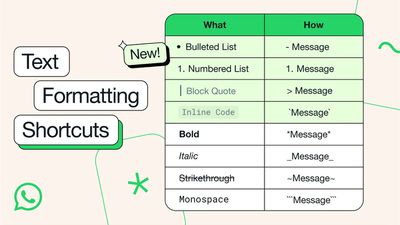
Following Wednesday's update, WhatsApp users can now use bulleted and numbered lists, block quotes, and inline code to communicate more effectively.
The new formatting options join the existing bold, italic, strikethrough, and monospaced formats that have been available to WhatsApp users for a while now.
How to Use New WhatsApp Text Formatting Options
Bulleted list: Start a new line with a - (dash) symbol, followed by a space.
Numbered list: Start a new line with 1 or 2 digits, followed by a period and a space.
Block quote: Start a new line with the > symbol, followed by a space.
Inline code: Wrap any code or text you want to highlight using the ` (backtick) symbol.
All of WhatsApp's text formatting options (Image: WhatsApp)
Last month, WhatsApp introduced a custom sticker creation tool for iPhone users running iOS 17 or later. In a future update, WhatsApp also plans to add passkey support, allowing iPhone users to sign in to the app with Face ID, Touch ID, or their device's passcode.
Wednesday October 14, 2026 7:00 am PDT by Juli Clover
Popular Meta chat app WhatsApp today gained guest calling, a feature that lets users invite anyone to join a voice or video call, even if the invitee doesn't have a WhatsApp account.
WhatsApp says everyone has access to free, end-to-end encrypted calls with no time limits and support for up to 32 people at once.
A guest joining a call needs permission from the call host, and guests will...
WhatsApp is developing an optional in-app browser for its iPhone app that would let users open any link shared in chats without leaving the app, according to WABetaInfo.
A new "In-app browser" option under Settings and Chats would let users enable the feature or continue opening links in their default browser. Users would also be able to clear cookies, cache, and other browsing data. The...
Tuesday October 20, 2026 11:12 am PDT by Juli Clover
With just three days to go until the iPhone Duo is released, Apple is getting ready for the launch. Behind the scenes, the App Store now has screenshots of Apple's built-in apps running on the Duo. We've seen some apps in marketing materials, but images of the ones we haven't seen give us an idea of what it will be like using the iPhone Duo day to day.
Many apps are shown in landscape...
Wish iMessage would add more features - not gimmicky ones, but really useful ones like WhatsApp has. Lot of our clients prefer to use WhatsApp to communicate, instead of emails. WhatsApp is very very useful for business chats.
iMessage on other hand is not intuitive or business user friendly much...
Wish iMessage would add more features - not gimmicky ones, but really useful ones like WhatsApp has. Lot of our clients prefer to use WhatsApp to communicate, instead of emails. WhatsApp is very very useful for business chats.
iMessage on other hand is not intuitive or business user friendly much...
Sometimes in these threads it seems that a lot of people think that WhatsApp only gets used because some people aren't blessed with iMessage. Well, as you pointed out WhatsApp is a very well put together app, simple and effective.
Wish iMessage would add more features - not gimmicky ones, but really useful ones like WhatsApp has. Lot of our clients prefer to use WhatsApp to communicate, instead of emails. WhatsApp is very very useful for business chats.
iMessage on other hand is not intuitive or business user friendly much...
Surely iMessage as a business tool is a non-starter anyway due to its single-platform nature? A business communications app for me has to be cross platform, if I can't message colleagues on Windows and Linux with it then it's no use.
Apple's first foldable iPhone, with a book-style design featuring a 5.4-inch outer display and a 7.6-inch inner display with a minimal crease down the middle.




























![Apple Pulls Keynote, Pages and Numbers From App Store [Update: Back]](https://images.macrumors.com/t/Okb7kitB_gNr6qe5Pex9nQIysD8=/112x112/article-new/2026/01/Apple-Creator-Studio-iWork-suite.jpg)





















