Astropad's Paper-Like Screen Protector and Apple Pencil Tip Works With M4 iPad Pro

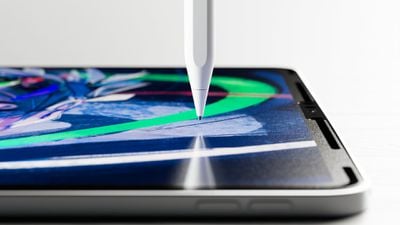
Astropad today confirmed that its updated version of Rock Paper Pencil is compatible with the 2024 iPad Pro and iPad Air models. Rock Paper Pencil is a screen protector and Apple Pencil tip duo designed to mimic the feel of writing on paper with a pen.
rock paper pencil 3
Rock Paper Pencil combines a removable screen protector with a unique ‌Apple Pencil‌ tip to replicate the feel of writing on paper. The NanoCling Screen Protector adheres to the iPad's display using static cling, and it can easily be put on and taken off when it's not needed, with no adhesive residue.

The Pencil tip can hold up to heavy daily use with a wear-resistant copper alloy core and palladium coating. The tip is equivalent to a standard 0.7mm ballpoint pen for a pleasant note taking experience. The kit includes two pencil tips and a protective storage sleeve for the screen protector.

Rock Paper Pencil is priced at $40 and can be purchased from the Astropad website. The 13-inch version is compatible with the 13-inch ‌iPad Pro‌ and ‌iPad Air‌, while there are separate versions for the 11-inch ‌iPad Air‌ and the 11-inch ‌iPad Pro‌.

Popular Stories

Apple Logo Zoomed

Tim Cook Teases Plans for Apple's Upcoming 50th Anniversary

Thursday February 5, 2026 12:54 pm PST by
Apple turns 50 this year, and its CEO Tim Cook has promised to celebrate the milestone. The big day falls on April 1, 2026. "I've been unusually reflective lately about Apple because we have been working on what do we do to mark this moment," Cook told employees today, according to Bloomberg's Mark Gurman. "When you really stop and pause and think about the last 50 years, it makes your heart ...
wwdc sans text feature

Apple Rumored to Announce New Product on February 19

Thursday February 5, 2026 12:22 pm PST by
Apple plans to announce the iPhone 17e on Thursday, February 19, according to Macwelt, the German equivalent of Macworld. The report, citing industry sources, is available in English on Macworld. Apple announced the iPhone 16e on Wednesday, February 19 last year, so the iPhone 17e would be unveiled exactly one year later if this rumor is accurate. It is quite uncommon for Apple to unveil...
Finder Siri Feature

Why Apple's iOS 26.4 Siri Upgrade Will Be Bigger Than Originally Promised

Friday February 6, 2026 3:06 pm PST by
In the iOS 26.4 update that's coming this spring, Apple will introduce a new version of Siri that's going to overhaul how we interact with the personal assistant and what it's able to do. The iOS 26.4 version of Siri won't work like ChatGPT or Claude, but it will rely on large language models (LLMs) and has been updated from the ground up. Upgraded Architecture The next-generation...
iOS 26

iOS 26.3 and iOS 26.4 Will Add These New Features to Your iPhone

Tuesday February 3, 2026 7:47 am PST by
While the iOS 26.3 Release Candidate is now available ahead of a public release, the first iOS 26.4 beta is likely still at least a week away. Following beta testing, iOS 26.4 will likely be released to the general public in March or April. Below, we have recapped known or rumored iOS 26.3 and iOS 26.4 features so far. iOS 26.3 iPhone to Android Transfer Tool iOS 26.3 makes it easier...
maxresdefault

Apple Shows Off a Key Reason to Upgrade to the iPhone 17

Saturday February 7, 2026 9:26 am PST by
Apple today shared an ad that shows how the upgraded Center Stage front camera on the latest iPhones improves the process of taking a group selfie. "Watch how the new front facing camera on iPhone 17 Pro takes group selfies that automatically expand and rotate as more people come into frame," says Apple. While the ad is focused on the iPhone 17 Pro and iPhone 17 Pro Max, the regular iPhone...


Top Rated Comments

motorazr Avatar
23 months ago

Sounds gimmicky
If you write, draw or sketch it’s the first thing I’ve found “fixes” the feeling and sound. It’s not quite paper, but it’s honestly a worth while $40 from my experience.

I don’t like screen protectors. I don’t use them generally. But this is so different; I’ve used iPad since day one (iPhone too) - I’ve tried countless stylus options that have come and gone (paper by 53 made an ok device long ago).

Apple Pencil fixed the accuracy issue all other styluses on iPads didn’t solve; but it felt gummy or slick depending on age of device and pressure. Also the sound was like tapping on glass over and over, to me maddening.

I prefer a scratchy but firm sound, reminds me of a sharp solid pencil; and the way it moves isn’t sticky or slick. It’s much more paper like in that way.

I don’t work for them, or with them, but honestly it’s a good tool I can’t recommend enough.
Score: 17 Votes (Like | Disagree)
motorazr Avatar
23 months ago
These are wonderful. Highly recommend.

Edit: I’ve owned two, first batch and updated. Both great.
Score: 8 Votes (Like | Disagree)
aevan Avatar
23 months ago

Am considering getting a screen protector for my M2 iPP, either Paperlike or Astropad, in hopes the surface will be more paper-like for sketching (aside from occasionally marking up PDFs, I don't use my stylus for writing).

Astropad appeals because it's removable and Paperlike is said to slightly reduce clarity (especially noticeable in dark mode and when film and photo editing) and to produce rainbow effects. OTOH Paperlike's surface is said to be excellent for sketching with the Apple Pencil as is (without a special tip) though it does go through tips faster.

Any reccos? Thanks.
I used both versions of Astropad's protector and Paperlike v2. The feel is quite comparable, and Astropad one comes with a metal nib that enhances the feel even further (although you don't have to use it).

One downside of removable screen protectors (like the Astropad one) is that on edges of the screen, you can sometimes feel the gap, the protector feels slightly loose (but only edges, not a big deal). On the other hand, they have 2 really big benefits: 1. you can remove and reapply them whenever you want and 2. installation is much, much easier and completely bubble-free.

I would suggest the Astropad one, for sure.
Score: 4 Votes (Like | Disagree)
PurringPigeon Avatar
23 months ago
I have used both version on my iPad pro, I do not recommend them. They put a gasoline oil slick on water look on the screen which is highly noticeable on very dark and very light screens. Version 2 seems even more prone to it. I like the feel of drawing on it, but I have abandoned it as it is just to obfuscating for me.
Score: 4 Votes (Like | Disagree)
jhwalker Avatar
23 months ago
This is a really excellent product. I love the feel of drawing with the screen protector in-place and using the replacement stylus. And the look of the protector is "matte" which I'd not be surprised pretty much replicates the effect of the new $$$$ matte coating you can order with the new iPads.
Score: 4 Votes (Like | Disagree)
tobybrut Avatar
23 months ago

Am considering getting a screen protector for my M2 iPP, either Paperlike or Astropad, in hopes the surface will be more paper-like for sketching (aside from occasionally marking up PDFs, I don't use my stylus for writing).

Astropad appeals because it's removable and Paperlike is said to slightly reduce clarity (especially noticeable in dark mode and when film and photo editing) and to produce rainbow effects. OTOH Paperlike's surface is said to be excellent for sketching with the Apple Pencil as is (without a special tip) though it does go through tips faster.

Any reccos? Thanks.
Paperlike and Astropad will both reduce clarity on the screen and muddy the blacks. I've tried both. Astropad, IMO, is superior because you can remove it. I absolutely hated losing the clarity of my nice glossy mini-LED screen so I removed Paperlike permanently and didn't get anything for a long time until Astropad came along. But now there are cheap alternatives on Amazon, too, that will do the same thing as Astropad, so you actually have more than two options.

I don't understand why anyone would ruin their incredible OLED or mini-LED screen permanently. That goes for Apple's nano-texture screen as well. You might as well have an ordinary LCD screen on an iPad Air. I would recommend getting any that is removable. That way you can enjoy your mini-LED screen unless you have a need to draw.
Score: 3 Votes (Like | Disagree)