Astropad's Paper-Like Screen Protector and Apple Pencil Tip Works With M4 iPad Pro - GeekWebGuides
Skip to Content

Astropad's Paper-Like Screen Protector and Apple Pencil Tip Works With M4 iPad Pro

Astropad today confirmed that its updated version of Rock Paper Pencil is compatible with the 2024 iPad Pro and iPad Air models. Rock Paper Pencil is a screen protector and Apple Pencil tip duo designed to mimic the feel of writing on paper with a pen.
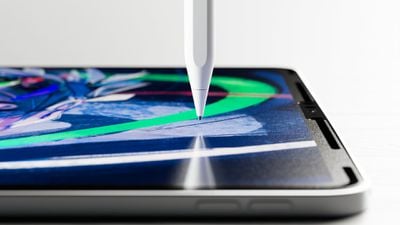
rock paper pencil 3
Rock Paper Pencil combines a removable screen protector with a unique ‌Apple Pencil‌ tip to replicate the feel of writing on paper. The NanoCling Screen Protector adheres to the iPad's display using static cling, and it can easily be put on and taken off when it's not needed, with no adhesive residue.

The Pencil tip can hold up to heavy daily use with a wear-resistant copper alloy core and palladium coating. The tip is equivalent to a standard 0.7mm ballpoint pen for a pleasant note taking experience. The kit includes two pencil tips and a protective storage sleeve for the screen protector.

Rock Paper Pencil is priced at $40 and can be purchased from the Astropad website. The 13-inch version is compatible with the 13-inch ‌iPad Pro‌ and ‌iPad Air‌, while there are separate versions for the 11-inch ‌iPad Air‌ and the 11-inch ‌iPad Pro‌.

Popular Stories

M5 MacBook Pro

RIP, MacBook Ultra

Monday October 19, 2026 9:37 am PDT by
Apple today sent out invites for an experience in Los Angeles on Wednesday, October 28, and the "Pro and tell" tagline on the invitation likely means that the rumored MacBook models with touch-enabled OLED displays will stick with MacBook Pro branding instead of the once-rumored "MacBook Ultra" name. The long-rumored "iPhone Ultra" ended up being named iPhone Duo, so speculation that Apple...
iPhone Duo Trio

Here's What Apple's Apps Look Like on the iPhone Duo

Tuesday October 20, 2026 11:12 am PDT by
With just three days to go until the iPhone Duo is released, Apple is getting ready for the launch. Behind the scenes, the App Store now has screenshots of Apple's built-in apps running on the Duo. We've seen some apps in marketing materials, but images of the ones we haven't seen give us an idea of what it will be like using the iPhone Duo day to day. Many apps are shown in landscape...
apple pro tell logo

Apple Announcing New Products Next Week: 'Pro and Tell'

Monday October 19, 2026 9:05 am PDT by
Apple's Greg Joswiak today hinted at new product announcements coming next week, sharing a social media post that says "Can't wait to pro and tell next week." Rumors suggest Apple is planning to debut the new MacBook Pro with an OLED touchscreen display, an M6 entry-level MacBook Pro, an M6 iMac, an iPad mini with an OLED display. Can't wait to pro and tell next week....

Top Rated Comments

motorazr Avatar
32 months ago

Sounds gimmicky
If you write, draw or sketch it’s the first thing I’ve found “fixes” the feeling and sound. It’s not quite paper, but it’s honestly a worth while $40 from my experience.

I don’t like screen protectors. I don’t use them generally. But this is so different; I’ve used iPad since day one (iPhone too) - I’ve tried countless stylus options that have come and gone (paper by 53 made an ok device long ago).

Apple Pencil fixed the accuracy issue all other styluses on iPads didn’t solve; but it felt gummy or slick depending on age of device and pressure. Also the sound was like tapping on glass over and over, to me maddening.

I prefer a scratchy but firm sound, reminds me of a sharp solid pencil; and the way it moves isn’t sticky or slick. It’s much more paper like in that way.

I don’t work for them, or with them, but honestly it’s a good tool I can’t recommend enough.
Score: 17 Votes (Like | Disagree)
motorazr Avatar
32 months ago
These are wonderful. Highly recommend.

Edit: I’ve owned two, first batch and updated. Both great.
Score: 8 Votes (Like | Disagree)
32 months ago
I have used both version on my iPad pro, I do not recommend them. They put a gasoline oil slick on water look on the screen which is highly noticeable on very dark and very light screens. Version 2 seems even more prone to it. I like the feel of drawing on it, but I have abandoned it as it is just to obfuscating for me.
Score: 4 Votes (Like | Disagree)
aevan Avatar
32 months ago

Am considering getting a screen protector for my M2 iPP, either Paperlike or Astropad, in hopes the surface will be more paper-like for sketching (aside from occasionally marking up PDFs, I don't use my stylus for writing).

Astropad appeals because it's removable and Paperlike is said to slightly reduce clarity (especially noticeable in dark mode and when film and photo editing) and to produce rainbow effects. OTOH Paperlike's surface is said to be excellent for sketching with the Apple Pencil as is (without a special tip) though it does go through tips faster.

Any reccos? Thanks.
I used both versions of Astropad's protector and Paperlike v2. The feel is quite comparable, and Astropad one comes with a metal nib that enhances the feel even further (although you don't have to use it).

One downside of removable screen protectors (like the Astropad one) is that on edges of the screen, you can sometimes feel the gap, the protector feels slightly loose (but only edges, not a big deal). On the other hand, they have 2 really big benefits: 1. you can remove and reapply them whenever you want and 2. installation is much, much easier and completely bubble-free.

I would suggest the Astropad one, for sure.
Score: 4 Votes (Like | Disagree)
32 months ago
This is a really excellent product. I love the feel of drawing with the screen protector in-place and using the replacement stylus. And the look of the protector is "matte" which I'd not be surprised pretty much replicates the effect of the new $$$$ matte coating you can order with the new iPads.
Score: 4 Votes (Like | Disagree)
32 months ago

Am considering getting a screen protector for my M2 iPP, either Paperlike or Astropad, in hopes the surface will be more paper-like for sketching (aside from occasionally marking up PDFs, I don't use my stylus for writing).

Astropad appeals because it's removable and Paperlike is said to slightly reduce clarity (especially noticeable in dark mode and when film and photo editing) and to produce rainbow effects. OTOH Paperlike's surface is said to be excellent for sketching with the Apple Pencil as is (without a special tip) though it does go through tips faster.

Any reccos? Thanks.
Paperlike and Astropad will both reduce clarity on the screen and muddy the blacks. I've tried both. Astropad, IMO, is superior because you can remove it. I absolutely hated losing the clarity of my nice glossy mini-LED screen so I removed Paperlike permanently and didn't get anything for a long time until Astropad came along. But now there are cheap alternatives on Amazon, too, that will do the same thing as Astropad, so you actually have more than two options.

I don't understand why anyone would ruin their incredible OLED or mini-LED screen permanently. That goes for Apple's nano-texture screen as well. You might as well have an ordinary LCD screen on an iPad Air. I would recommend getting any that is removable. That way you can enjoy your mini-LED screen unless you have a need to draw.
Score: 3 Votes (Like | Disagree)
Latest Stories
F1 on Apple TV Now Available in Dolby Atmos
15 minutes ago
Apple Reveals More Than 50 Apps That Will Be Updated for iPhone Duo
46 minutes ago
Apple Blocks Certificates That Could Help Attackers Fake Websites
2 hours ago
Giant iPhone Duo Installations Spotted at Apple Fifth Avenue
3 hours ago
iPhone Duo 2 Prototypes Include Under-Display Face ID
3 hours ago
Tesla App Gains iPad and iPhone Duo Support
7 hours ago
Apple Reportedly Boosts iPhone Duo Orders by 44%
7 hours ago
Fortnite Returning to Australian App Store After Court Ruling
8 hours ago
Apple Ordered to Open iPhone to Rival App Stores in Australia
8 hours ago
Apple Suppliers Face Hurdles Cutting Circuit Board Emissions
9 hours ago
Things Updated for iPhone Duo With Adaptive Layout
9 hours ago
Simplicity and Siri AI Are HomeView's Killer Features, Apple Says
9 hours ago
iPhone Duo Reviewers Really Miss Face ID
14 hours ago
Does the iPhone Duo Run Hot? Here's What Reviews Found
16 hours ago
Apple Music's New Look is Now Live on Apple's Website
16 hours ago
Anthropic Launches Claude Duet, a Proactive AI Agent
17 hours ago
What 32,000 Folds Did to the iPhone Duo's Hinge
18 hours ago
iPhone Duo's Hidden FaceTime Camera Takes 'Trash' Photos
19 hours ago
iPhone Duo Has 'Edge Light' Feature That Debuted on Macs Last Year
20 hours ago
Apple Support App Updated for iPhone Duo's Larger Display
20 hours ago
Amazon Sweetens the Deal on Entry-Level 16-Inch MacBook Pro With $570 Off
20 hours ago
iPhone Duo Tips Over on MagSafe Stands When Unfolded
20 hours ago
Apple Music's New Look Officially Announced
22 hours ago
iPhone Duo Supports Apple Pencil Starting With iOS 27.2
23 hours ago
iPhone Duo Accessories Roundup: Cases and Screen Protectors From OtterBox, ZAGG, and More
23 hours ago
Apple Stores Will Have 'Limited' Availability of iPhone Duo for Walk-In Customers
1 day ago
iPhone Duo Reviews Explain Why Device is Both 'Fun' and 'Frustrating'
1 day ago
Apple Says 'Reachability' Feature Coming to iPhone Duo Later This Year
1 day ago
Loop Capital Cuts Apple Rating Over iPhone Sales Outlook
1 day ago
Apple Stores in Bordeaux and Lille Looted During French Protests
1 day ago











































