iOS 18 Tidbits: Enhanced Flashlight Controls, Control Center Edit Mode, and More

With the first beta of iOS 18 now in the hands of developers, there are a handful of smaller changes and quality-of-life improvements being discovered in Apple's iPhone software that are worth highlighting.
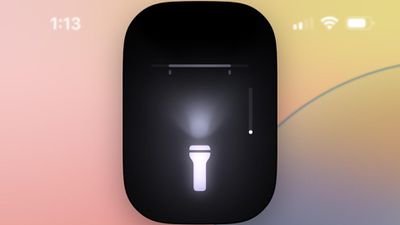
flashlight interface
First up, Apple has improved the flashlight controls. In iOS 18, turning on the Flashlight via the Lock Screen or Control Center now brings up a small interface that lets you adjust the flood of light from the LED. In other words, you now have granular control over not only the intensity of light, but also the breadth of illumination.

In the new Passwords app, you can generate QR codes for saved Wi-Fi passwords, allowing them to be shared more easily with others.
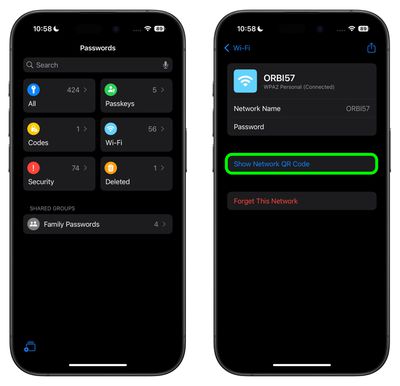
passwords app wi fi qr code
In the Settings app, usually you scroll down to get to settings for individual apps installed on your iPhone. In the iOS 18 beta, Apple has moved settings for apps to a separate screen, so now you tap "Apps" at the bottom of the menu to access a separate searchable list.
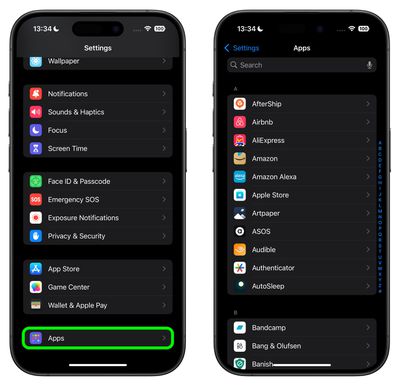
settings app menu
In the redesigned Control Center, which now extends to multiple screens, tapping a new + icon in the top-left corner (or long-pressing on an empty area) reveals minus icons that let you remove individual buttons, similar to how you remove apps from the Home Screen, and there's a new Add a Control option at the bottom. There are also anchors that let you resize buttons or cards like the media player. So if you've always wanted to make the Shazam icon a 4x4 button, for example, now you can.
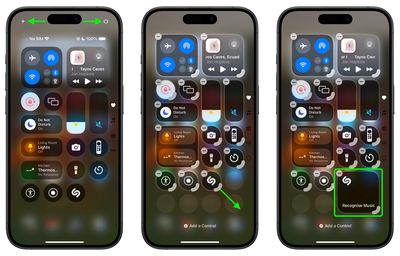
control center edit mode
Apple in iOS 18 has also added a new Power button to the top-right corner of the Control Center, so you don't have to physically hold the Side button to bring up the "Slide to power off" screen.

In the Weather app, you can show forecasts for separate Home and Work locations. The new Home and Work labels can be toggled in Settings ➝ Apps ➝ Weather, under a new "Locations" section. Home and work locations can be updated by editing your Contacts card.
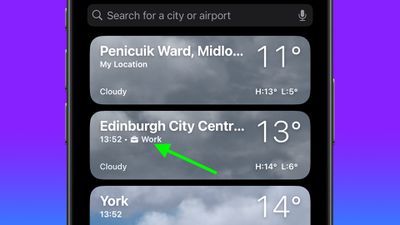
weather home location
The first developer beta of iOS 18 is now available, with a public beta following in July. Apple will officially release the new iPhone operating system to the public in the fall.


Related Forums: iOS 18, iPadOS 18

Popular Stories

Apple Logo Zoomed

Tim Cook Teases Plans for Apple's Upcoming 50th Anniversary

Thursday February 5, 2026 12:54 pm PST by
Apple turns 50 this year, and its CEO Tim Cook has promised to celebrate the milestone. The big day falls on April 1, 2026. "I've been unusually reflective lately about Apple because we have been working on what do we do to mark this moment," Cook told employees today, according to Bloomberg's Mark Gurman. "When you really stop and pause and think about the last 50 years, it makes your heart ...
wwdc sans text feature

Apple Rumored to Announce New Product on February 19

Thursday February 5, 2026 12:22 pm PST by
Apple plans to announce the iPhone 17e on Thursday, February 19, according to Macwelt, the German equivalent of Macworld. The report, citing industry sources, is available in English on Macworld. Apple announced the iPhone 16e on Wednesday, February 19 last year, so the iPhone 17e would be unveiled exactly one year later if this rumor is accurate. It is quite uncommon for Apple to unveil...
Finder Siri Feature

Why Apple's iOS 26.4 Siri Upgrade Will Be Bigger Than Originally Promised

Friday February 6, 2026 3:06 pm PST by
In the iOS 26.4 update that's coming this spring, Apple will introduce a new version of Siri that's going to overhaul how we interact with the personal assistant and what it's able to do. The iOS 26.4 version of Siri won't work like ChatGPT or Claude, but it will rely on large language models (LLMs) and has been updated from the ground up. Upgraded Architecture The next-generation...
iOS 26

iOS 26.3 and iOS 26.4 Will Add These New Features to Your iPhone

Tuesday February 3, 2026 7:47 am PST by
While the iOS 26.3 Release Candidate is now available ahead of a public release, the first iOS 26.4 beta is likely still at least a week away. Following beta testing, iOS 26.4 will likely be released to the general public in March or April. Below, we have recapped known or rumored iOS 26.3 and iOS 26.4 features so far. iOS 26.3 iPhone to Android Transfer Tool iOS 26.3 makes it easier...
maxresdefault

Apple Shows Off a Key Reason to Upgrade to the iPhone 17

Saturday February 7, 2026 9:26 am PST by
Apple today shared an ad that shows how the upgraded Center Stage front camera on the latest iPhones improves the process of taking a group selfie. "Watch how the new front facing camera on iPhone 17 Pro takes group selfies that automatically expand and rotate as more people come into frame," says Apple. While the ad is focused on the iPhone 17 Pro and iPhone 17 Pro Max, the regular iPhone...

Top Rated Comments

PsykX Avatar
22 months ago

Nice features BUT is it just me or is the UI design all over the place and very Un-Apple like?
The new Home Screen is indeed one of the strangest Apple designs with those tinted icons.
I was skeptical in the demo, and after trying it myself, it's awful.
Score: 15 Votes (Like | Disagree)
contacos Avatar
22 months ago
Nice features BUT is it just me or is the UI design all over the place and very Un-Apple like?
Score: 13 Votes (Like | Disagree)
anakinfan8 Avatar
22 months ago
Really liking all these refinements so far. I hope we get to import from 1Password eventually.
Score: 11 Votes (Like | Disagree)
zorinlynx Avatar
22 months ago

Unfortunately, still just disconnects with Dev Beta 1.
I'm glad they're leaving this the same.

When I disconnect WiFi, it's almost always a temporary thing.

Like for example: "Aww crap this network is ******, I'm going to disconnect and use cellular for now."

I like that it turns back on eventually, so I don't forget to do so. It's never turned on sooner than I've wanted; usually it's the next day or when I'm at a new location.

I haven't wanted to turn Wifi completely off in years. I'd prefer the option I use the most to be in the control center, and the thing I do 2-3 times a decade to be in Settings.
Score: 8 Votes (Like | Disagree)
petitpiton Avatar
22 months ago
The flashlight controls must be hardware specific. Don't have it on my 13 PM.
Score: 7 Votes (Like | Disagree)
Dorv Avatar
22 months ago

Also, there’s been control over LED intensity on the flashlight for years - it used to be a 3D Touch action, but now you can just press + hold on the icon in Control Center.
You must have missed this part of the article:


"In other words, you now have granular control over not only the intensity of light, but also the breadth of illumination."
Score: 7 Votes (Like | Disagree)