Apple's iPhone 16 and iPhone 16 Plus models have adopted the Action button that was exclusive to the iPhone 15 Pro models last year. The Action button replaces the traditional Ring/Silent switch – a staple of the iPhone since it launched in 2007. Here's a rundown of its functions.

The Action button replaces the single-function switch used to toggle between ring and silent, offering additional options so users can choose between quickly accessing the camera or flashlight, activate Voice Memos, Focus modes, Translate, and accessibility features like Magnifier. Users can also associate it with Shortcuts for more options.
A press-and-hold gesture with fine-tuned haptic feedback and visual cues in the Dynamic Island ensure the Action button launches the intended action, which users can customize in Settings and assign to different actions. Here's what it can be programmed to do:
- Accessibility: Access to various accessibility settings, such as VoiceOver, Zoom, AssistiveTouch, Live Speech, and more.
- Shortcuts: Open your favorite app, or run a shortcut created in or downloaded from the Shortcuts app, such as sending a message, playing a playlist, or controlling smart home devices.
- Silent Mode: Like the Ring/Silent switch on existing iPhone models, toggle silent mode on or off, which will mute or unmute the ringer and alerts.
- Camera: Take a photo, selfie, video, portrait, or portrait selfie with a single press of the Action button.
- Controls: Quickly access your favorite Control Center button.
- Flashlight: Turn on or off the flashlight on the back of the device.
- Focus: Activate or deactivate a Focus mode.
- Magnifier: Activate the Magnifier app to use the iPhone's camera as a magnifying glass to zoom in on small text or objects.
- Recognize Music: Launch the iPhone's built-in Music Recognition feature powered by Shazam.
- Translate: Launch the Translate app and start a conversation or text translation with a single press of the Action button.
- Voice Memos: Start or stop recording a voice memo with the Voice Memos app.
Customizing the Action Button
If you want to change the Action button's default Ring/Silent behavior, here's how to customize it in iOS 18. Open Settings ➝ Action Button, and swipe left and right to browse the options.
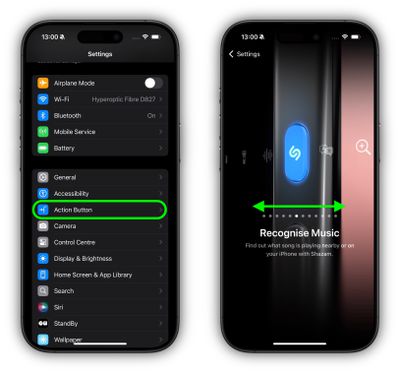
If there are additional options for a selected action, two chevrons will appear below the action. For the Shortcut, Control, and Accessibility actions, you need to tap the blue button below the action and select a specific option, otherwise the Action button does nothing.
Fine-tuned haptic feedback and visual cues in the Dynamic Island accompany every long press of the Action button, ensuring you know it is launching the intended action. Meanwhile, a regular short press confirms whatever setting you have customized it to control.