

Apple in October will release macOS Sequoia 15.1, bringing to Macs the first Apple Intelligence features such as Writing Tools, new Siri features, Smart Replies, and more. In addition, macOS 15.1 adds a handful of welcome tweaks and improvements to existing Mac capabilities.

Here's what we can expect from the first major update to macOS Sequoia later this month. Note that Apple Intelligence features require Macs powered by Apple silicon.
iPhone Mirroring Drag and Drop Support
One of the most anticipated iPhone Mirroring features coming in macOS 15.1 is support for drag and drop. After updating to the new software, you will be able to drag files from an iPhone to a Mac and vice versa.
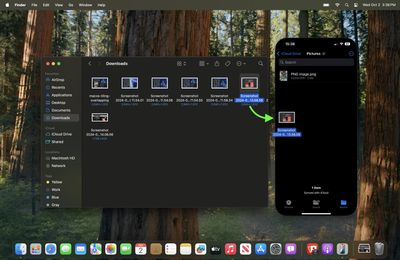
iPhone Mirroring makes file transfers between devices effortless, even when the iPhone is locked and charging. With an iPhone running iOS 18.1, you can drag files, such as photos, from your Mac directly to the open Photos app on your iPhone, and they'll transfer instantly. For PDFs, open the Files app and drag the document from your Mac to the iPhone. Transferring files from iPhone to Mac follows the same process — simply drag the file to your desired location on the Mac.
New Low Power Mode Toggle
Low Power Mode is a long-standing iPhone feature for conserving battery, and was introduced to the Mac with macOS Monterey. Since then, it has remained hidden in System Settings, but in macOS 15.1, Apple is simplifying access by adding a Low Power Mode toggle to the Battery menu for MacBook users, allowing it to be enabled or disabled in just two clicks.
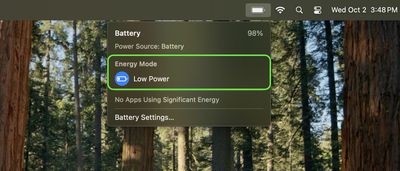
The battery icon also now turns yellow when Low Power Mode is active, similar to iOS. It's worth noting that some advanced settings, like automatically enabling Low Power Mode when unplugged, remain within System Settings. When enabled, Low Power Mode optimizes the system to conserve energy by slightly reducing performance, suspending background tasks, lowering screen brightness, and capping ProMotion display refresh rates at 60Hz where applicable.
Writing Tools
Apple Intelligence
You can select any text on your Mac and use Apple Intelligence to access Writing Tools for summaries and other features. The proofreading feature scans your text for spelling and grammar errors, providing suggestions for word choice and sentence structure improvements. You can quickly accept all recommendations or review them individually with accompanying explanations.

If you're looking to refine your writing style, the rewrite function allows for tone adjustment without altering the core content. You can choose from options such as Friendly, Professional, or Concise to tailor your message to your intended audience.

Additionally, the update introduces versatile summarization capabilities. You can select text and generate concise summaries in various formats, including paragraphs, key points, lists, or tables. This feature seamlessly integrates with apps like Mail and Messages, making it easier to distill and share written information.
Enhanced Siri
Apple Intelligence
The Siri window now offers greater flexibility, allowing you to position it anywhere on their screen. A new responsive glow animation provides visual feedback, indicating when Siri is actively listening without disrupting ongoing tasks.
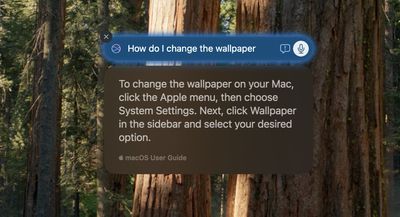
If you prefer typing, the Type to Siri feature can be quickly accessed by double-pressing the Command key, and it now includes suggested requests. Siri's improved contextual awareness also lets you ask follow-up questions without repeating previously established information.
The update also brings more natural language processing capabilities. Siri can now better understand and interpret you if you stumble over your words or change direction mid-sentence, making interactions feel more conversational and less rigid.
Lastly, Siri's knowledge base has been expanded to include comprehensive information about Apple products and support, so you can inquire about device features and settings. Siri can even locate specific settings even if you're unsure of their exact names.
Smart Replies and Mail Summaries
Apple Intelligence
To facilitate faster responses, Mail and Messages now include a Smart Reply feature. This intelligent system offers contextual quick-tap responses based on the content of received messages, allowing you to reply promptly with minimal effort.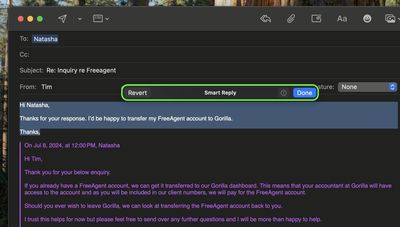
In Mail, a new summarize button allows you to quickly distill the content of incoming emails, providing concise overviews at a glance. This feature also extends to multiple Messages notifications and your Mail inbox, where brief summaries replace the first few lines of each message. Mail also prioritizes time-sensitive communications by automatically elevating them to the top of your inbox.
Photos Cleanup Tool
Apple Intelligence
With macOS Sequoia 15.1, Apple is bringing a powerful new feature to the Photos app called Clean Up. Thanks to advanced object detection algorithms, this editing tool can automatically identify potentially unwanted objects in your images, allowing you to effortlessly remove them.

At the same time, users retain full control over the editing process, with the ability to manually select objects for removal by clicking, circling, or brushing over them.

You can zoom in on images to meticulously remove smaller blemishes or imperfections using brush strokes. Notably, Clean Up is designed to preserve the integrity of main subjects like people, even if they are inadvertently selected during the editing process.
Transcription Summaries
Apple Intelligence
In macOS Sequoia, Apple added a transcription feature to Notes that lets you capture audio recordings and automatically generates a verbatim transcript of the content.
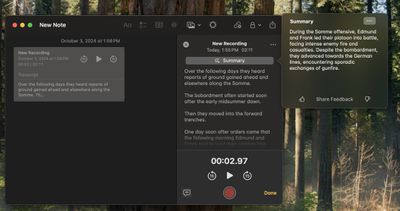
In macOS Sequoia 15.1, the feature also provides a concise summary of the transcribed text, offering a quick overview of the recorded material. The transcript is useful for recording lectures and meetings as it ensures that no important details are missed, while the addition of a summary provides a quick reference for key topics, action items, or main discussion points.
Focus Modes
Apple Intelligence
A dedicated new Reduce Interruptions Focus Mode filters out all but the most important notifications, ensuring you only see those that require your attention.
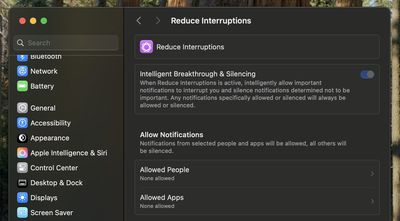
When customizing or creating a new Focus mode, there's a new option to enable Intelligent Breakthrough and Silencing. This feature lets critical notifications come through while muting less important ones, similar to how the Reduce Notifications Focus works.



/https://forums.macrumors.com/attachments/2432243/)























![Apple Pulls Keynote, Pages and Numbers From App Store [Update: Back]](https://images.macrumors.com/t/Okb7kitB_gNr6qe5Pex9nQIysD8=/112x112/article-new/2026/01/Apple-Creator-Studio-iWork-suite.jpg)





















