iFixit Releases New USB-Powered Tool to Remove iPhone 16's Battery
The batteries inside the iPhone 16 and iPhone 16 Plus use an innovative type of adhesive that can be loosened with low-voltage electrical current. Apple's official repair guide recommends using a 9V battery with alligator clips for this process, but DIY repair website iFixit has released a new USB-powered tool as an alternative solution.
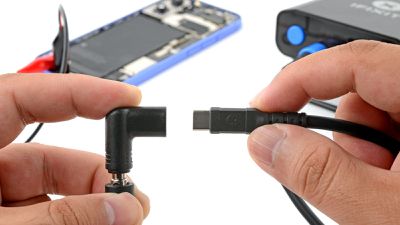
As reported by The Verge, iFixit is now selling a VoltClip tool that is essentially a pair of alligator clips with an integrated USB-C adapter. With a USB-C to USB-C cable, which is not provided, you can connect the tool to any USB-C charger or device that supports 9V or 12V output. iFixit has a step-by-step guide with complete instructions.
The adhesive debonding process takes roughly 60 to 90 seconds.
The tool is available for $10.95 on iFixit's online store in the U.S., with same-day shipping available on orders placed before 1 p.m. Pacific Time each day.
This electrical removal process does not extend to iPhone 16 Pro and iPhone 16 Pro Max batteries, which still have stretch-release adhesive pull tabs.
Popular Stories
Apple has unveiled a whopping nine new products so far this March, including an iPhone 17e, iPad Air models with the M4 chip, MacBook Air models with the M5 chip, MacBook Pro models with M5 Pro and M5 Max chips, the all-new MacBook Neo, an updated Studio Display, a higher-end Studio Display XDR, AirPods Max 2, and now the Nike Powerbeats Pro 2.
iPhone 17e features the same overall design as...
Apple has unveiled nine new products this month, but the wait continues for the next-generation Apple TV 4K and HomePod mini models.
In his Power On newsletter today, Bloomberg's Mark Gurman said new versions of the Apple TV and HomePod mini have been "ready" since last year, but he reiterated that Apple has held off on releasing them until the more personalized version of Siri and other...
iOS 26.4 was released today, and it includes a couple of new features for CarPlay: an Ambient Music widget and support for voice-based chatbot apps.
To update your iPhone 11 or newer to iOS 26.4, open the Settings app and tap on General → Software Update. CarPlay will automatically offer the new features so long as the iPhone connected to your vehicle is running iOS 26.4 or later....