
Apple Updates Final Cut Pro for iPad and Final Cut Camera - MacRumors
Skip to Content

Apple Updates Final Cut Pro for iPad and Final Cut Camera

Apple today updated both Final Cut Pro for iPad and Final Cut Camera, introducing a handful of useful new features that improve video editing and recording on Apple's mobile devices.
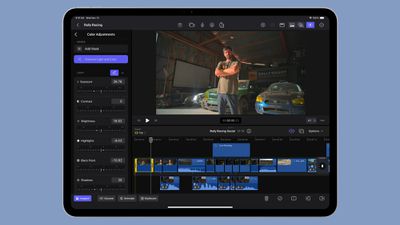
final cut pro ipad
Final Cut Pro for ‌iPad‌ gains support for editing video in portrait orientation, and it includes new keyboard shortcuts. There's also Image Playground integration, and an option to capture video in 50fps.

- Expand your editing workflows with support for portrait orientation on your iPad.
- Speed up your editing with keyboard shortcuts to nudge a selection, replace with gap, and lift or overwrite to the primary storyline.
- Get inspired with Image Playground and use Apple Intelligence to quickly create stylized images based on a description, suggested concepts, or people from your Photos library. (Requires iPad with A17 Pro or M1 and later and iPadOS 18.2 or later.)
- Capture in 50 fps for additional editing flexibility and delivery options.

The updated version of Final Cut Camera includes support for quickly swapping over to the Telephoto lens on the iPhone 14 Pro and later, recording in Spatial Audio on the iPhone 16 and later, and recording in 50fps video.

- Quickly switch to the 48 mm telephoto lens to capture the perfect shot. (Requires iPhone 14 Pro or later.)
- Play back your Log videos in SDR or HDR with the vibrancy of the original scene by applying the Apple Log LUT. (Requires iPhone 15 Pro or later.)
- Record videos in Spatial Audio for even more realistic and immersive sound. (Requires iPhone 16.)
- Capture in 50 fps for additional editing flexibility and delivery options.

Final Cut Camera is software that is designed to let users record from up to four devices with footage imported into Final Cut Pro for ‌iPad‌.

Final Cut Pro for ‌iPad‌ is available for $49 per year or $4.99 per month, while Final Cut Camera is free.

Popular Stories

Apple Event Logo

Apple's Next Era Begins September 1

Thursday May 7, 2026 10:36 am PDT by
Apple recently announced that Tim Cook will be stepping down as CEO later this year, after 15 years of leading the company. Effective September 1, Apple's hardware engineering chief John Ternus will become the company's next CEO, while Cook will become executive chairman of Apple's board of directors. In his new role, Apple said Cook will assist with "certain aspects" of the company,...
Instagram Feature 2

PSA: Instagram Encrypted Messaging Ends on Friday, May 8

Tuesday May 5, 2026 8:24 am PDT by
Instagram will remove end-to-end encryption for direct messages between users from May 8, 2026. When the date comes around, Meta will potentially be able to see the contents of all messages between users on the social media platform. Encrypting messages has been an optional feature in Instagram since 2023, but in March of this year the social media platform quietly updated a help page to say ...
Apple Event Logo

Apple Just Released a New Accessory

Monday May 4, 2026 8:13 am PDT by
Apple today released a new Pride Edition Sport Loop for the Apple Watch. The band features a rainbow design with 11 colors of woven nylon yarns. The new Pride Edition Sport Loop is available to order now on Apple.com and in the Apple Store app in 40mm, 42mm, and 46mm sizes, and it will be available at Apple Store locations starting later this week. In the U.S., the band costs $49. There...

Top Rated Comments

15 months ago
I visited my local Apple Store yesterday to enquire about training courses for Final Cut Pro on the Mac. Sadly they no longer provide this training.

I remember when the retail stores first opened and they had purpose built rooms for all sorts of training and presentations. It’s a shame that has all gone now.
Score: 8 Votes (Like | Disagree)
hovscorpion12 Avatar
15 months ago

Would be great if Final Cut for iPad could, you know, render in the background...
If your using FCP in Stage-Manager as a window, it "renders in the background".
Score: 3 Votes (Like | Disagree)
Amazing Iceman Avatar
15 months ago

I visited my local Apple Store yesterday to enquire about training courses for Final Cut Pro on the Mac. Sadly they no longer provide this training.

I remember when the retail stores first opened and they had purpose built rooms for all sorts of training and presentations. It’s a shame that has all gone now.
YouTube has some, also Udemy.
And there are free books released by Apple in the Books App.
Should be enough to get you started.
Score: 3 Votes (Like | Disagree)
Justin Cymbal Avatar
15 months ago
Awesome! I use Final Cut Pro occasionally on my iPad Pro so I’m glad that it’s been updated with more features

Final Cut Pro is now even compatible on the new $349 iPad:

https://www.geekwebguides.com/2025/03/14/a16-ipad-final-cut-pro-support/
Score: 2 Votes (Like | Disagree)
kirbyrun Avatar
15 months ago
Would be great if Final Cut for iPad could, you know, render in the background...
Score: 1 Votes (Like | Disagree)
Astuces iOS Avatar
15 months ago
I think everyone will love to use portrait mode for Final Cut Pro ! People will be so happy that they will also use their MacBook on portrait mode (yeah you can)
Score: 1 Votes (Like | Disagree)














