
Google Maps Can Now Scan Your iPhone Screenshots for Places

Google Maps has gained the optional ability to scan screenshots in your iPhone's photos and save any found locations to a dedicated list.
google maps
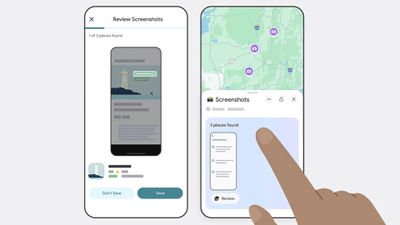
Powered by the company's Gemini AI, the new feature lets Google Maps search for any screenshots in your photos, such as social media posts, news articles, and travel blogs, and capture them in the app under a new Screenshots List under the You tab.

The feature scans for shots that include location information like names and addresses, and the app finds associated listings in Google Maps. Users can review those captures via a carousel, and Gemini will automatically identify the associated places and offer to save them with additional details.

The feature's Auto-scan option requires that Google Maps is given the "Allow Access to All Photos" permisssions, so it's not like your photos automatically get scanned. Alternatively, users can browse their photos and manually import screenshots to review. Here's how Google describes the steps involved to save screenshots in Google Maps:

  1. Navigate to the You tab.
  2. At the top of the You tab, you'll see a Screenshots list with a badge that says "Try it out!" Tap the badge. This will open a video showing you how the feature works — you'll even be able to test it out alongside the video.
  3. You'll see a request to allow Google Maps access to your photos. Choose when it has access. (There's also a manual option if you don't want to give Maps full access, more on that later.)
  4. Next time you take a screenshot that includes location information, head to Google Maps after.
  5. If Maps recognizes a place, a message will pop up telling you that it has places ready for you to review.
  6. Tap "review," and decide if you want to save the image to your screenshots list or not. (You can add these images to other lists later, too, if you want.)
  7. You also have the option to upload screenshots manually: When you're in the app select the Screenshots list under the You tab. From there, you can upload screenshots manually. The rest of the process is the same!
  8. You'll see the saved places directly on your map or can get to the list through You tab to access while you're on the go.

The new capability has rolled out to Google Maps for iOS (in U.S. English), and is likely to extend to other languages and regions soon.


Popular Stories

Apple Logo Zoomed

Tim Cook Teases Plans for Apple's Upcoming 50th Anniversary

Thursday February 5, 2026 12:54 pm PST by
Apple turns 50 this year, and its CEO Tim Cook has promised to celebrate the milestone. The big day falls on April 1, 2026. "I've been unusually reflective lately about Apple because we have been working on what do we do to mark this moment," Cook told employees today, according to Bloomberg's Mark Gurman. "When you really stop and pause and think about the last 50 years, it makes your heart ...
wwdc sans text feature

Apple Rumored to Announce New Product on February 19

Thursday February 5, 2026 12:22 pm PST by
Apple plans to announce the iPhone 17e on Thursday, February 19, according to Macwelt, the German equivalent of Macworld. The report, citing industry sources, is available in English on Macworld. Apple announced the iPhone 16e on Wednesday, February 19 last year, so the iPhone 17e would be unveiled exactly one year later if this rumor is accurate. It is quite uncommon for Apple to unveil...
Finder Siri Feature

Why Apple's iOS 26.4 Siri Upgrade Will Be Bigger Than Originally Promised

Friday February 6, 2026 3:06 pm PST by
In the iOS 26.4 update that's coming this spring, Apple will introduce a new version of Siri that's going to overhaul how we interact with the personal assistant and what it's able to do. The iOS 26.4 version of Siri won't work like ChatGPT or Claude, but it will rely on large language models (LLMs) and has been updated from the ground up. Upgraded Architecture The next-generation...
iOS 26

iOS 26.3 and iOS 26.4 Will Add These New Features to Your iPhone

Tuesday February 3, 2026 7:47 am PST by
While the iOS 26.3 Release Candidate is now available ahead of a public release, the first iOS 26.4 beta is likely still at least a week away. Following beta testing, iOS 26.4 will likely be released to the general public in March or April. Below, we have recapped known or rumored iOS 26.3 and iOS 26.4 features so far. iOS 26.3 iPhone to Android Transfer Tool iOS 26.3 makes it easier...
iphone 17 pro dark blue 1

iPhone 18 Pro Max Rumored to Deliver Next-Level Battery Life

Friday February 6, 2026 5:14 am PST by
The iPhone 18 Pro Max will feature a bigger battery for continued best-in-class battery life, according to a known Weibo leaker. Citing supply chain information, the Weibo user known as "Digital Chat Station" said that the iPhone 18 Pro Max will have a battery capacity of 5,100 to 5,200 mAh. Combined with the efficiency improvements of the A20 Pro chip, made with TSMC's 2nm process, the...

Top Rated Comments

DougieS Avatar
10 months ago
100% no thanks. Google not getting access to my full library.
Score: 28 Votes (Like | Disagree)
abusbey3 Avatar
10 months ago
Absolutely NO NO NO.
Score: 18 Votes (Like | Disagree)
Kirkster Avatar
10 months ago
Not if google were the last immigrant grocer on earth… Honey…
Score: 10 Votes (Like | Disagree)
iMac The Knife Avatar
10 months ago
Yeah, I'm sure folks with iPhones are completely stoked on Google scanning their phones...?
Score: 10 Votes (Like | Disagree)
ignatius345 Avatar
10 months ago

The feature's Auto-scan option requires that Google Maps is given the "Allow Access to All Photos" permisssions
Nope!

This is probably the actual reason the whole feature was developed -- as bait to get someone lazy to just let Google run rampant through their entire photo album.
Score: 8 Votes (Like | Disagree)
Fuzzball84 Avatar
10 months ago
AI will be scanning you’re entire device soon enough and who knows where that data will end up.

Got anything embarrassing, well it will be spewed out by an LLM soon enough ?
Score: 7 Votes (Like | Disagree)













