
Here's Everything New in macOS Tahoe Beta 2

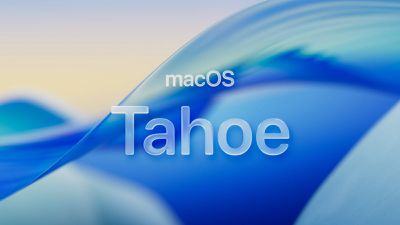
The second developer beta of macOS Tahoe is now available for testing, and it includes a handful of smaller new features and changes on the Mac.
macos tahoe
Below, we recap everything new that has been found in macOS Tahoe beta 2 so far.

Redesigned Finder App Icon
Fi vs Fi
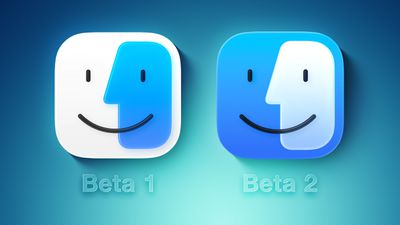
Crisis averted: Apple has restored the Finder icon's design to its former glory on the second beta.

On the first macOS Tahoe developer beta, the app icon's colors were inverted, with blue appearing on the right side and white appearing on the left side. That change disappointed some people, and Apple has evidently listened to that feedback.

Redesigned Migration Assistant App Icon

Migration Assistant Feature
The second beta also gives a fresh coat of paint to the Migration Assistant app icon.

Menu Bar Background Option
Frosted vs Unfrosted Menu Bar
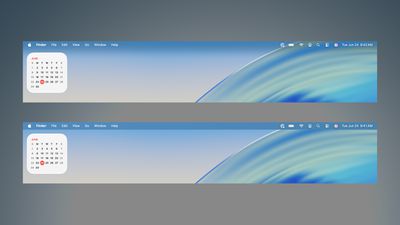
Apple removed the frosted background from the menu bar by default on macOS Tahoe, as part of the Liquid Glass redesign. If you miss it, though, the second beta adds a "Show menu bar background" option to the System Settings app under Menu Bar.

AirPods Beta Firmware
AirPods Beta Updates Feature
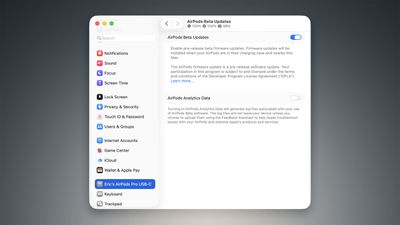
As spotted by Federico Trevisani, the second macOS Tahoe beta lets you enroll in beta testing of AirPods firmware updates directly on a Mac.

First, connect your AirPods to your Mac. Next, open the System Settings app and click on the Bluetooth menu. Then, select the (i) symbol next to your AirPods. On the ensuing page, scroll down to the bottom and click on "AirPods Beta Updates. Finally, there is a toggle to enable beta firmware updates on your AirPods. Firmware updates will be installed when your AirPods are in their charging case and near the Мас.

Apple currently offers AirPods beta firmware updates to developers only. However, that will soon change. Apple plans to start offering public betas of AirPods firmware updates in July for the first time, beginning with the AirPods 4 and AirPods Pro 2.

The latest firmware beta for the ‌AirPods 4‌ and AirPods Pro 2 adds support for improved audio quality for phone calls and video calls, plus studio-quality audio recording for interviews, podcasts, and videos. There is also an option to use AirPods as a camera remote with the Camera app to take photos or start a video recording, and these AirPods models can automatically pause audio if it is detected that you fell asleep.

Other Changes

The first macOS Tahoe public beta will be available in July, and the update will likely be released to the general public in September.


Related Roundup: macOS Tahoe
Related Forum: macOS Tahoe

Popular Stories

wwdc sans text feature

Apple Rumored to Announce New Product on February 19

Thursday February 5, 2026 12:22 pm PST by
Apple plans to announce the iPhone 17e on Thursday, February 19, according to Macwelt, the German equivalent of Macworld. The report, citing industry sources, is available in English on Macworld. Apple announced the iPhone 16e on Wednesday, February 19 last year, so the iPhone 17e would be unveiled exactly one year later if this rumor is accurate. It is quite uncommon for Apple to unveil...
maxresdefault

Apple Shows Off a Key Reason to Upgrade to the iPhone 17

Saturday February 7, 2026 9:26 am PST by
Apple today shared an ad that shows how the upgraded Center Stage front camera on the latest iPhones improves the process of taking a group selfie. "Watch how the new front facing camera on iPhone 17 Pro takes group selfies that automatically expand and rotate as more people come into frame," says Apple. While the ad is focused on the iPhone 17 Pro and iPhone 17 Pro Max, the regular iPhone...
Apple Logo Zoomed

Tim Cook Teases Plans for Apple's Upcoming 50th Anniversary

Thursday February 5, 2026 12:54 pm PST by
Apple turns 50 this year, and its CEO Tim Cook has promised to celebrate the milestone. The big day falls on April 1, 2026. "I've been unusually reflective lately about Apple because we have been working on what do we do to mark this moment," Cook told employees today, according to Bloomberg's Mark Gurman. "When you really stop and pause and think about the last 50 years, it makes your heart ...
Finder Siri Feature

Why Apple's iOS 26.4 Siri Upgrade Will Be Bigger Than Originally Promised

Friday February 6, 2026 3:06 pm PST by
In the iOS 26.4 update that's coming this spring, Apple will introduce a new version of Siri that's going to overhaul how we interact with the personal assistant and what it's able to do. The iOS 26.4 version of Siri won't work like ChatGPT or Claude, but it will rely on large language models (LLMs) and has been updated from the ground up. Upgraded Architecture The next-generation...
iOS 26

iOS 26.3 and iOS 26.4 Will Add These New Features to Your iPhone

Tuesday February 3, 2026 7:47 am PST by
While the iOS 26.3 Release Candidate is now available ahead of a public release, the first iOS 26.4 beta is likely still at least a week away. Following beta testing, iOS 26.4 will likely be released to the general public in March or April. Below, we have recapped known or rumored iOS 26.3 and iOS 26.4 features so far. iOS 26.3 iPhone to Android Transfer Tool iOS 26.3 makes it easier...

Top Rated Comments

TheDailyApple Avatar
8 months ago
Reverting the colors back to the original ones was a good move for the finder icon, but I think the border they added is still way too large. I'd prefer it if it looked more like this:


Attachment Image
Score: 14 Votes (Like | Disagree)
HighwaySnowman Avatar
8 months ago

Reverting the colors back to the original ones was a good move for the finder icon, but I think the border they added is still way too large. I'd prefer it if it looked more like this:


There's already a much nicer version they could use:


Attachment Image
Score: 5 Votes (Like | Disagree)
JohnC4 Avatar
8 months ago
Sad, the biggest thing to talk about on Apple OS’s is the design language.

Least Apple could do is recognize the existence of ultra wide monitors. The top menu bar for apps is annoying on 49” monitor, always having to look to the top left. Same with ultra wide in Vision Pro. Do they actually use their own software? At a minimum the menu should have an option to center vs pin left. Better, put it on the top bar of the running app, so you don’t have to look away from what you’re doing to select a menu option.
Score: 4 Votes (Like | Disagree)
iMattPro Avatar
8 months ago

I’m unclear what the problem was with their new Finder icon. I liked it. I think it looked cleaner.


Attachment Image
Score: 3 Votes (Like | Disagree)
orbital~debris Avatar
8 months ago
Did Apple say anything during WWDC about why app corners are more rounded on macOS (e.g. look at Settings in the screenshots above)?
I know they did for iOS/iPadOS but they have corresponding hardware rounded corners with their Liquid Retina displays. On Mac, there's still a mix of square edged corners and rounded corners.
Score: 3 Votes (Like | Disagree)
Dark_Omen Avatar
8 months ago

Sad, the biggest thing to talk about on Apple OS’s is the design language.

Least Apple could do is recognize the existence of ultra wide monitors. The top menu bar for apps is annoying on 49” monitor, always having to look to the top left. Same with ultra wide in Vision Pro. Do they actually use their own software? At a minimum the menu should have an option to center vs pin left. Better, put it on the top bar of the running app, so you don’t have to look away from what you’re doing to select a menu option.
Tim should just tell the board that he's out of ideas (not that any were his anyways) -- maybe I should just say "his C-suite team" is out of ideas, so they can terminate him and move on to someone that knows what they're doing.

He's over his head now that Steve's inventions have matured. The cow has run out of milk.
Score: 3 Votes (Like | Disagree)














