
Everything New in iOS 26 Beta 4 - GeekWebGuides
Skip to Content

Everything New in iOS 26 Beta 4

Apple released the fourth beta of iOS 26 today, and the company has continued making changes to the way that Liquid Glass looks. There are also new features, including the return of Apple Intelligence Notification Summaries for news. This beta is of particular interest because it's likely the beta that public beta testers will get in the not too distant future.

iOS 26 Feature

Liquid Glass Changes

Liquid Glass is more translucent in beta 4, with Apple walking back some of the opacity changes that it introduced in beta 3.
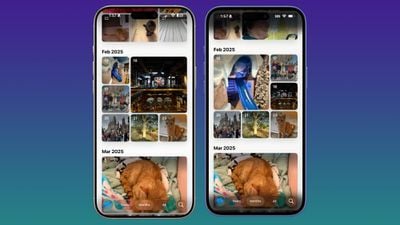
ios 26 beta 4 photosBeta 4 on left, beta 3 on right

Menu bars in apps like Photos, Music, and the App Store are now feature more transparency, allowing more of the background color to show through.
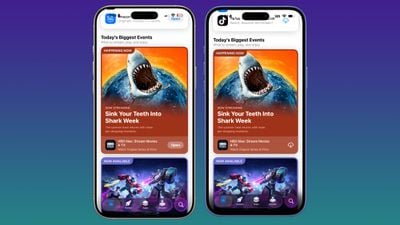
ios 26 beta 4 app storeBeta 4 on left, beta 3 on right

On the Lock Screen, when you scroll through notifications, the background gets darker. The darker tone improves the readability of text.
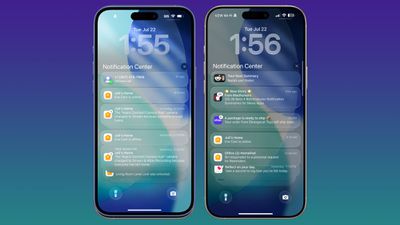
ios 26 b4 lock screenBeta 4 on right, beta 3 on left

Notification Summaries

‌Apple Intelligence‌ Notification Summaries are available for News and Entertainment apps again. Apple removed summaries for news articles back in January to improve the feature, and now it's ready for testing again.
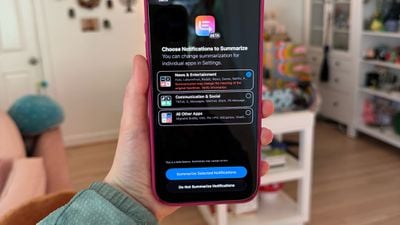
ios 26 beta 4 news summaries
At the time, Notification Summaries were producing misleading news headlines by picking up and combining the wrong information in articles. Apple says the feature should work better now, and that testing will continue throughout the ‌iOS 26‌ beta.

After updating to ‌iOS 26‌, you'll see a pop up for enabling the summary feature for different app categories. You can choose to get news summaries or opt out. All notification summaries for News and Entertainment apps that are generated with ‌‌Apple Intelligence‌‌ will be italicized and will be annotated with a "Summarized by ‌‌Apple Intelligence‌‌" notice.

Camera App

When you swipe between modes in the Camera app, the button behavior has changed slightly. Before, the button seemed to be fixed with the background sliding back and forth, but now the button moves freely in both directions.
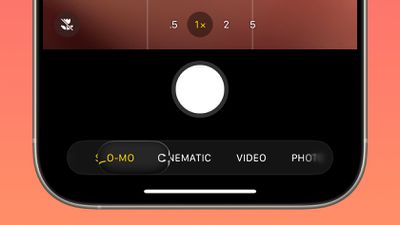
ios 26 beta 4 photos app
Apple also changed the icon of the Camera app on the Home Screen.
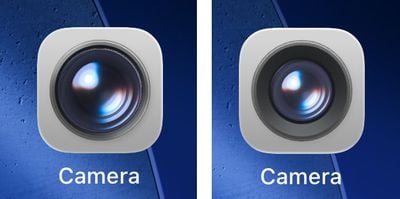
ios 26 camera app 1Beta 4 camera app icon on left, beta 3 icon on right

CarPlay Wallpapers

There are new CarPlay wallpapers available that match the new ‌iOS 26‌ wallpaper design. The ‌CarPlay‌ wallpapers come in a range of colors, including blue, brown, gray, green, purple, and red. The wallpapers support both light mode and dark mode.


Apple has also removed some older ‌CarPlay‌ wallpapers that were introduced with earlier versions of iOS.

Passcode Changes

When you tap on Face ID & Passcode in the Settings app, there's an updated interface and wording that reminds you to enter the passcode you use to unlock the iPhone.
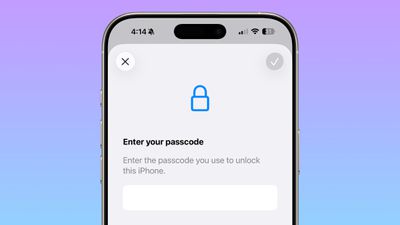
ios 26 beta 4 passcode

Passwords

The Passwords app has an Allow Contacting Websites option, which allows the app to contact websites to show names and icons for apps and websites and to let you know when a website supports passkeys.
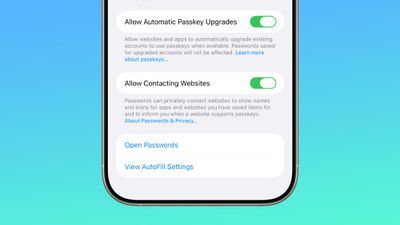
ios 26 beta 4 website passwords
With this feature, Passwords now shows custom icons for websites automatically.

Weather

There's a new toggle in the Weather app settings that allows it to access Significant Locations. With the feature enabled, the Weather app is able to provide weather information for places that you are likely to visit.
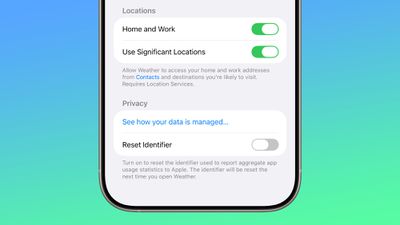
ios 26 beta 4 weather locations

Reduce Loud Sounds

The "Late Night Mode" option in the Sounds and Haptics section of the Settings app has been renamed to Reduce Loud Sounds, and Apple added a description.
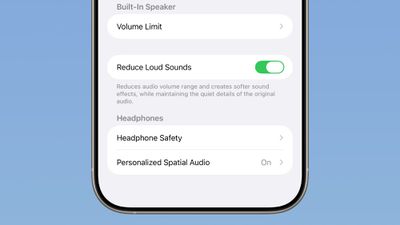
ios 26 beta 4 reduce loud sounds

Reduces audio volume range and creates softer sound effects while maintaining the quiet details of the original audio.

Call Screening

Apple updated the Screen Unknown Callers option to add new options. You can turn the feature off, ask unknown callers the reason why they are calling, or silence calls from unknown numbers automatically, sending them to voicemail.
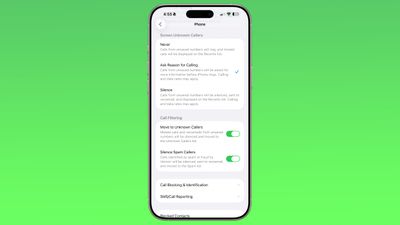
ios 26 beta 4 call screening

Mail

There are very subtle changes to the design of the Mail app icon.
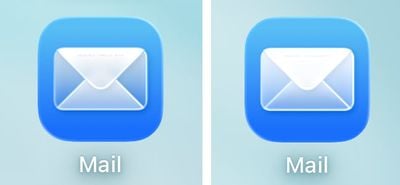
ios 26 beta 4 mail app‌iOS 26‌ beta 3 Mail app icon on left, beta 4 icon on right

Wallpaper

The wallpapers introduced with ‌iOS 26‌ are now dynamic and will change color over the course of the day.
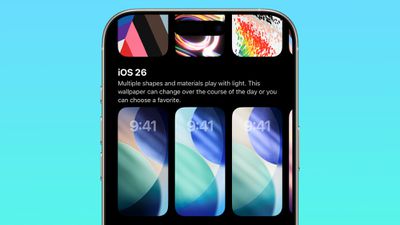
ios 26 beta 4 wallpaper

Read More

We have additional info on all of the new features in ‌iOS 26‌ in our roundup.

Related Roundups: iOS 26, iPadOS 26
Related Forum: iOS 26

Popular Stories

iOS 27 Feature Dark

Apple Now Pushing iPhone Users Still on iOS 26 to Install iOS 27

Thursday October 8, 2026 1:17 pm PDT by
Starting today, iPhone users still running iOS 26 will see iOS 27.0.1 as the prominent software update in the Settings app under General → Software Update, with iOS 26.7.1 now relegated to a smaller "Also Available" section at the bottom. iOS 27 was released on September 14, but until now that update and later iOS 27.0.1 were shown under the "Also Available" section, with iOS 26.7 and...
apple lock security bug vulnerability fix privacy

iOS 26.7.1 Fixes Vulnerability Used in Targeted Attacks

Monday September 28, 2026 11:45 am PDT by
iOS 26.7.1, iPadOS 26.7.1, macOS Tahoe 26.7.1, and macOS Sequoia 15.8.1 address a major vulnerability that Apple believes was used against a small number of people. Apple's security support pages say there was a CoreGraphics out-of-bounds write issue that could be exploited with a maliciously crafted file, allowing for arbitrary code execution. It has been fixed with improved bounds...
iPhone Duo Trio

Here's What Apple's Apps Look Like on the iPhone Duo

Tuesday October 20, 2026 11:12 am PDT by
With just three days to go until the iPhone Duo is released, Apple is getting ready for the launch. Behind the scenes, the App Store now has screenshots of Apple's built-in apps running on the Duo. We've seen some apps in marketing materials, but images of the ones we haven't seen give us an idea of what it will be like using the iPhone Duo day to day. Many apps are shown in landscape...

Top Rated Comments

firewire9000 Avatar
16 months ago
Seriously, GeekWebGuides, ALWAYS, I mean, ALWAYS, the before image goes on the left! Not on the right, it doesn’t make any sense! And also, at least be consistent because in the last comparison image, they are swapped.
Score: 91 Votes (Like | Disagree)
spishack Avatar
16 months ago
Juli, I'm begging you, pick one left/right layout and use it for the whole post 😂. Beta 4 right, Beta 3 left. Beta 3 left, Beta 4 right. Beta 4 right of left, Beta 3 right of right. 😵‍💫
Score: 36 Votes (Like | Disagree)
klasma Avatar
16 months ago

Seriously, GeekWebGuides, ALWAYS, I mean, ALWAYS, the before image goes on the left! Not on the right, it doesn’t make any sense! And also, at least be consistent because in the last comparison image, they are swapped.
My conspiracy theory is they are trying to drive engagement. ;)
Score: 22 Votes (Like | Disagree)
16 months ago
The new slider for camera modes selection in b4 is a UX disaster.

The button slides, the selections also slides at the same time.
When you drag the button to the left, the button moves, the background selections also scrolls to the left. But usually, if you drag to the left, the scrollable content should slide in reverse to the right.

This is so confusing and impossible to use. Just try it out.

And who tf thought it’s a good idea to hide the function toggles behind the mode selection? No one expects clicking on the mode selection again will expand shooting options.

I know I am on beta, but beta testers are only responsible for finding unintended bugs for Apple. The design itself is so horrible and wrong in the first place. That’s skill issue
Score: 22 Votes (Like | Disagree)
16 months ago

Seriously, GeekWebGuides, ALWAYS, I mean, ALWAYS, the before image goes on the left! Not on the right, it doesn’t make any sense! And also, at least be consistent because in the last comparison image, they are swapped.
ikr? And you always need to read the caption to know which one is beta 3 or 4. 😂
Score: 19 Votes (Like | Disagree)
TuffLuffJimmy Avatar
16 months ago
I might be in the minority, but I really enjoy the strong transparency. I didn’t think it would last though. Same as with the Mac OSX Leopard betas that re-introduced menu bar transparency, but Apple heavily toned it down before release. Too many complaints from the chorus — and I would bet most of those complaints were from people who didn’t actually have issues with it but they love to echo whatever niche complaint getting amplified online.
Score: 13 Votes (Like | Disagree)
Latest Stories
iPhone Duo Launch Begins as First Orders Reach Customers
3 hours ago
1Password for Agents Keeps Your Passwords Hidden From AI
4 hours ago
iPhone Duo 24 Hours Later: Your Questions Answered
4 hours ago
Apple's iWork Apps Get 'Intelligent Assistant' and iPhone Duo Support
5 hours ago
Apple is Apparently Considering a Slightly Larger iPhone Duo
5 hours ago
Giant iPhone Duo Displays Coming to Four Apple Stores
6 hours ago
Apple Pulls Keynote, Pages and Numbers From App Store [Update: Back]
7 hours ago
Apple Updates More Apps With iPhone Duo Support
8 hours ago
Apple Will Label Apps 'Made for iPhone Duo' in App Store
10 hours ago
Amazon Takes $49 Off iPad With Prices Starting at $399.99
11 hours ago
F1 on Apple TV Now Available in Dolby Atmos
11 hours ago
Apple Reveals More Than 50 Apps That Will Be Updated for iPhone Duo
12 hours ago
Apple Blocks Certificates That Could Help Attackers Fake Websites
13 hours ago
Giant iPhone Duo Installations Spotted at Apple Fifth Avenue
14 hours ago
iPhone Duo 2 Prototypes Include Under-Display Face ID
14 hours ago
Tesla App Gains iPad and iPhone Duo Support
18 hours ago
Apple Reportedly Boosts iPhone Duo Orders by 44%
19 hours ago
Fortnite Returning to Australian App Store After Court Ruling
19 hours ago
Apple Ordered to Open iPhone to Rival App Stores in Australia
19 hours ago
Apple Suppliers Face Hurdles Cutting Circuit Board Emissions
20 hours ago
Things Updated for iPhone Duo With Adaptive Layout
20 hours ago
Simplicity and Siri AI Are HomeView's Killer Features, Apple Says
21 hours ago
iPhone Duo Reviewers Really Miss Face ID
1 day ago
Does the iPhone Duo Run Hot? Here's What Reviews Found
1 day ago
Apple Music's New Look is Now Live on Apple's Website
1 day ago
Anthropic Launches Claude Duet, a Proactive AI Agent
1 day ago
What 32,000 Folds Did to the iPhone Duo's Hinge
1 day ago
iPhone Duo's Hidden FaceTime Camera Takes 'Trash' Photos
1 day ago
iPhone Duo Has 'Edge Light' Feature That Debuted on Macs Last Year
1 day ago
Apple Support App Updated for iPhone Duo's Larger Display
1 day ago










































