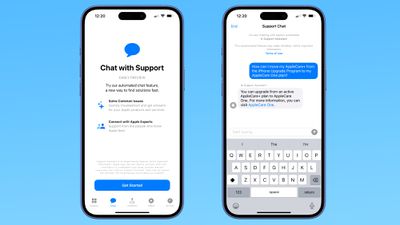
We've been seeing signs of an upcoming chatbot-based support feature in the Apple Support app, and it turns out it's already in testing. Some iPhone users have access to an early preview of the feature.
In the Apple Support app, the Support Assistant early preview can be accessed by tapping on a dedicated "Chat" button that's been added to the navigation bar. Only a select number of iPhone users will see the chat option at this time.
Tapping on the Chat button launches the new Support Assistant. It opens with a splash screen that gives you insight into how to use it. The Support Assistant is able to answer questions about your Apple products and services, providing troubleshooting information, answering questions about device features, and more.
The chatbot will not answer questions that are not related to Apple support, so you can't ask it details about upcoming products.
If the AI can't solve your issue, there is an option to escalate a chat to one of Apple's support staff for additional help.
Apple warns that the Support Assistant is an experimental feature that "may make mistakes." The company recommends that users verify important information.
It is not clear how long the early preview will last, and Apple hasn't provided details on when the Support Assistant will launch for all users.
Saturday February 7, 2026 9:26 am PST by Joe Rossignol
Apple today shared an ad that shows how the upgraded Center Stage front camera on the latest iPhones improves the process of taking a group selfie.
"Watch how the new front facing camera on iPhone 17 Pro takes group selfies that automatically expand and rotate as more people come into frame," says Apple. While the ad is focused on the iPhone 17 Pro and iPhone 17 Pro Max, the regular iPhone...
Thursday February 5, 2026 12:22 pm PST by Joe Rossignol
Apple plans to announce the iPhone 17e on Thursday, February 19, according to Macwelt, the German equivalent of Macworld.
The report, citing industry sources, is available in English on Macworld.
Apple announced the iPhone 16e on Wednesday, February 19 last year, so the iPhone 17e would be unveiled exactly one year later if this rumor is accurate. It is quite uncommon for Apple to unveil...
Thursday February 5, 2026 12:54 pm PST by Joe Rossignol
Apple turns 50 this year, and its CEO Tim Cook has promised to celebrate the milestone. The big day falls on April 1, 2026.
"I've been unusually reflective lately about Apple because we have been working on what do we do to mark this moment," Cook told employees today, according to Bloomberg's Mark Gurman. "When you really stop and pause and think about the last 50 years, it makes your heart ...
Friday February 6, 2026 3:06 pm PST by Juli Clover
In the iOS 26.4 update that's coming this spring, Apple will introduce a new version of Siri that's going to overhaul how we interact with the personal assistant and what it's able to do.
The iOS 26.4 version of Siri won't work like ChatGPT or Claude, but it will rely on large language models (LLMs) and has been updated from the ground up.
Upgraded Architecture
The next-generation...
Tuesday February 3, 2026 7:47 am PST by Joe Rossignol
While the iOS 26.3 Release Candidate is now available ahead of a public release, the first iOS 26.4 beta is likely still at least a week away. Following beta testing, iOS 26.4 will likely be released to the general public in March or April.
Below, we have recapped known or rumored iOS 26.3 and iOS 26.4 features so far.
iOS 26.3
iPhone to Android Transfer Tool
iOS 26.3 makes it easier...
I'm sure this will work as well as the other AI slop chat agents every company is trying to use instead of paying a human who can actually assist you with the matter at hand.
Wooo, it’s time to get stoked for the best-in-class Support app taking things to a whole new level with a game-changing integration with Apple Intelligence. Now customers can access the Apple Support Standard Operating Procedure without ever having to pick-up the phone:
1. Restart you device. 2. Force reboot your device. 3. Reset Network Settings. 4. Reset All Settings. 5. Erase and Set Up as New 6. Collect screen recordings and logs for an RTA to Engineering by a Senior Advisor 7. Senior Advisor submits RTA to Engineering 8. Within 48 hr, receive a response that Engineering is aware of the issue, keep your device up to date, and no further troubleshooting will be provided 9. Thank you for contacting Apple Support. Have a nice day.
Apple warns that the Support Assistant is an experimental feature that "may make mistakes." The company recommends that users verify important information.
What exactly qualifies as “important information”? And how is this information supposed to be verified by the user?