macOS Tahoe 26 includes support for automatically joining your iPhone's Personal Hotspot when no Wi-Fi network is available, so you no longer need to manually connect.
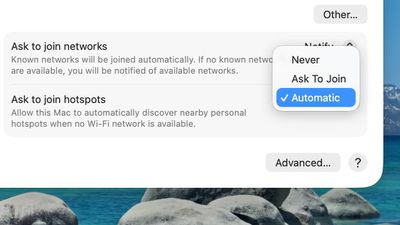
To set up automatic joining in macOS Tahoe, you can click on the Wi-Fi button in the menu bar or Control Center to open up Wi-Fi Settings. From there, scroll down to the bottom where it says "Ask to join hotspots" and click to select the Automatic option.
With Auto-Join Hotspot turned on, when your Mac doesn't have Wi-Fi available and is near an iPhone or iPad providing a Personal Hotspot, it will automatically attempt to join it.
Auto-Join works with Family Sharing, so you can set up your Mac to automatically connect to a family member's Personal Hotspot, or allow their Mac to automatically connect to yours.
Tuesday October 20, 2026 11:12 am PDT by Juli Clover
With just three days to go until the iPhone Duo is released, Apple is getting ready for the launch. Behind the scenes, the App Store now has screenshots of Apple's built-in apps running on the Duo. We've seen some apps in marketing materials, but images of the ones we haven't seen give us an idea of what it will be like using the iPhone Duo day to day.
Many apps are shown in landscape...
Thursday October 22, 2026 11:01 am PDT by Juli Clover
Apple has temporarily removed Keynote, Pages, and Numbers from the App Store, just after releasing an update that added iPhone Duo support and a new Intelligent Assistant.
It is not clear if the apps were removed intentionally, or if it is a bug. Apple has not said when the apps will be reinstated, but if it was in error, they should return soon.
Update: The Mac versions are back without...
Monday October 19, 2026 9:37 am PDT by Joe Rossignol
Apple today sent out invites for an experience in Los Angeles on Wednesday, October 28, and the "Pro and tell" tagline on the invitation likely means that the rumored MacBook models with touch-enabled OLED displays will stick with MacBook Pro branding instead of the once-rumored "MacBook Ultra" name.
The long-rumored "iPhone Ultra" ended up being named iPhone Duo, so speculation that Apple...
Since my cell carrier has a strong signal, blazing fast speeds, and cheap prices, I no longer have a WiFi at home and exclusively use my hotspot.
It has been quite annoying to have to turn it on on the phone so frequently, so this is a much asked feature from me (via feedback app) (and no doubt many in my situation).
One question that I haven’t tested yet is that frequently I see my neighbor’s iPhone hotspot.
Does auto join any hotspot or only those it has been authenticated to like during manual join?
I think it must be the latter but ask out of an abundance of caution as I’m not keen (spoof hotspot for MIM attack?) on just attaching to any hotspot in the neighborhood, train or plane.
Since my cell carrier has a strong signal, blazing fast speeds, and cheap prices, I no longer have a WiFi at home and exclusively use my hotspot.
It has been quite annoying to have to turn it on on the phone so frequently, so this is a much asked feature from me (via feedback app) (and no doubt many in my situation).
One question that I haven’t tested yet is that frequently I see my neighbor’s iPhone hotspot.
Does auto join any hotspot or only those it has been authenticated to like during manual join?
I think it must be the latter but ask out of an abundance of caution as I’m not keen (spoof hotspot for MIM attack?) on just attaching to any hotspot in the neighborhood, train or plane.
I did the same and haven’t had a Wi-Fi router for a few years so this is welcome as I feel your pain in manually connecting.
You can forget networks so can set your neighbours phone to ignore. Also your Mac would need to know their hotspot password anyway which I assume you don’t have?
All kinds of useless stuff and you still can't resize the finder window and let it stay like that after a reboot. Simple, useful, and something that should be "allowed". But no, Apple knows best. Still can't do a basic click-through. Have to go and activate the window then you can start clicking. Still the "End" button on the keyboard won't take a blinking cursor to the end of a line. It scrolls down a full page as if that's even related when you're in the middle of typing anyway. Apple loves adding useless features to their os systems. Beyond crazy.
Apple's first foldable iPhone, with a book-style design featuring a 5.4-inch outer display and a 7.6-inch inner display with a minimal crease down the middle.





























![Apple Pulls Keynote, Pages and Numbers From App Store [Update: Back]](https://images.macrumors.com/t/Okb7kitB_gNr6qe5Pex9nQIysD8=/112x112/article-new/2026/01/Apple-Creator-Studio-iWork-suite.jpg)





















