
Everything New in iOS 26.1 Beta 2

Apple released the second beta of iOS 26.1 and iPadOS 26.1, introducing useful changes to alarms, multitasking on the iPad, and more. There are also subtle tweaks to some of the Liquid Glass design elements as Apple continues to refine iOS 26.
iOS 26

Alarms and Timers

Alarms set using the Clock app now have a slide to stop button rather than a tap to stop button on the Lock Screen. To snooze an alarm, you can tap, but to turn it off from the Lock Screen, you need to use a slide gesture.

ios 26 1 slide to stop
The change makes it much harder to dismiss an alarm when you're trying to tap on the snooze button. Slide to Stop is also used for timers.

Background Security Improvements

The Privacy and Security section of the Settings app now has a toggle to automatically download and install security improvements. It's a revamp of the prior Rapid Security Responses feature.
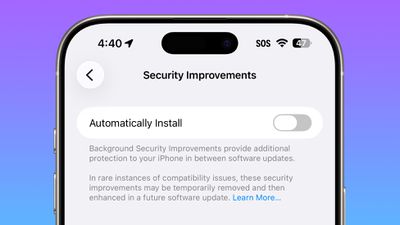
ios 26 1 security improvements

Fitness App

You can now create custom workouts in the Fitness app on iPhone. There are options for selecting workout type, estimated Active Calories, effort, duration, and start time.
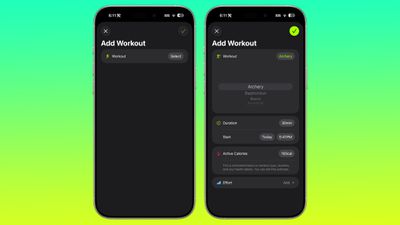
ios 26 1 custom workout

Settings App

Apple changed the alignment of icons and text in the Settings app. All settings with headers that feature text now have that text aligned to the left instead of center aligned.
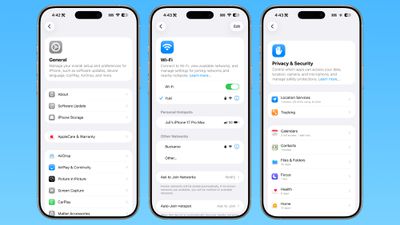
ios 26 1 left aligned settings
This includes General, Bluetooth, Wi-Fi, Cellular, Personal Hotspot, Accessibility, and more.

Display Settings

The Display section of the Settings app now has iOS 26-themed wallpaper instead of iOS 18 wallpaper.
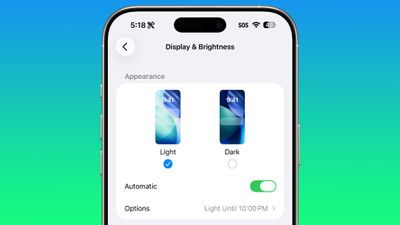
display brightness setting ios 26 1

Home Screen Folders

When you tap into a folder on the Home Screen, the name of the folder at the top is left aligned instead of center aligned.
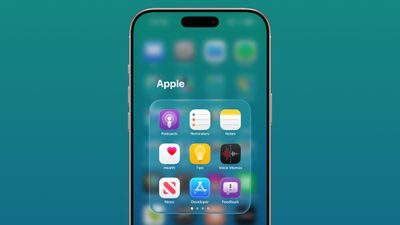
ios 26 1 folder alignment

iPadOS 26.1 Slide Over

With iPadOS 26.1 beta 2, Apple reintroduced Slide Over. Slide Over works alongside the window-based iPadOS 26 multitasking functionality, so you can have multiple windows open and still swipe over to quickly access a Slide Over app.

ipados 26 1 slide over
You can only have one Slide Over app at a time in iPadOS 26.1, and you can use the feature by tapping on the green window resizing button and
toggling on Enter Slide Over.

External Microphones on iPad

There's now an option to adjust input gain on the ‌iPad‌ when using an external microphone.

Liquid Glass

The light refraction effect around apps is now more subtle with darker icon colors and background colors.

Wallpaper

When setting a wallpaper on the Lock Screen, instructions like Pinch to Crop show up momentarily and then disappear, rather than being shown all the time.
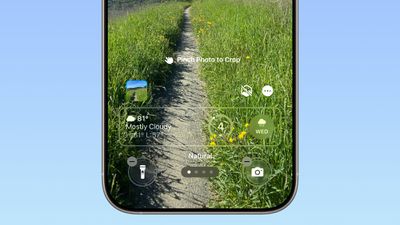
ios 26 1 wallpaper crop

Display Accessibility

Under the Display and Text Size section in the Accessibility settings, there is a new "Display Borders" toggle. It adds a border to all buttons, and replaces the prior "Button Shapes" setting.

Calendar

The Calendar app change that showed events with a full color background in iOS 26.1 beta 1 has been removed.

Photos App

The interface for managing multiple photos that you've selected has been tweaked slightly. Play as Slideshow, Favorite, and Hide are now at the top of the menu.
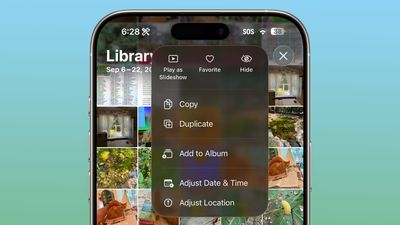
ios 26 1 photos app

More Features

Know of something new in iOS 26.1 that we missed? Let us know in the comments below.

Related Roundups: iOS 26, iPadOS 26
Related Forum: iOS 26

Popular Stories

wwdc sans text feature

Apple Rumored to Announce New Product on February 19

Thursday February 5, 2026 12:22 pm PST by
Apple plans to announce the iPhone 17e on Thursday, February 19, according to Macwelt, the German equivalent of Macworld. The report, citing industry sources, is available in English on Macworld. Apple announced the iPhone 16e on Wednesday, February 19 last year, so the iPhone 17e would be unveiled exactly one year later if this rumor is accurate. It is quite uncommon for Apple to unveil...
Apple Logo Zoomed

Tim Cook Teases Plans for Apple's Upcoming 50th Anniversary

Thursday February 5, 2026 12:54 pm PST by
Apple turns 50 this year, and its CEO Tim Cook has promised to celebrate the milestone. The big day falls on April 1, 2026. "I've been unusually reflective lately about Apple because we have been working on what do we do to mark this moment," Cook told employees today, according to Bloomberg's Mark Gurman. "When you really stop and pause and think about the last 50 years, it makes your heart ...
Finder Siri Feature

Why Apple's iOS 26.4 Siri Upgrade Will Be Bigger Than Originally Promised

Friday February 6, 2026 3:06 pm PST by
In the iOS 26.4 update that's coming this spring, Apple will introduce a new version of Siri that's going to overhaul how we interact with the personal assistant and what it's able to do. The iOS 26.4 version of Siri won't work like ChatGPT or Claude, but it will rely on large language models (LLMs) and has been updated from the ground up. Upgraded Architecture The next-generation...
maxresdefault

Apple Shows Off a Key Reason to Upgrade to the iPhone 17

Saturday February 7, 2026 9:26 am PST by
Apple today shared an ad that shows how the upgraded Center Stage front camera on the latest iPhones improves the process of taking a group selfie. "Watch how the new front facing camera on iPhone 17 Pro takes group selfies that automatically expand and rotate as more people come into frame," says Apple. While the ad is focused on the iPhone 17 Pro and iPhone 17 Pro Max, the regular iPhone...
iOS 26

iOS 26.3 and iOS 26.4 Will Add These New Features to Your iPhone

Tuesday February 3, 2026 7:47 am PST by
While the iOS 26.3 Release Candidate is now available ahead of a public release, the first iOS 26.4 beta is likely still at least a week away. Following beta testing, iOS 26.4 will likely be released to the general public in March or April. Below, we have recapped known or rumored iOS 26.3 and iOS 26.4 features so far. iOS 26.3 iPhone to Android Transfer Tool iOS 26.3 makes it easier...

Top Rated Comments

ossifer Avatar
18 weeks ago
I’ve been waiting for years for the folder name alignment thing. This is why I never bought an iPhone until now.
Score: 23 Votes (Like | Disagree)
swrobel Avatar
18 weeks ago
“Revamp of the Rapid Security Response feature they never used”
Score: 22 Votes (Like | Disagree)
What_Is_George Avatar
18 weeks ago
The fact the wallpaper wasn’t updated in display settings is actually disappointing for Apple standards
Score: 10 Votes (Like | Disagree)
sxbino Avatar
18 weeks ago
The left alignment on texts is actually hideous. Whoever approved that is not a designer for sure.
Score: 10 Votes (Like | Disagree)
dreamerstree Avatar
18 weeks ago
Too bad about the calendar change. I actually liked it the way it was before.
Score: 7 Votes (Like | Disagree)
eoblaed Avatar
18 weeks ago

That's because Apple doesn't beta test anything anymore.
Of course they do. A lot. But given that iOS is one of their few schedule driven release cycles, they frequently have to make decisions on which bugs get resolved before release and which will be fixed over time.

Visual adjustments are going to be lower priority than functional issues... and with complete UX overhauls like we saw with iOS 7 and iOS 26, there are going to be lingering visual tweaks.
Score: 6 Votes (Like | Disagree)















