Google Adds 'AI Mode' Button to Chrome for iPhone and iPad
Google is updating the Chrome app for the iPhone and the iPad with a dedicated "AI Mode" button that matches functionality found in the desktop version of Chrome. AI Mode is located under the Google search bar, next to an Incognito Mode button.
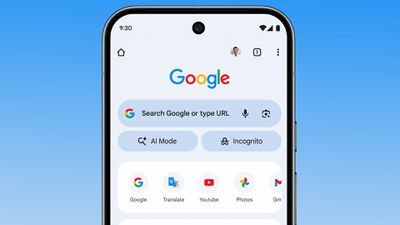
The AI Mode option provides quicker access to Chrome's Gemini-powered AI search feature. Google says that AI Mode lets users ask more complex, multi-part questions, and follow up on answers.
Chrome users in the United States will see the AI Mode button in the Chrome apps for iPhone, iPad, and Android as of today, with Google planning to expand it to additional countries in the near future.
Popular Stories
Chrome has been updated today with a Skills library that's designed to let Chrome users turn AI tasks into repeatable skills that can be used on any website.
Useful prompts you create for Gemini in Chrome can be saved as a Skill that can be accessed later with a single click. If you're shopping for skincare and ask Gemini about the ingredients in a product, for example, you can save the...
Google is bringing Gemini to the Mac with a new native macOS app that's available starting today. Gemini for Mac can be activated with a keyboard shortcut, and it has built-in tools for generating images, analyzing what's on your screen, reviewing files, and more.
Gemini is the last of the three major AI services to have a dedicated Mac app, because OpenAI and Anthropic have had Mac apps for ...
Google today commented on its partnership with Apple, confirming that Gemini will power a new, more personalized version of Siri that's set to be released later in 2026.
Google Cloud chief Thomas Kurian mentioned the Apple partnership during Google Cloud Next 2026, a conference that's taking place in Las Vegas, Nevada today.
Earlier this year, we announced a monumental partnership with one...