
iPhone Driver's License Feature in Apple Wallet App Now Live in Illinois - MacRumors
Skip to Content

iPhone Driver's License Feature in Apple Wallet App Now Live in Illinois

In select U.S. states, residents can add a driver's license or state ID to Apple's Wallet app on the iPhone and Apple Watch, providing a convenient and contactless way to display proof of identity or age at select airports and businesses, and in select apps.
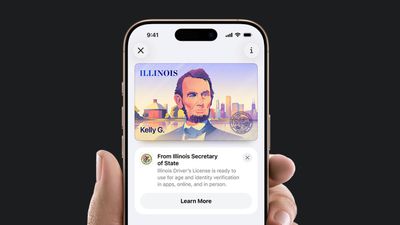
Apple Wallet ID Illinois
After being announced yesterday, the feature is now live in Illinois.

Apple Wallet IDs are accepted at TSA checkpoints in more than 250 airports, including O'Hare and Midway in Chicago. They can also be used to show proof of age or identity at select businesses and venues, but there is no list of specific locations.

To set up the feature, open the Wallet app and tap on the plus sign in the top-right corner. Next, select Driver's License and ID Cards and follow the steps.


Apple says the feature requires an iPhone 8 or later running iOS 16.5 or later, or an Apple Watch Series 4 or later running watchOS 9.5 or later.

The feature is also available in Arizona, California, Colorado, Georgia, Hawaii, Iowa, Maryland, Montana, New Mexico, North Dakota, Ohio, West Virginia, and Puerto Rico. Japan's My Number Card can be added to Apple Wallet too.

Apple previously said Connecticut, Kentucky, Mississippi, Oklahoma, and Utah plan to offer the feature in the future, but it did not provide timeframes.


Popular Stories

iOS 26

iOS 26.4 Adds Two New Features to CarPlay

Tuesday March 24, 2026 1:55 pm PDT by
iOS 26.4 was released today, and it includes a couple of new features for CarPlay: an Ambient Music widget and support for voice-based chatbot apps. To update your iPhone 11 or newer to iOS 26.4, open the Settings app and tap on General → Software Update. CarPlay will automatically offer the new features so long as the iPhone connected to your vehicle is running iOS 26.4 or later....
AirPods Pro Firmware Feature

Apple Releases New Firmware for AirPods Pro 3, AirPods Pro 2 and AirPods 4

Tuesday March 24, 2026 12:31 pm PDT by
Apple today released new firmware for the AirPods Pro 2, AirPods Pro 3, and the AirPods 4. The firmware has a version number of 8B39, up from 8B34 on the AirPods Pro 3, 8B28 on the AirPods Pro 2, and 8B21 on the AirPods 4. There is no word on what's included in the firmware, but Apple has a support document with limited notes. Most updates are limited to bug fixes and performance...
apple tv 4k new orange

tvOS 26.4 Adds These New Features to Your Apple TV

Wednesday March 25, 2026 3:33 pm PDT by
Apple this week released tvOS 26.4, and the software update includes a handful of new features and changes for the Apple TV. tvOS 26.4 is compatible with all Apple TV 4K and Apple TV HD models released since 2015. To update your Apple TV, open the Settings app on the device, navigate to System → Software Updates, and select Update Software. Below, we have recapped what is new in tvOS...

Top Rated Comments

18 weeks ago
Cue the I'm not handing my unlocked phone to the police!! folks who don't understand how this works before commenting about it...
Score: 4 Votes (Like | Disagree)
smithrh Avatar
18 weeks ago
[Second edit - reading between the lines and some very very small text at the end of the IL SOS website announcement, at this point this is for ID purposes only. Still need to carry your physical D/L with you when driving. Suspect at some point down the road it will become valid as a driver's license, but not yet, likely some sort of phased implementation at play here.]


OK, for people who don't know how this works:
[LIST=1]
* Just like Apple Pay, double-click the side button
* Select your license
* Hold it up to the reader (store, bar, TSA, cop, etc)
* See what info will be transmitted
* Approve transfer or not

Phone is never unlocked or leaves your hand. Never give or unlock your phone to anyone.

Having said this, unless there are a lot of cops with iPhones or other devices that can read the iPhone's transmission, you'll still be better off carrying your physical ID with you. But having this in case you forget your wallet at home will be nice as well.

(Edited to add this: I'm actually not sure how driving in a state that doesn't handle these electronic IDs works. So, if you travel outside of Illinois and don't have your physical license with you and the cop that stops you doesn't have a reader, what happens? I know they'll verify you in the long run but I wonder if there's a possibility they'll try to slap a "driving without physical license" citation on you. I don't know how far home rule extends here)

Also note the data that gets transferred depends on who is asking; bars/stores selling alcohol for example only get confirmation that you're legal age, that's it. So in these cases you're actually cutting down on your information getting out in the wild. No address, DOB, etc.

Outside of places that need to see your ID, there a lots of places that want to see your ID, for example doctor's offices. Here I decline letting them scan it and store it, which many times they want to do. They'll put up a minor fuss, but I've never been turned down after I've explained I've had my ID and personal information stolen.

Now, if Apple could make a provider-side app for that, I'd be happy to provide that level of verification.
Score: 3 Votes (Like | Disagree)
jholzner Avatar
18 weeks ago
I live in Illinois and it’s not appearing as an option for me yet.
Score: 3 Votes (Like | Disagree)
ebika Avatar
18 weeks ago

"Illinois" doesn't show up as a state-option on my active 17_pro_max (iOS 26.1). Been trying since about 8:30 AM. Rebooted, Restarted, closed all the apps. Still no option. Contacted Apple Care and they were stumped. Got the brush off from senior support and the famous "give it till the end of the day. It should show up. We'll call you in the morning!" Meanwhile on my old 16_pro_max (also iOS 26.1) "Illinois" is available. Any luck for anyone who's also having this issue?
I wouldn't be surprised if they are rolling it out in a ramp or in waves. It didn't show up on my phone until mid afternoon.
Score: 2 Votes (Like | Disagree)
Pcar17 Avatar
18 weeks ago
It was super easy to add my state of Illinois drivers license! The Apple Wallet does show all of the info on the front of your physical license including your headshot picture when you drill down into your license in the Apple Wallet. It’s easily accessed. For everyone freaking out about showing the digital license to law enforcement by letting them have your phone, it’s best to carry your license with you in your car or backpack. I agree it best to never give them your phone!
Score: 2 Votes (Like | Disagree)
Prof. Avatar
18 weeks ago

What a JOKE!!! My state sucks as it always has when it comes to GOVT and tech !
I mean... why are we complaining about advanced security measures that are in place? I had to wait for a code to come via USPS to move my mail from my old address to my new one. Same thing applies here. We're talking about our identity. I appreciate all the extra steps I need to jump through to ensure my information stays as safe as possible.

In the meantime, I have my physical Drivers License.
Score: 2 Votes (Like | Disagree)















