
iOS 26.4 Beta Tidbits: Hidden Features You May Have Missed - MacRumors
Skip to Content

iOS 26.4 Beta Tidbits: Hidden Features You May Have Missed

There is a long list of new features in the iOS 26.4 beta, many of which we highlighted yesterday, but we've since discovered several other smaller changes that Apple made in the software.
iOS 26

Health App

iOS 26.4 includes a new Average Bedtime metric for the sleep section of the Health app, providing a better idea of how bedtime can impact sleep quality.
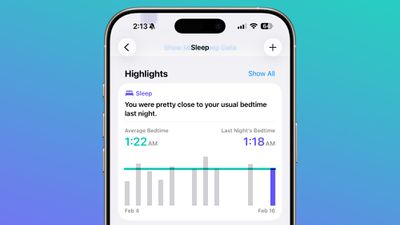
ios 26 4 average bedtime

Apple also updated the Vitals section of the Health app in the U.S., and now includes blood oxygen level on the line graph overview that's available each day. In iOS 26.3 and earlier versions of iOS 26, there was a section for the blood oxygen level, but the graph did not include a blood oxygen measurement.
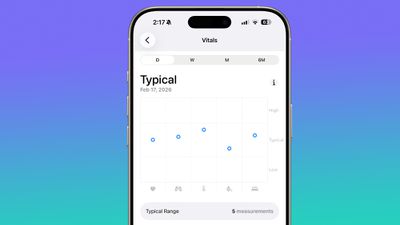
ios 26 4 vitals app blood oxygen

Camera

In the Settings section of the Camera app, there is a new "Audio Zoom" option. The feature causes recorded audio to focus on the subject when the camera is zoomed while recording a video. It can be turned on or off, depending on the audio settings you prefer.
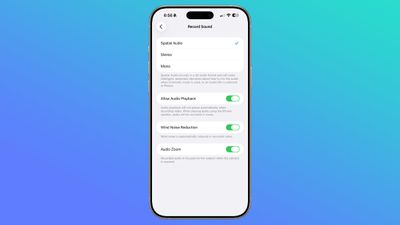
ios 26 4 audio zoom

CarPlay

We found mentions of Apple TV support for CarPlay, indicating that Apple will eventually allow users to watch Apple TV content through their car's dashboard when the vehicle is not in motion.
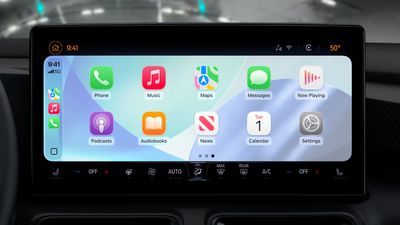
Apple CarPlay iOS 26 Tight Crop

At WWDC 2025, Apple said that it would add support for AirPlaying video content to a CarPlay display, and it appears that feature could come in the near future.

Apple Music

A song can be added to multiple playlists at the same time in the Apple Music app. In the add to playlist interface, there is a list button, and tapping it allows you to select multiple playlists at the same time.
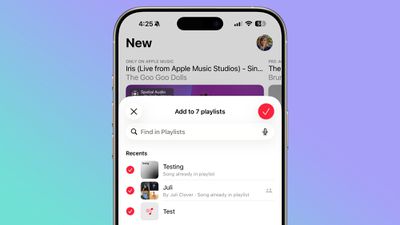
ios 26 4 multiple playlists

Hotspot Data

Apple moved the location of hotspot data usage. Rather than having data usage metrics tucked away under Cellular, you'll see how much data you've used right in the Personal Hotspot section.
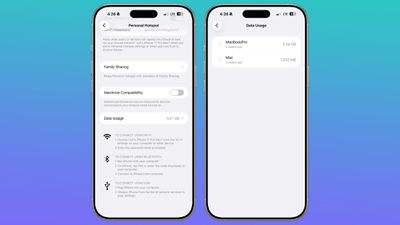
ios 26 4 hotspot data usage

Live Captions

Chinese (Taiwan) is a new language option for Live Captions in the Accessibility section.
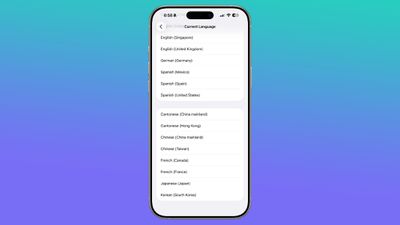
ios 26 4 live captions

Passcode Settings

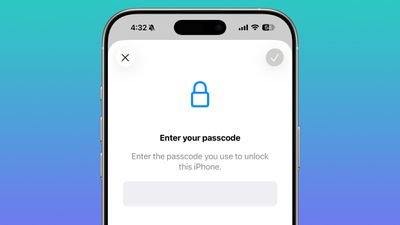
In the Face ID and Passcode section of the Settings app, when you enter a passcode to access your options, the text is now center aligned instead of left aligned.
ios 26 4 passcode

Shortcuts

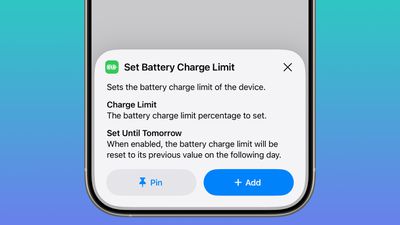
Apple added a Set Charge Limit action to the Shortcuts app. It sets a battery charge limit for the iPhone.
ios 26 4 shortcuts charge limit

Read More

For more on all of the new features in iOS 26.4, we have a dedicated iOS 26.4 features guide.

Related Roundups: iOS 26, iPadOS 26
Related Forum: iOS 26

Popular Stories

iOS 26

Here's What's New in iOS 26.5 So Far

Tuesday April 21, 2026 1:30 pm PDT by
iOS 26.5 has been in beta since late March, with a third beta released this week. The update is relatively minor so far, which is not too surprising given that Apple is starting to shift its focus towards iOS 27. Apple will unveil iOS 27 during its WWDC 2026 keynote on June 8, and the update should be released in September. iOS 26.5 lays the groundwork for two changes, including end-to-end...
iOS 26

Apple Seeds Second iOS 26.5 and iPadOS 26.5 Betas to Developers

Monday April 13, 2026 10:08 am PDT by
Apple today seeded the second betas of upcoming iOS 26.5 and iPadOS 26.5 updates to developers for testing purposes, with the software coming two weeks after Apple released updated first betas. Registered developers can download the betas from the Settings app on the iPhone or iPad by going to the General section and selecting Software Update. iOS 26.5 and iPadOS 26.5 do not include new...
iOS 26

Apple Releases Second iOS 26.5, iPadOS 26.5, tvOS 26.5 and watchOS 26.5 Public Betas

Tuesday April 14, 2026 10:06 am PDT by
Apple today provided public beta testers with the second releases of upcoming iOS 26.5, iPadOS 26.5, watchOS 26.5, and tvOS 26.5 updates for testing purposes. The public betas come a day after Apple provided the betas to developers. After signing up for beta testing on Apple's beta site, public beta testers can download the updates using the Software Update section of the Settings app on...

Top Rated Comments

eveluvsrainbows Avatar
12 weeks ago

Hidden "tidbits" in this trainwreck of an OS, yeah, like who cares? Not me, for sure.
Lol, its not a trainwreck, but okay. Also, why post if you are just going to be incredibly negative?
Score: 7 Votes (Like | Disagree)
12 weeks ago
App Store Updates have been moved.
After opening the user account page, there's now a link to "Updates"

Attachment Image
Score: 7 Votes (Like | Disagree)
fatTribble Avatar
12 weeks ago
I really enjoy these types of articles. Maybe to some people a particular feature is minor, but to others it may be a big upgrade.
Score: 5 Votes (Like | Disagree)
lazyrighteye Avatar
12 weeks ago
As these OSes continue to expand, I appreciate these entries that call out some likely missed functionality.

I immediately, before reading any further, went and disabled the Audio Zoom feature. I attend a lot of live music. I like grabbing a few moments of a show - strictly for my own enjoyment. It has been so annoying to have the audio fidelity alter when zooming in for closer shots of the band. When/if you need that capability, fantastic. But when you don’t? So glad there’s now an option to disable. Approved!
Score: 5 Votes (Like | Disagree)
jz0309 Avatar
12 weeks ago
some nice additions and most importantly there will be security updates and bug fixes, so pretty much instant install upon release
Score: 5 Votes (Like | Disagree)
d5aqoëp Avatar
12 weeks ago

App Store Updates have been moved.
After opening the user account page, there's now a link to "Updates"
This is my favourite. 1 extra additional step to update your apps.
Score: 3 Votes (Like | Disagree)










































