

When macOS Mojave was announced, Apple warned that it would be the last version of macOS that would support older 32-bit apps. Apple has been phasing out 32-bit apps for the last 10 years and is now ready to take the final step, even if Mac users may not be ready to lose access to older apps.

With the release of macOS Catalina, 32-bit app support is no longer available, which means many of your older apps will no longer work if they haven't been updated to 64-bit.

32-bit vs. 64-bit
32-bit apps date back to a time when there were 32-bit processors and 32-bit operating systems, but are now outdated. Apple has long since transitioned to 64-bit processors and macOS has been 64-bit since the launch of Snow Leopard in 2009.
Compared to 32-bit apps, 64-bit apps can take advantage of more memory and offer faster system performance. Apple technologies like Metal only work with 64-bit apps, and for Apple to ensure that Mac apps include all of the latest advancements and optimizations, support for 32-bit needs to end. In the simplest terms, 32-bit apps are inefficient.
32-bit apps can run on a 64-bit system as they've been doing for years, but Apple wants to get rid of outdated apps to make sure everything that runs on the Mac is properly optimized and isn't an unnecessary drain on system resources.
Previous Warnings
Apple started warning Mac users about plans to end support for 32-bit apps back with macOS High Sierra. In High Sierra, users started getting warnings about a 32-bit app's future incompatibility with macOS.
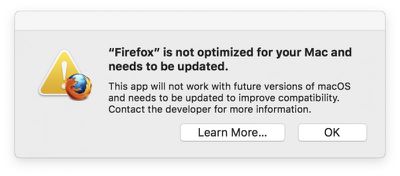
A similar message was available in macOS Mojave, and if you opened up a 32-bit app while running Mojave, you saw an alert letting you know a specific app wouldn't work with future versions of macOS unless it was updated.
Alerts re-appeared every 30 days when launching an app, with Apple aiming to make sure customers would not be caught unaware when a 32-bit app stopped working in the future, so you should already know if one of your frequently used apps hasn't been upgraded to 64-bit.
Upon updating to macOS Catalina, you'll be shown a list of 32-bit apps that no longer work on your system.
How to Check if an App is 32-Bit or 64-Bit in macOS Mojave
To determine whether an app is 64-bit or 32-bit and to see if there are 32-bit apps installed on your machine before upgrading to macOS Catalina, follow these steps:
- Click the Apple symbol () in the menu bar on your Mac's desktop.
- Click on About This Mac.
- Choose "System Report" at the bottom of the window.
- Scroll down to the Software list on the sidebar.
- Select Legacy Software."
Anything in the list of Legacy Software applications is a 32-bit app and will not work when upgrading to macOS Catalina.
If Legacy Software isn't an option in the sidebar, select the Applications option and then check the list of apps at the right. The column that's labeled 64-bit will show a "No" listing for apps that are 32-bit.
How to Prepare to Update to macOS Catalina
The first step is to make sure there aren't already available updates for apps that you have on your system, which you can generally do by updating through the Mac App Store for Mac App Store apps.
Apps outside of the Mac App Store use other update methods that can vary by app, but for many, you can click on the app's name in the menu bar and choose the "Check for Updates" option. Some other apps have more hidden update methods, so if you do have a 32-bit app, make sure to Google how to update it to be sure there's not already new software available.
After ensuring you've updated everything you're able to update, you can contact developers and ask them to update their apps, but if that doesn't pan out, the only other solution is to start the search for an alternative app if you're committed to upgrading to macOS Catalina or have already done so.
32-Bit App Warnings When Installing Catalina
When upgrading to macOS Catalina, the installer will show a list of recently used apps that are 32-bit so you know what to expect before installing.
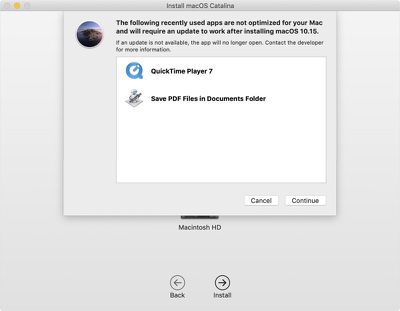
After viewing this list, you can choose to either cancel or continue with the installation.
macOS Catalina also shows a stop symbol over the icon of 32-bit apps in the Finder, so you know that the app isn't going to open.
Aperture
With the release of macOS Catalina, Aperture is going to stop working. Apple warned Aperture users in April 2019 that the software won't run in future versions of macOS, starting with macOS Catalina.
If you're an Aperture user, you'll have to transition to alternate photo editing and management software, such as Adobe's Lightroom. Aperture is not 32-bit, but Apple is phasing it out all the same.
Affected Media Formats
Certain media files that use older formats and codecs are also not compatible with macOS after macOS Mojave due to the 64-bit transition, and you will need to convert some iMovie and Final Cut Pro X libraries. Incompatible media files were created using codecs that rely on QuickTime 7, and while macOS Mojave has QuickTime 7 frameworks, future versions of macOS will not.
Apple has a full list of media formats that are going to be affected by the transition available in a support document.
Continuing to Use 32-Bit Apps
In macOS Mojave and earlier versions of macOS like High Sierra, you can continue to use your 32-bit apps. If you have a 32-bit app that you absolutely depend on, you're going to want to think twice before upgrading to macOS Catalina.
Guide Feedback
Have questions about the end of support for 32-bit apps or want to offer feedback on this guide? Send us an email here.






















![Apple Pulls Keynote, Pages and Numbers From App Store [Update: Back]](https://images.macrumors.com/t/Okb7kitB_gNr6qe5Pex9nQIysD8=/112x112/article-new/2026/01/Apple-Creator-Studio-iWork-suite.jpg)





















